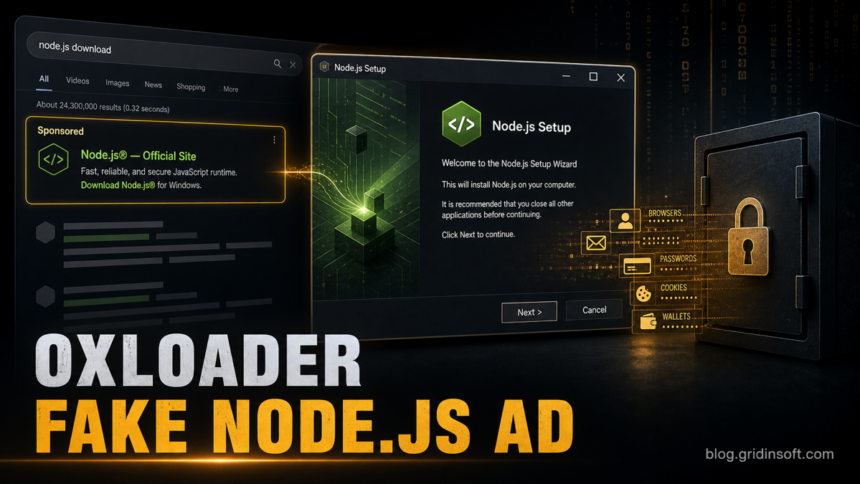
A fake Node.js sponsored search result has been tied to a Windows malware chain that starts with OXLOADER and ends with the CastleStealer infostealer. Elastic Security Labs documented the campaign, and the useful lesson is not only the new family name: a normal-looking software ad can start a batch script, PowerShell download, UAC prompt, DLL side-loading chain, and browser-data theft before the user realizes the installer was fake.
The reported ad campaign is no longer active, but the pattern is current and repeatable. If you recently installed Node.js or another developer tool from a sponsored result instead of the official project site, treat the download as suspicious until you verify the installer source and scan the machine.
Who is affected
The campaign described by Elastic targeted Windows users searching for the LTS version of Node.js. The fake result led to node-js[.]prentiva99[.]info, then through a redirector to a Storj-hosted batch script. The script showed a fake setup flow while downloading and running OXLOADER.
This is most relevant to developers, students, and power users who install runtimes from search results. It also matters for home users because the final payload, CastleStealer, is designed to steal browser information, cookies, passwords, and wallet-related data.
What the attack chain looked like
| Initial lure | Sponsored search result impersonating a Node.js download. |
| Known fake domain | node-js[.]prentiva99[.]info. |
| Launcher files | BATPackageBuilderSetup.bat and BATPackageBulderSetup.bat. |
| Loader samples | apimonitor-x64.exe and node-v24.15.0-x64-86.exe. |
| Payload | CastleStealer, delivered in memory after OXLOADER unpacks and side-loads components. |
| Why it is hard to notice | Fake installer UI, UAC prompt, anti-VM checks, obfuscation, and low initial static detection. |
What to check if you installed Node.js from an ad
- Check your browser history for the exact download source. A real Node.js install should come from the official project domain, not a lookalike sponsored result or redirect chain.
- Look in
%USERPROFILE%\Downloads,%TEMP%, and recent browser downloads for the batch or executable names listed above. - If Microsoft Defender or another security tool flags the same download with a severe Trojan label such as
Trojan:Win32/Qwexlafiba!rfn, keep it quarantined and record the detected path. Do not restore it just because the window looked like a normal Node.js installer. - If you ran a suspicious file, disconnect from sensitive accounts, change important passwords from a clean device, and revoke active sessions for email, banking, crypto, work, and developer accounts.
- Review installed startup entries, scheduled tasks, recent PowerShell activity, and unexpected UAC prompts around the install time.
- Scan the system before restoring or trusting the installer. Stealers often leave the visible file behind while a loader, scheduled task, copied DLL, or browser-data collection step has already run.
If the file ran, do not rely only on deleting the downloaded installer. Run a full Gridinsoft Anti-Malware scan, remove detections, reboot, and scan again if browser sessions, alerts, or startup entries return.
If a token stealer ran here, logging back in can hand the attacker your new Discord session, email cookie, Steam token, or wallet access. Scan this Windows PC first, then reset passwords from a clean device.
Scan after a fake installerWhy this is not just another loader name
OXLOADER matters because it sits in front of the stealer and tries to buy time. Elastic describes abuse of the Windows .reloc section, control-flow and Boolean obfuscation, anti-sandbox checks, DLL side-loading, and in-memory payload delivery. For a victim, the visible clue is much simpler: a sponsored software result and an installer that did not come from the source you expected.
That makes this story a close cousin of other fake software download cases, including malicious CPU-Z ads, fake developer-tool downloads, and broader infostealer malware activity. The safe habit is the same: use bookmarks or manually typed official domains for runtimes and tools, avoid ads for software downloads, and verify the file before running it.
FAQ
Is OXLOADER the same as CastleStealer?
No. OXLOADER is the loader observed in front of the final payload. CastleStealer is the infostealer delivered after the loader chain runs.
Was the fake Node.js ad still active?
Elastic reported that the advertiser and related campaigns were removed in May 2026. The exact ad may be gone, but the fake software ad pattern remains useful for attackers.
Should I uninstall Node.js if I use it?
No. Legitimate Node.js is not the problem. The risk is a fake sponsored result or lookalike installer. Verify the source, file history, and any security alerts around the installation.
What if my browser passwords were saved?
Assume saved browser sessions and passwords may be exposed if the suspicious installer ran. Change passwords from a clean device and revoke active sessions before signing back in on the affected PC.
References
- Elastic Security Labs, Daniel Stepanic and Jia Yu Chan. “Lost in relocation: analysis of a new loader distributing CASTLESTEALER.” Elastic Security Labs, published June 19, 2026; accessed June 22, 2026. https://www.elastic.co/security-labs/oxloader-malware-loader-infostealer
- Microsoft Security Intelligence. “Antimalware updates change log.” Microsoft, accessed June 23, 2026. https://www.microsoft.com/en-us/wdsi/definitions/antimalware-definition-release-notes