
NSSInstallStub.exe has been used to launch a Norton installer on Windows. In one documented reinstall, a scheduled task called Norton Product Installer pointed to C:\ProgramData\NortonInstaller\NSSInstallStub.exe and ran once on the installation date. If an installer asks for permission today and you didn’t start a Norton installation, choose No. You can find out what launched it without opening the file. [1]
What made the installer appear?
Start with the time of the prompt. Did it appear during an installation you started from your Norton account, at every sign-in, or just once after a repair? An old task can stay visible long after its last run. Its presence alone doesn’t tell you what caused today’s prompt.
- Open Task Scheduler from Windows Search. Select Task Scheduler Library and look for the installer entry. In the documented case it was in the library’s root. Select the task without clicking Run.
- On Actions, read the program path and any arguments. On Triggers, check whether it runs once or repeats. Compare Last Run Time with the prompt and your installation date. A successful run years ago can explain an old entry, but leaves a new prompt unexplained.
- Find the file named in the action. Right-click it and open Properties → Digital Signatures. Select the signer and open Details to check whether Windows validates the signature. Compare the publisher and product with the installation you recognize. The company name on the file’s Details tab is weaker evidence than a validated signature.
A window titled “Norton Download Manager” is another clue. Check which executable produced it before changing a scheduled task. If a different task launched a script, use the guide to reading a scheduled task’s program and arguments to trace that action.
What to do with a matching Norton task
A one-time task matches your reinstall. If the path, validated publisher and last-run time all fit, and no prompt has returned, you can leave the completed task alone. There is no need to launch the stub to test it.
The task repeats after an uninstall. Look in Settings → Apps for the precise product name. Norton ended downloads of its standalone Norton Security Scan on April 1, 2020, and the utility stopped functioning on June 30 that year. If that exact utility is still listed and you wish to remove it, use its own Uninstall entry. The filename alone cannot tell you whether that retired scanner was ever installed. [2]
The action points to a missing file. Check your uninstall and security history. If you can tie that exact repeating task to a product you intentionally removed, record its action and trigger, then disable just that task. After the next sign-in, see whether the prompt returns. Disabling a task is reversible. Leave the shared ProgramData folder intact and avoid downloading a replacement EXE.
Which antivirus is protecting the PC now?
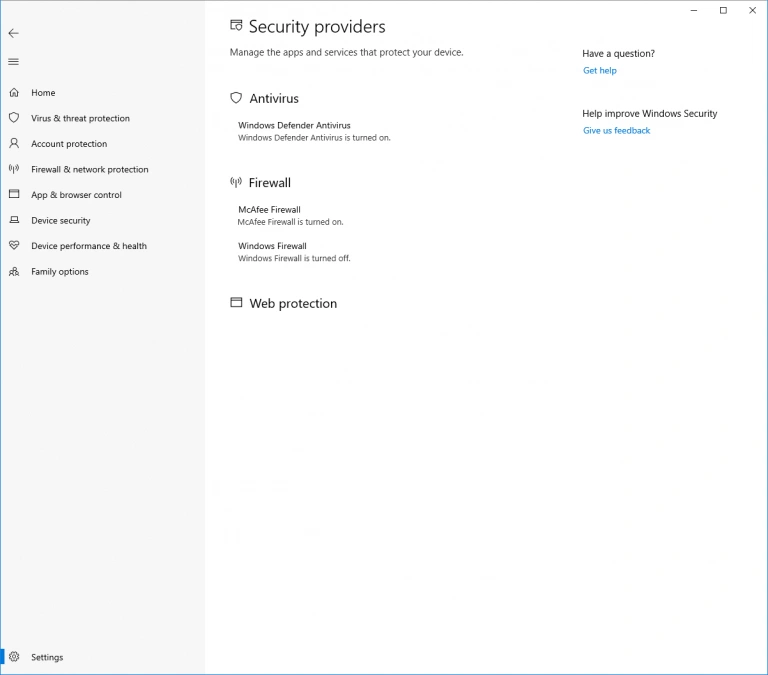
Open Windows Security → Settings → Manage providers and expand Antivirus. Read the product name and status there before removing any other Norton software. An active Norton 360 subscription and an old Norton installer can coexist. If Windows reports no active antivirus, resolve that through your intended security app or your organization’s IT team. [3]
If the publisher or launch still looks wrong
Leave an unexpected privilege prompt closed. If the file is still running, use Task Manager’s Open file location to compare that exact copy with the scheduled action. A copy in Downloads or a temporary folder needs its own origin check, even if you also found a signed copy under NortonInstaller.
If you already ran an unfamiliar copy, a security tool flagged it, or it keeps reappearing from an unexplained task, run a Full Scan with Gridinsoft Anti-Malware and review the detections before removing anything. Save the exact path and the task action so you can tell whether the same item returns. If the scan finds malware, the post-malware Windows security checks cover changes worth reviewing after cleanup.
References
- Norton Community. Norton Security Scan. User report of the Norton Product Installer task, April 2019. Accessed November 27, 2026.
- Norton Support. End-of-Life announcement for Norton Security Scan. Updated April 24, 2025. Accessed November 27, 2026.
- Microsoft. What was new in Windows 10 Insider Preview builds (RS5). Microsoft Learn, Security providers screenshot. Accessed November 27, 2026.