

Gridinsoft found no threats in eaglercraft1-12.html, the only file inside the Eaglercraft 1.12.2 offline ZIP we checked. The malware warning players may remember came from a different download. In August 2025, a researcher ran a Windows program disguised as a Minecraft installer. Chrome opened a playable Eaglercraft game while the installer also launched njRAT, a remote-access Trojan. If you are checking your own download, the most useful detail is which file you opened first.
What Gridinsoft found inside the offline ZIP
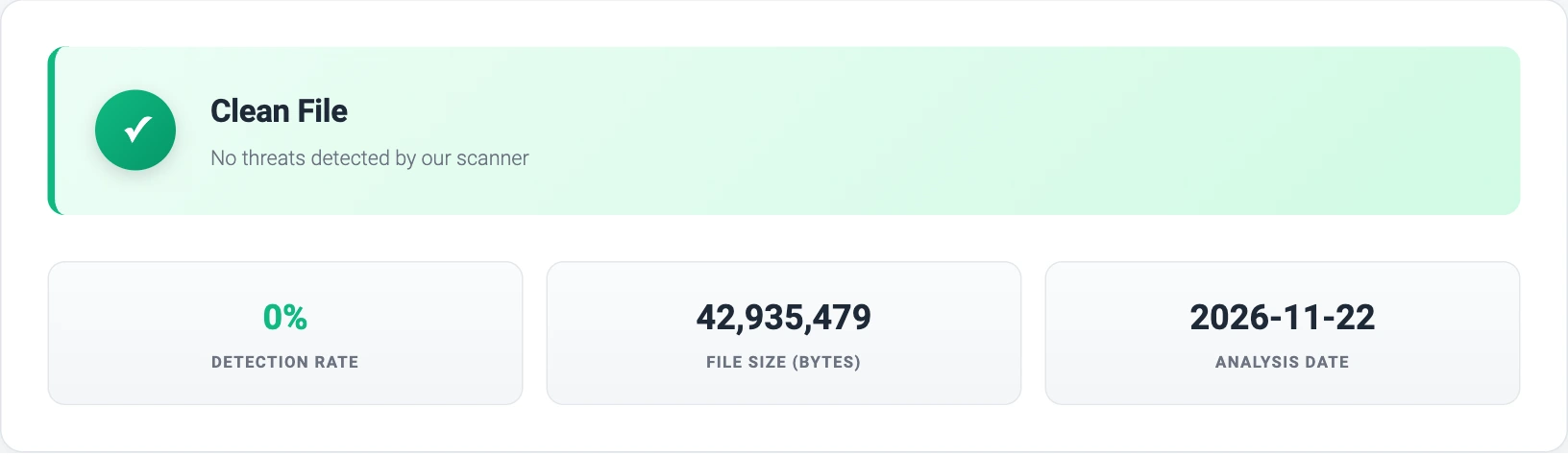
On November 21, 2026, we retrieved the JavaScript build listed under Eaglercraft 1.12.2 offline on dev.eaglercraft[.]com/downloads. The download was a 19,188,743-byte ZIP named eaglercraft1-12-62da5f39.zip. We listed its contents without starting the game. It contained one HTML document, 42,935,479 bytes long, and no Windows installer.
We submitted the ZIP and its extracted HTML separately to Gridinsoft Online Virus Scanner. Both submissions returned the same report ID. Its SHA-256 and reported size match the extracted HTML. The scanner returned Clean File. That gives you one identifiable result for this build. A download from another mirror, even one with the same filename, needs its own check. View the Gridinsoft file report.
Why the infected installer opened a working game
In Point Wild’s investigation, the player-facing part of the Windows executable did exactly what someone hoping to play Minecraft might expect. It opened an HTML game in Chrome. In the background, the same executable dropped a file named Client.exe. The researcher identified the payload as njRAT and observed a hidden process running while the game was visible. Closing Chrome would only close the visible part of that sequence. [1]
We matched the installer’s published MD5 to its archived VirusTotal record. The SHA-1 in that record also matches the 40 characters in the sample filename reported by the researcher. In the June 26, 2026 analysis, Gridinsoft detected the executable as Trojan.Win32.Injector.sb!s1. Point Wild’s njRAT identification refers to the payload they analyzed inside it. We checked the historical record without downloading or running the malware. [2]
Which file do you have?
In Windows 11 File Explorer, select View → Show → File name extensions. Read the entire name. A file ending in .html.exe is a Windows application, even if the visible part of its name says “HTML.” An HTML document can itself run scripts in the browser. Its extension tells you how it opens, while its fingerprint lets you compare its contents with a specific report. [3]
These are the SHA-256 fingerprints for the three files discussed here. If you have a ZIP, compare it with the archive entry. If you already extracted the game, compare the HTML entry. A mismatch identifies different bytes and leaves the verdict open.
- Offline ZIP ·
eaglercraft1-12-62da5f39.zipbdc12cd149eeae93bbde1f1ccfcce5b898c368e4bb5b986a922de64807dc5b6b - HTML inside that ZIP ·
eaglercraft1-12.html3821e28f40cd726198d6b4988968f27a01e5b8ec7ce3a7cc8e0b5b4a7451287c - Historical malicious Windows installer · Point Wild sample
3128ff2317d40725a14114abe74a2fb979e5ec9048eb67ee8928518114cb53da
To calculate a fingerprint without opening a file, use PowerShell’s Get-FileHash. For example, from the folder containing the extracted document, run Get-FileHash -Algorithm SHA256 -LiteralPath '.\eaglercraft1-12.html'. Compare all 64 characters of the result.
What to do after downloading or opening Eaglercraft Offline
- You downloaded or extracted the ZIP. Check what is inside before opening anything. The build above had a single HTML file. If your copy offers a setup wizard, asks for administrator access, or includes an unexpected application, leave it unopened. You can delete the download or let your security software quarantine it.
- You opened an HTML file in your browser. Check the name and hash of that document. If a new page asked you to download software, enable notifications, or sign in, review what you actually approved. Opening the checked HTML alone does not match the Windows installer sequence Point Wild documented.
- You ran an unfamiliar Windows EXE and then the game opened. Disconnect the PC from the network. On a school or work device, contact IT and give them the filename and time you launched it. On a personal Windows PC, run a Full Scan, review the findings, and let the scanner quarantine detected components. From another trusted device, change passwords you entered after launching the file, starting with email, and sign out other account sessions. A remote-access Trojan can capture keystrokes while the game appears to work.
If Windows flagged a Minecraft mod ending in .jar, record its own detection name. Our WeedHack Minecraft mod guide covers a separate case involving Java mods.
References
- Nihanshu Katkar, Lat61 Threat Intelligence Team. “Fake Minecraft Game Spreads NjRat Malware.” Point Wild, August 11, 2025. Original installer investigation and observed behavior.
- VirusTotal. File report for SHA-256
3128ff23…14cb53da, analysis dated June 26, 2026. Historical engine results for the Windows executable. - Microsoft Support. “File Explorer in Windows.” Accessed November 21, 2026. How to show file name extensions.