META Stealer, also known as META Infostealer, is a Windows information stealer built to copy browser passwords, cookies, session tokens, autofill data, and cryptocurrency wallet data from an infected computer. The old 2022 spam campaign is still useful as a clear infection example, but the page should no longer be read as only a one-campaign news story: META became part of the broader stealer-log economy, was later disrupted together with RedLine in Operation Magnus, and remains a name users search when they find old samples, alerts, stolen-account symptoms, or incident reports.
If you think META Stealer ran on your PC, do not start by changing passwords on the same device. Isolate the computer, remove the malware, then rotate passwords and revoke sessions from a clean phone or computer. Infostealers can steal active sessions, so a password change alone may not kick the attacker out of every account.
For broader context, see our guide to top infostealer malware and stealer logs and the practical password stealer recovery checklist. This page focuses on META/META Stealer specifically.

What META Stealer Targets
META Stealer belongs to the same practical category as RedLine, Raccoon, Vidar, and other commodity stealers: it tries to turn one infected Windows profile into a package of account data. A successful run may expose:
- saved browser passwords and autofill entries;
- cookies and session tokens that may keep an account logged in;
- cryptocurrency wallet files, wallet extensions, or recovery material left on disk;
- FTP, VPN, messaging, gaming, and email-client data when supported by the build;
- system details that help criminals resell or reuse the stolen profile.
That is why victims often notice account activity after the malware is gone. The stolen data can be sold as a stealer log, used for credential stuffing, or used to enter accounts through already-valid sessions.
Why the Old Article Stopped Matching Search Intent
The original version of this page covered one 2022 malspam chain in detail. That was accurate for that moment, but the search intent has changed. People now search for META Stealer because they want to know whether it is the same as Meta/Facebook, whether it still matters after Operation Magnus, what it steals, and what to do if their passwords or crypto accounts are exposed.
Google’s current results for stealer-related queries tend to reward pages that answer the victim workflow quickly: what the threat is, what was stolen, whether the name is current, how to clean the device, and how to secure accounts afterward. A short news recap about an old Excel macro campaign does not satisfy that workflow well enough.
How the 2022 META Spam Campaign Worked
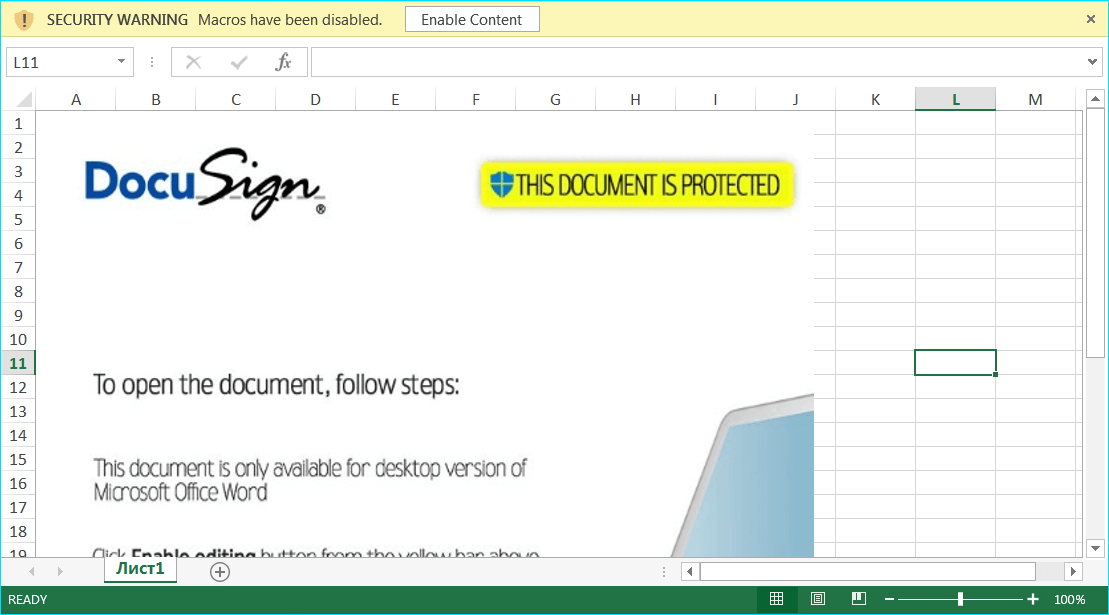
The 2022 campaign documented by Internet Storm Center researcher Brad Duncan is still a good example of how META entered victim machines. The attack began with a payment-themed email attachment. The attached Excel document displayed a DocuSign-style lure and asked the recipient to enable macros. Once macros ran, scripts downloaded additional payloads, decoded or reversed parts of the content, assembled executable files, and contacted attacker infrastructure. Newer lures can replace macros with disk-image delivery, as in the DocuSign Legal Department Document email virus ISO/EXE chain.
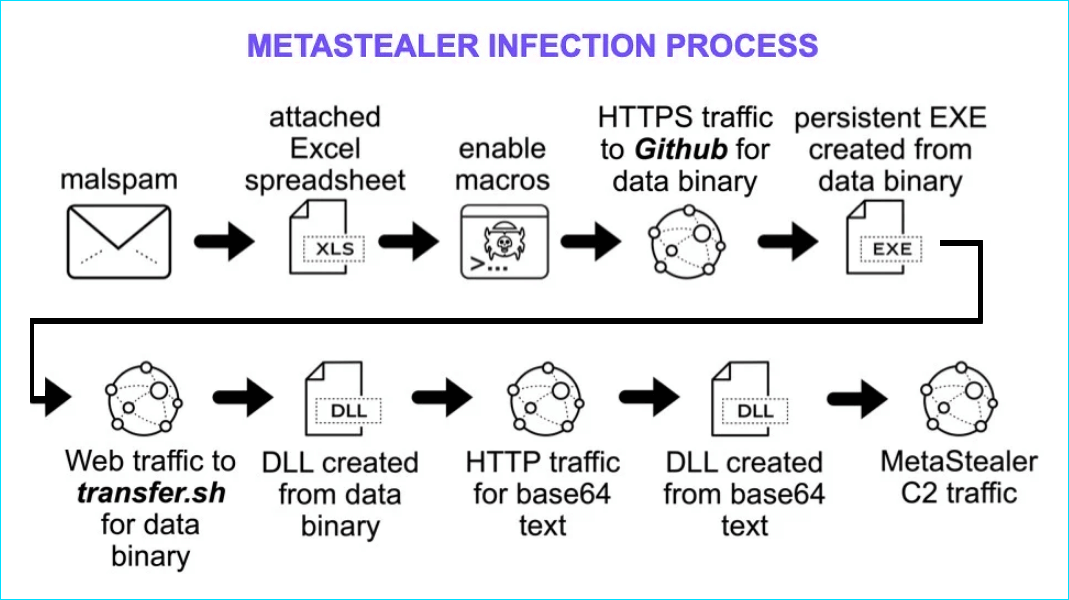
The lure was not technically complex. Its strength was timing and familiarity: fake payment paperwork, a spreadsheet, and a macro prompt. That matters because current stealer infections still rely on the same human step, even when the delivery channel changes to fake software, game mods, cracked tools, fake job-interview apps, or malicious archives.
Operation Magnus and META’s Current Status
In late 2024, international law enforcement disrupted infrastructure associated with RedLine and META stealers in Operation Magnus. The operation did not mean that every old sample, stolen log, or related criminal workflow disappeared overnight. It did mean the original service infrastructure and operator ecosystem were hit hard, which changes how readers should interpret older articles that describe META as a growing commercial tool.
For Gridinsoft readers, the practical takeaway is simple: if you are investigating a recent alert, suspicious executable, or stolen-account incident, treat META as an infostealer risk pattern. The exact branded service may have been disrupted, but the recovery steps are the same whenever a stealer has had access to your Windows profile.
META Stealer vs. macOS MetaStealer
Do not mix every similarly named threat into one bucket. This article is about the Windows META/META Stealer family associated with RedLine-era stealer activity. Security researchers have also reported a macOS threat called MetaStealer or MetaStealer for Mac. That name overlap can confuse search results, but the platforms, delivery paths, and cleanup steps differ.
If your alert or report mentions a Windows executable, Excel macro chain, RedLine/META, 2Easy, or Operation Magnus, this page is the right lane. If the affected device is a Mac and the evidence mentions a macOS application bundle, Keychain access, or Apple-specific prompts, follow macOS-specific guidance instead.
Signs You May Be Dealing With a Stealer
META Stealer infections are not always loud. Look for the pattern around the incident, not only for one file name:
- you opened an email attachment, cracked app, fake update, game mod, or suspicious archive shortly before account trouble began;
- password resets, login alerts, crypto withdrawals, ad-account changes, or email forwarding rules appeared unexpectedly;
- security software reported an infostealer, password stealer, suspicious PowerShell activity, or blocked outbound traffic;
- browser sessions stayed compromised even after a password change;
- unknown startup entries, scheduled tasks, or exclusions appeared in security settings.
One symptom does not prove META specifically. It does justify treating the machine as exposed until a cleanup and account review are complete.
What to Do If META Stealer May Have Run
- Disconnect the device from sensitive accounts. Stop logging into email, banking, crypto, work, or admin panels from the suspected PC.
- Use a clean device for recovery. Change critical passwords from a phone or computer that was not exposed.
- Revoke active sessions. In email, social, cloud, crypto, browser-sync, and work accounts, sign out of all devices and remove unknown trusted devices.
- Scan and clean the infected PC. Run a full security scan and remove suspicious startup items, browser extensions, scheduled tasks, and exclusions. Gridinsoft Anti-Malware can be used as a second-opinion cleanup scan when you suspect a stealer or security-tool alert.
- Rotate passwords after cleanup. Use unique passwords and a password manager. Prioritize email first because it controls resets for other accounts.
- Regenerate secrets. Replace API keys, wallet seed material exposed on the PC, recovery codes, FTP credentials, SSH keys, and app passwords when applicable.
- Watch accounts for follow-up abuse. Check forwarding rules, OAuth apps, ad accounts, marketplace listings, crypto addresses, and recent login history.
After uninstalling the suspicious app or deleting the visible threat, use Gridinsoft Anti-Malware to check hidden files, startup entries, scheduled tasks, bundled apps, browser changes, and other persistence points that can restore malware.
Download Anti-MalwareFAQ
Is META Stealer the same as Meta or Facebook?
No. META Stealer is a malware name and is not a Meta/Facebook product. Attackers may abuse familiar names in lures, but this threat is about credential and session theft from infected devices.
Is META Stealer still active after Operation Magnus?
Operation Magnus disrupted infrastructure tied to RedLine and META, but old samples, stolen logs, copycat delivery chains, and similar infostealer behavior can still affect victims. Treat any confirmed stealer run as an account-compromise event.
Can changing my password remove META Stealer?
No. A password change protects an account only after the infected device is cleaned and active sessions are revoked. If the stealer copied cookies or tokens, attackers may remain logged in until those sessions are invalidated.
Why do some results mention macOS MetaStealer?
MetaStealer has also been used as a name for macOS malware. This page focuses on Windows META/META Stealer. If your case involves a Mac, use Mac-specific cleanup and account-recovery steps.
References
- Brad Duncan. “Windows MetaStealer Malware.” SANS Internet Storm Center, April 12, 2022, accessed June 7, 2026. https://isc.sans.edu/forums/diary/Windows+MetaStealer+Malware/28522/
- U.S. Department of Justice. “Alleged Developer and Administrator of RedLine Infostealer Malware Charged.” U.S. Department of Justice, October 29, 2024, accessed June 7, 2026. https://www.justice.gov/opa/pr/alleged-developer-and-administrator-redline-infostealer-malware-charged
- Phil Stokes. “MetaStealer | New macOS Infostealer Targeting Businesses.” SentinelOne, September 11, 2023, accessed June 7, 2026. https://www.sentinelone.com/blog/metastealer-new-macos-infostealer-targeting-businesses/