Two Steam Workshop maps for Meccha Chameleon—Laser Tag Neon and its later replacement, Chroma Grid Arena—were reported as malicious. Version 3.1.0 added an official security patch for MOD maps, and the known affected items were subsequently reported removed. Updating closes the demonstrated custom-map route, but it cannot remove a script or second stage that ran before the patch. If you loaded either map on Windows, unsubscribe, close the game and Steam, and scan the PC before signing back into important accounts. The evidence does not show malware embedded in the base game itself.
Which Meccha Chameleon maps were affected?
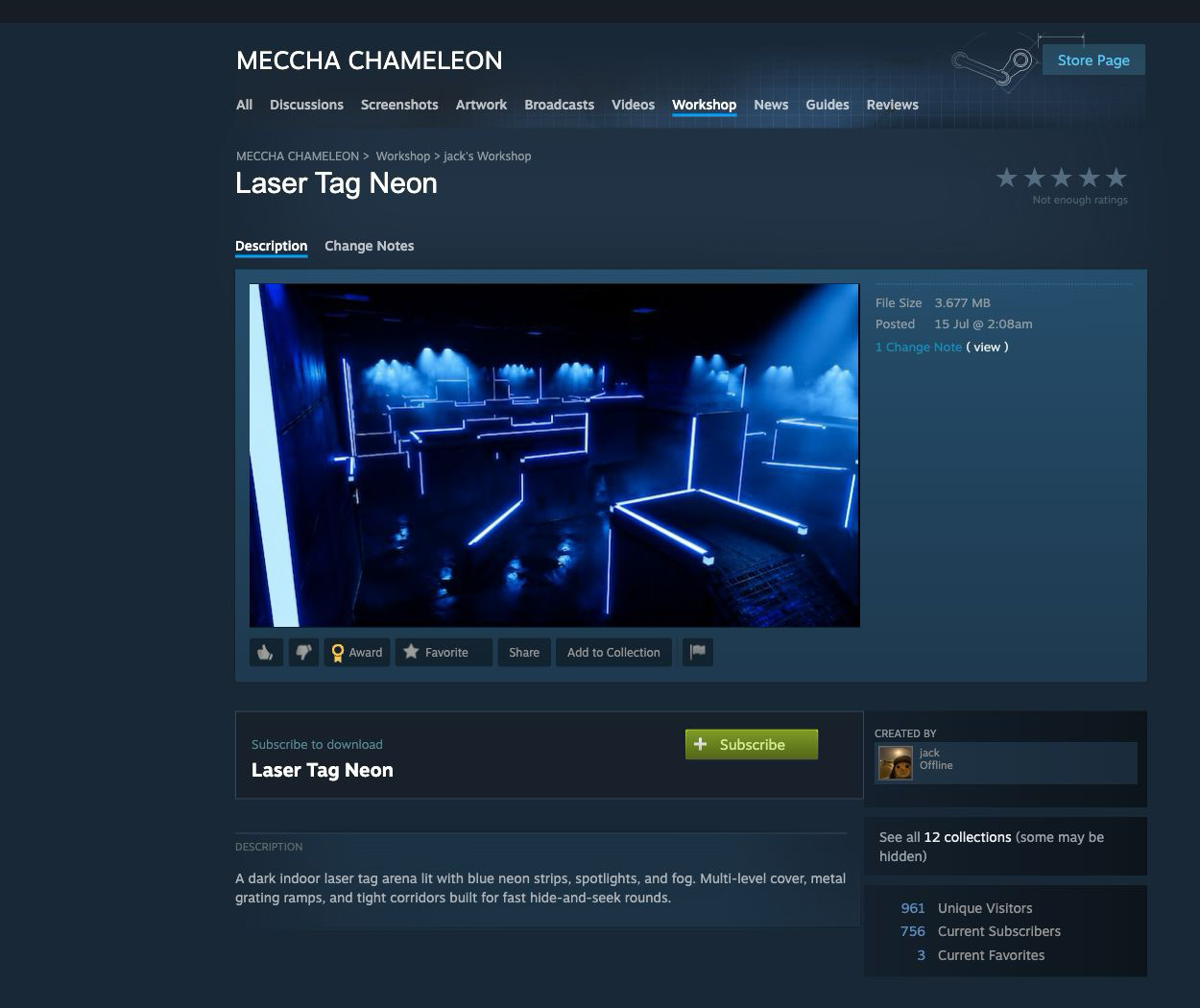
The technically analyzed item was Laser Tag Neon, Workshop ID 3765145606. The public listing still showed 756 subscribers when Gridinsoft checked it on July 24, 2026. Feint updated the analysis on July 25 to say Laser Tag Neon had been removed and a replacement named Chroma Grid Arena was active; a later update said all identified malicious maps had then been removed.[1]
| Map or state | Verified status and user decision |
|---|---|
| Laser Tag Neon | The analyzed build wrote a batch script and attempted a hidden PowerShell download when the map loaded. It was later removed. Players who loaded it before the patch should still check Windows. |
| Chroma Grid Arena | Reported by the same researcher as the replacement malicious map on July 25 and later reported removed. No separate public item ID or technical artifact set was published in that update, so do not guess a Workshop folder or payload family. |
| Version 3.1.0 or newer | The official 3.1.0 note lists a security patch for MOD maps. Updating is required, but it is prevention rather than retroactive cleanup. |
| Base game | The evidence concerns malicious Workshop content and a custom-map execution path, not malware embedded in the normal game files. |
What update 3.1.0 fixed—and what it did not
The official Steam note for version 3.1.0 includes a security patch for MOD maps.[3] That closes the reported route by which map assets could write and run code. Install the latest available version before loading any Workshop content.
- The patch protects the current game path: it addresses the custom-map vulnerability used by the known items.
- The patch does not clean Windows: files written to Documents or Temp, a successfully delivered second stage, or persistence created before the update remain outside the game files.
- Steam file verification is not a malware scan: it repairs the base game but does not assess scripts, tasks, services, exclusions, or browser changes elsewhere on the PC.
What happened to the official Discord?
The Discord incident was related to the response effort but was not evidence that the game update itself contained malware. The developer’s Steam notice says a system engineer’s test PC was infected while the team investigated and patched the malicious-map issue. The attacker then bypassed that account’s Discord 2FA, changed server permissions, and removed the staff; the notice also says the affected machine could not publish or edit the game’s source files.[4] A later official post said the server had been restored.[5]
Do not follow an “urgent patch,” recovery command, download, or replacement-server link copied from messages sent during the takeover. If you only belonged to the server and did not click or download anything, that alone does not expose the PC. If you followed instructions, installed a file, or entered credentials, use the account-hacked response checklist from a clean device and include the downloaded file in the Windows response below.
How the Workshop malware chain works
The primary analysis found one custom Blueprint with references including GetPlatformUserDir, ToFile, and powershell. Its older embedded actor name, BP_RCE_Test_C_0, remained visible even though the class appeared under an ambient-controller name. The recovered bytecode and string data describe this chain:[1]
- When the map begins loading, its Blueprint obtains the current Windows user directory.
- It writes a JSON/batch polyglot to
%USERPROFILE%\Documents\s.bat. - The script relaunches itself in a minimized command window, then starts PowerShell with a hidden window and a process-level execution-policy bypass.
- PowerShell attempts to save a remote
steamb.batfile as%TEMP%\s.batand execute it.
A separate June investigation had already demonstrated why this route was possible: Meccha Chameleon Workshop maps could contain Unreal Engine Blueprint logic and use a predictable Workshop path to launch a planted file. That researcher reported the original arbitrary-file issue as patched, but the later Laser Tag Neon analysis shows a different file-writing path embedded in map assets.[2]
The evidence has two time-separated parts. On the affected PC examined for the original report, PowerShell logged HTTP 404, so steamb.bat was not written or executed on that host. Feint later updated the same report to say a recovered copy installed a Remote Access Trojan.[1] The update does not publish a family name, payload hash, persistence details, or a second-stage technical breakdown, so Gridinsoft cannot independently verify a specific RAT family or claim that every exposed player suffered credential theft or remote control. Use host evidence and scan results for the individual PC.
How to tell whether your Windows PC was exposed
Use the following states to decide how far the response should go:
- You only saw the Workshop page: viewing the listing is not the same as loading the map. Do not subscribe. No malware cleanup is indicated from the page view alone.
- You subscribed but never loaded or joined a lobby using either named map: unsubscribe. A precautionary scan is reasonable if Steam downloaded the content, but the researched trigger is associated with starting the match and loading the map.
- You loaded Laser Tag Neon or Chroma Grid Arena on Windows before the patch, or saw a brief command window: treat the PC as exposed. Do not open any
s.batfile to inspect it. Follow the containment and scan steps below. - You find unexpected PowerShell activity, a downloaded second stage, persistence, or account alerts: treat this as a possible compromise. Preserve evidence if it matters, disconnect the PC from the network, and rotate exposed credentials from a clean device.
The demonstrated chain uses Windows paths, batch files, and PowerShell. The research did not show the same chain executing natively on macOS. That is a platform boundary, not a general guarantee that every Workshop item is safe on Mac, Linux, or Steam Deck.
Remove the affected maps and check the PC
- Disconnect if activity is continuing. If a command window keeps returning, PowerShell is active, or new account alerts are arriving, take the Windows PC offline before cleanup.
- Unsubscribe from the affected maps. Close Meccha Chameleon and Steam first. Confirm that Laser Tag Neon item
3765145606and Chroma Grid Arena are no longer subscribed or installed. Do not launch either map to test it. - Preserve evidence when necessary. Before deleting files, an administrator or incident responder may need the Workshop folder,
s.bathash, PowerShell Operational log, process history, and relevant timestamps. Do not upload samples to public forums. - Remove known local Workshop files. After Steam is closed and any required evidence is preserved, remove the known Laser Tag Neon directory shown below. The Chroma Grid Arena item ID was not published in the technical update, so use Steam subscription history, file timestamps, and security-tool findings rather than deleting arbitrary Workshop folders. Never double-click scripts inside them or in Documents/Temp.
C:\Program Files (x86)\Steam\steamapps\workshop\content\4704690\3765145606\
%USERPROFILE%\Documents\s.bat
%TEMP%\s.bat
Scan Windows and check for persistence
Unsubscribing removes the Workshop content, but it cannot prove that a script, downloaded second stage, scheduled task, service, startup entry, security exclusion, or other persistence was not created while a map loaded. Run a full Gridinsoft Anti-Malware scan, remove confirmed detections, reboot, and scan again if symptoms return. Then review recent PowerShell activity, Task Scheduler, startup apps, services, browser extensions, and security exclusions. The Windows security audit checklist provides the wider post-malware review.
If a suspicious file was downloaded or executed, use the account-response sequence in our game and mod infostealer guide: change Steam, email, and other exposed passwords from a clean device; revoke active sessions; enable Steam Guard or another strong second factor; and monitor payment methods. Do not rotate credentials on a PC that may still be compromised.
After containment, update Meccha Chameleon to the latest version and use Steam’s Verify integrity of game files option. Verification repairs the base game; it does not replace unsubscribing from affected Workshop content or scanning files written outside the game directory. For another example of malicious Steam user-generated content, see the Wallpaper Engine Workshop cleanup guide.
Indicators from the published analysis
These indicators belong to the analyzed Laser Tag Neon build and are for identification and incident response. The Chroma Grid Arena update did not publish a separate item ID or artifact set. The network address is defanged and should not be visited.
Steam AppID: 4704690
Workshop item: 3765145606
Map name: Laser Tag Neon
Dropped script: %USERPROFILE%\Documents\s.bat
Attempted second stage: %TEMP%\s.bat
Defanged request: hxxp://31[.]57[.]34[.]228/work/steamb.bat

s.bat SHA-256:
1ff540bc3c493a93059e602b414ba61027ed1a2b8a079f6197b0718f4a2101b6

UTOC SHA-256:
aea429fbb44d552c917c22018e838e4154e68a8cac5806f7a8e30b61586ba2a6

UCAS SHA-256:
fbd932faba4ec8d614fbd7a68636e177213259bafe2babdcdc47c2a8acd6d569

PAK SHA-256:
aa58f9061a4e39e3f5a28395c56cfa5b0072d90e66054894f9c8022e81e396c9
Hashes identify the analyzed build, not every future version of the listing. If Steam or the uploader replaces the content, the files and hashes may change.
FAQ
Is Meccha Chameleon malware?
No evidence reviewed here shows malware embedded in the base game. The incident involved malicious Workshop maps and the custom-map execution path they abused. Keep the game updated and judge Workshop content separately.
Is Meccha Chameleon safe after update 3.1.0?
Version 3.1.0 added the official MOD-map security patch, and the known affected maps were reported removed. That addresses the demonstrated route for current play, but it does not clean a Windows PC that loaded an affected map before the patch.
Which maps were malicious?
Laser Tag Neon, item 3765145606, was technically analyzed. Chroma Grid Arena was later reported as its replacement. Both were subsequently reported removed; do not create a separate item ID or payload claim for Chroma without new evidence.
Did the second-stage RAT run?
Not on the originally examined PC: its download returned HTTP 404. The researcher later said a recovered copy installed a RAT, but did not publish a family name or detailed second-stage artifacts. Check the individual PC instead of assuming either no exposure or a specific malware family.
Is unsubscribing from the maps enough?
No, if a map was loaded on Windows before the patch. Unsubscribing removes Workshop content, but it does not remove scripts already written to Documents or Temp, a delivered second stage, or persistence elsewhere on the system.
Was every member of the official Discord compromised?
No. The official account describes a server-permission takeover through one engineer’s infected PC. Membership alone is not a device compromise; clicking a malicious link, running a download, following a command, or entering credentials creates a separate response path.
Should I reinstall Windows?
Not by default. Start with containment, evidence preservation, a full scan, persistence checks, and account review. Reinstall from trusted media when a confirmed payload cannot be removed, system integrity is uncertain, or an incident-response requirement calls for it.
Are Mac and Steam Deck players affected?
The demonstrated dropper uses Windows batch files and PowerShell, and the published analysis did not show native execution on macOS. That does not prove all Workshop content is safe on other platforms, and Windows compatibility layers can change the practical exposure.
References
- Feint. “Workshop map for MECCHA CHAMELEON is a malware dropper (full breakdown).” Medium, July 24, 2026; updated July 25, 2026; accessed July 29, 2026. Primary reverse-engineering analysis and incident updates.
- Khael Kugler. “2-Click Remote Code Execution in Meccha Chameleon.” June 21, 2026; accessed July 29, 2026. Independent Workshop RCE research.
- Meccha Chameleon developers. “update3.1.0.” Steam News, July 25, 2026; accessed July 29, 2026. Official MOD-map security patch note.
- Meccha Chameleon developers. “Official Discord Server Breach Update.” Steam News, July 25, 2026; accessed July 29, 2026. Official breach account and game-file boundary.
- Meccha Chameleon developers. “The official Discord server is back!” Steam News, July 26, 2026; accessed July 29, 2026. Official server-restoration notice.