
A nearby phone could open the photo album on two cheap smart-glasses pairs tested for ABC News. NSB Cyber and Abstract Shield assessed an A$60 Temu purchase and an A$110 BDI Technology purchase from Big W Marketplace, both using HeyCyan. [1]
The stranger connects before the owner
With the glasses powered on and their owner disconnected, researchers could connect through Bluetooth without a password, retrieve stored media and trigger new recordings. ABC published the findings on September 22 in Australia; it reported partial patch attempts, with most issues unresolved. This test does not establish that every HeyCyan-compatible model behaves identically.
The critical question is who gets permission to become the camera’s controller. A device that accepts a connection needs a way to distinguish its owner from another person within radio range. Otherwise, convenient photo import becomes a route to someone else’s album.
Encryption and permission solve different problems
Bluetooth SIG describes security as a set of tools that product developers must select and implement appropriately. The presence of Bluetooth on a specification sheet is therefore not a verdict on the finished product’s security. [2]
Consider the distinction: encryption can protect a conversation from an eavesdropper, while authorization decides who should be in that conversation. Even a protected connection cannot keep photographs private if the product hands them to an unauthorized recipient at the other end. That is why the useful question for a seller is how a new phone obtains access, rather than simply whether the device “uses encryption.”
The same distinction matters for messaging: the MAX audit of server-controlled settings explains why protecting traffic on its way to a service does not prevent that service from reading it.
The app listing is an identification aid, not a fix notice
The developer’s Google Play listing identifies HeyCyan as com.glasssutdio.wear and describes importing photos and videos through its Gallery tab. Its Data safety section claims encryption in transit; Google labels these disclosures as developer-provided. The visible September 16 update has only a generic bug-fix note, not a model-specific security explanation. [3]
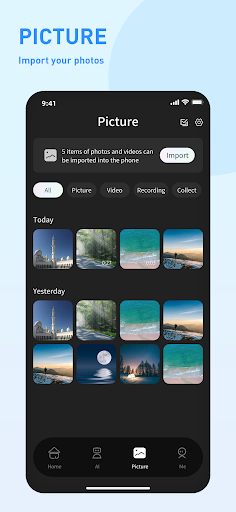
Use that identity to check which companion app your glasses require. Record the glasses’ exact model, firmware version and installed app version before contacting the seller. An app update and a firmware update are separate things; ask which component changed and whether a new phone now needs the owner’s approval. A recent download date alone cannot answer that.
Until the supplier can establish a fix for your model, our recommendation is to keep the glasses powered off and avoid using them for private recordings. Turning off Bluetooth only on your own phone is not equivalent to switching off the glasses. Do not try to validate the issue against somebody else’s device.
Also separate control of the camera from what an AI service does with submitted material. Our Talking Tilly privacy analysis explains why camera permission, analysis and retention need separate answers. For a wearable camera, the purchase decision should include one more: who can get its stored pictures?
The cloud creates a separate privacy boundary, even when access to the device itself is controlled. Our report on Eiliko’s exposed conversations and editable cloud memory follows how stored household information could influence a companion robot’s replies. This is a different investigation; isolating a home network cannot repair the vendor’s cloud access controls.
References
- Ange Lavoipierre. “Ultra-cheap smart glasses leaving Australians’ personal data exposed to hackers.” ABC News, September 22, 2026 (Australian date). Commissioned security investigation.
- Bluetooth SIG. “Bluetooth security.” Accessed September 23, 2026. Security features and implementation responsibilities.
- Glasses Dev. “HeyCyan.” Google Play, visible update September 16, 2026; accessed September 23, 2026. App identity and developer disclosures.