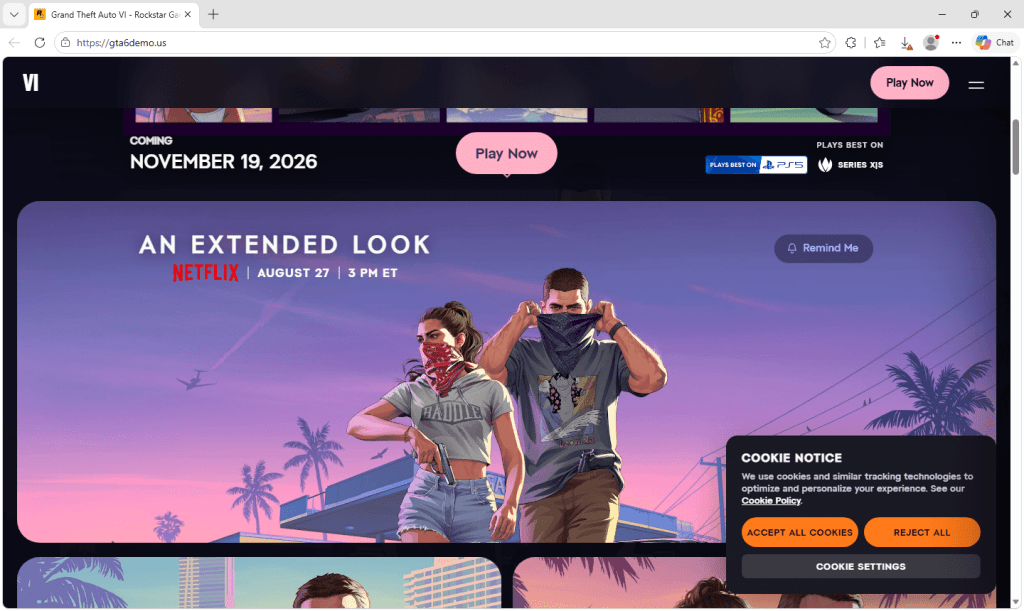
Rockstar’s GTA VI Extended Look is a video, not a playable demo. As of September 8, 2026, its official site lists a November 19 release for PlayStation 5 and Xbox Series X|S, with no public demo or PC build offered. Open the video through Rockstar; a “Play Now” download on a copied page is not an official way to watch it. [4]
Recent GTA 6 footage attributed to CyberLeek may show that someone had access to a playable build, but it does not authenticate any file offered to the public. A video, map, or convincing clip is not proof that a 113 GB ISO, torrent, installer, APK, wallet-gated mirror, or PC build is genuine. Unless Rockstar links the download from an official channel, treat it as fake and potentially malicious.
If you only watched ordinary coverage of the footage, your device does not need malware cleanup. Risk starts when you visit a mirror, grant browser permissions, enter credentials, connect a wallet, download an archive or ISO, mount or extract it, run an installer, or disable security controls. Match your response to the state below instead of testing the file.
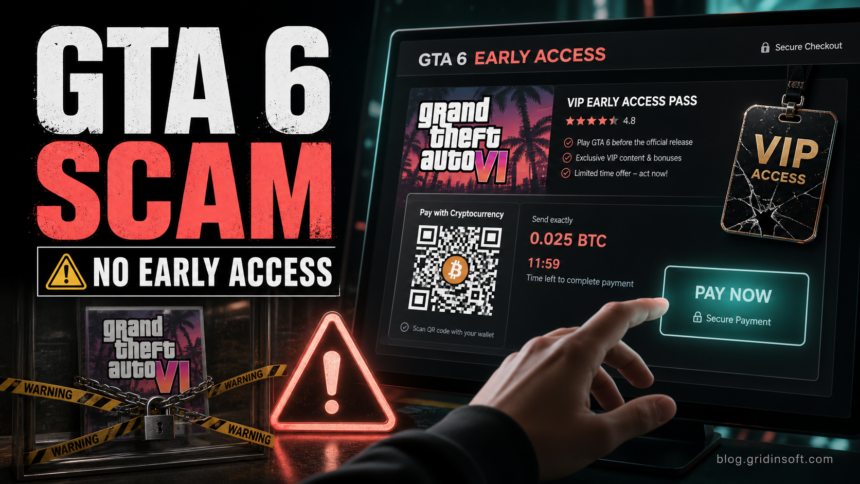
Malwarebytes reported a fresh wave of pages on June 23, 2026 that used polished GTA-style artwork, “VIP” access language, QR-code payments, and cryptocurrency checkout flows. Rockstar’s official information points in the opposite direction: the game is scheduled for release on November 19, 2026, and official pre-orders opened on June 25 through supported storefronts and retailers. That gap is exactly what scammers are exploiting. [1] [2]
Leaked GTA 6 footage is not a download signature. Do not trust an ISO, torrent, installer, APK, mirror, wallet request, or “VIP access” page unless the exact path comes from Rockstar. File size, screenshots, comments, and a familiar filename do not prove that a build is genuine.
CyberLeek Footage Does Not Verify a GTA 6 Download
The important distinction is possession versus distribution. A person may have recorded gameplay from a private or test build, but that does not make a file posted elsewhere the same build, a complete game, or safe to run. Scammers can reuse real-looking clips, filenames, hashes copied from posts, inflated file sizes, and fake comments around an unrelated payload.
Fake Extended Look Demo: gta6_installer.exe
On August 24, Malwarebytes documented copied Rockstar pages delivering the 1.1 MB gta6_installer.exe as Vidar. The analyzed file sought browser passwords, cookies, autofill data and FTP credentials. It showed no visible installer window and no observed reboot persistence. A silent launch therefore does not mean nothing happened; stolen sessions can remain usable after the file is removed. This finding identifies the analyzed campaign, not every similarly named file or fan site. [3]
A small executable can be a downloader rather than a complete game, so size alone is not a safety test. Equally, padding a malicious file to game-like size proves nothing. Verify the publisher’s exact distribution path; do not launch either file to test the claim.
What to Do Based on What You Did
- You only watched footage or read posts: close any imitation download page and use Rockstar’s official site for release or preorder information. Watching normal web video does not by itself infect the PC.
- You visited a mirror but did not download: close it, remove any notification or extension permission you granted, and change a password only if you entered it there. If you connected a wallet, disconnect the site and review approvals or signatures.
- You downloaded a file but did not mount, extract, or run it: do not open it. Preserve the source URL, filename, and a SHA-256 value if your scanner already shows one, then quarantine or delete the file and scan it from a trusted tool. Do not upload or share the suspected build.
- You mounted an ISO or extracted an archive but ran nothing: unmount it, close the extracted folder, quarantine the ISO/archive and extracted files, and scan the PC. Do not follow instructions to disable protection, add exclusions, or launch a separate “fix.”
- You ran an installer, script, shortcut, crack, or disabled security: disconnect the PC from the network, scan it fully, and review Startup Apps and other persistence points, scheduled tasks, services, browser extensions, security exclusions, and remote-access tools. From a clean device, revoke gaming, email, social, and crypto sessions; use the game-download infostealer recovery sequence if accounts or browser sessions may be exposed.
- You see unauthorized sign-ins, purchases or messages: use a clean device for account recovery. Start with email and payment accounts, then Steam, Epic, Discord, Telegram and wallets. Change passwords, sign out everywhere, revoke sessions, and review recovery contacts, authorized apps, email forwarding and unfamiliar devices. Enable 2FA, but do not assume it revokes a stolen session. Report unauthorized payments through the provider’s official support. [3]
Do not open the file “just to see,” seed the torrent, send the sample to other people, or assume that an antivirus result proves it is the real game. The safe question is not whether the leak story looks credible; it is whether Rockstar authenticated the exact distribution path.
What the fake GTA 6 pages look like
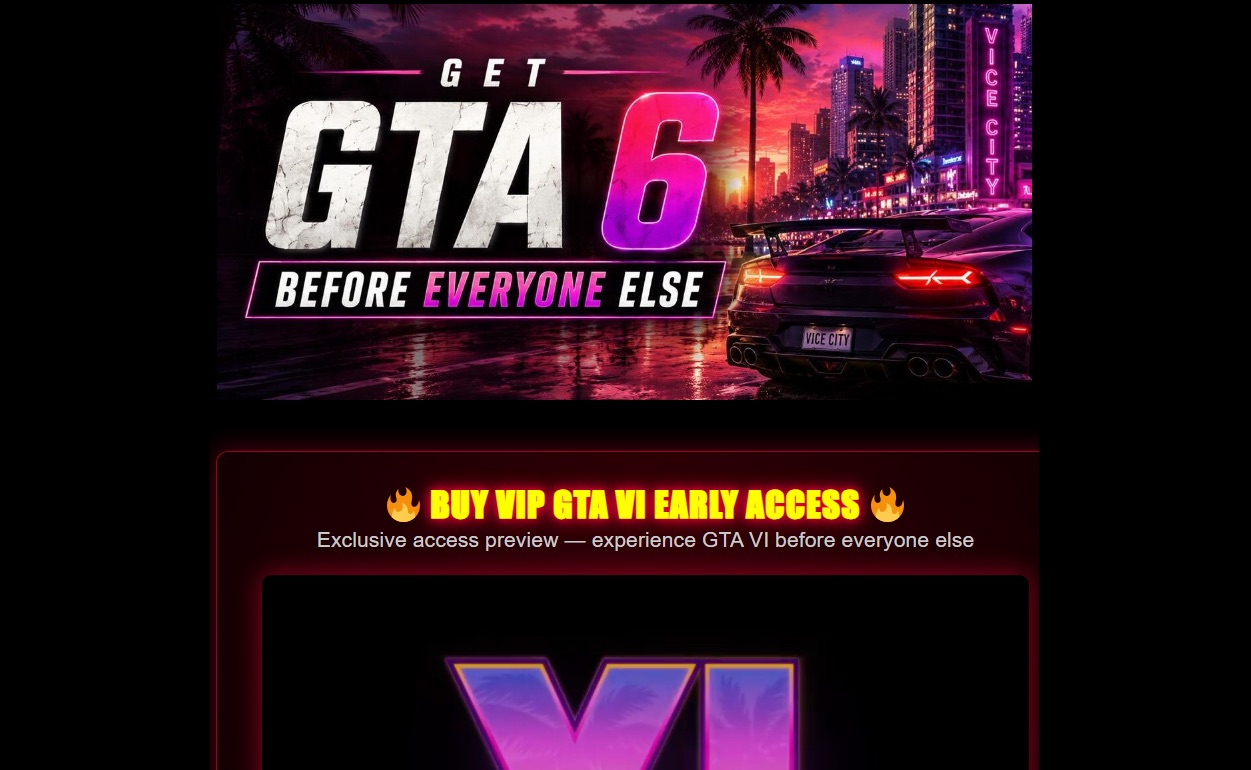
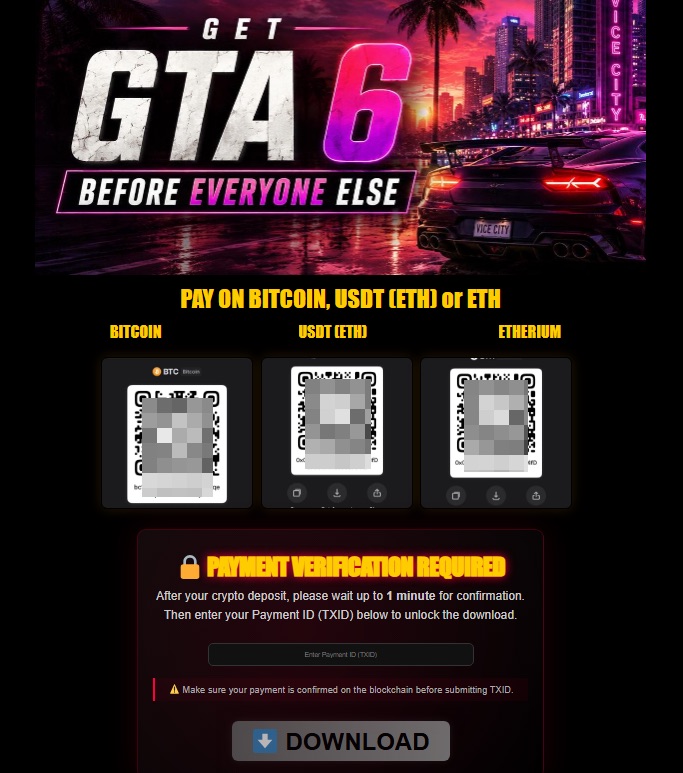
These are not generic mockups. Malwarebytes published screenshots of the scam flow, and they show why the page can feel convincing at first glance: glossy GTA-style artwork, VIP wording, crypto-only payment, and a transaction-ID box before the fake download button.

What the screenshots prove
- “Before everyone else” or “VIP early access”: the page sells exclusivity, not an official license. Leave it and open Rockstar’s site or your console store directly.
- Bitcoin, USDT, or Ethereum QR codes: crypto payments are hard to reverse. Do not scan or send to a private wallet presented as a game checkout.
- A transaction-ID field before download: the flow is built to confirm payment, not prove a legitimate product. Do not enter a TXID; save the page as evidence if you already paid.
- A $250 “VIP digital access” offer: a crypto-only price for secret pre-release access is not an authorized distribution path. Verify the exact offer through Rockstar or a supported official store.
How the Fake GTA 6 Offer Works
The scam does not need malware to hurt people. It first tries to get a payment that is hard to reverse. A typical page claims that a limited number of players can unlock early access, then asks for Bitcoin, USDT, Ethereum, or another cryptocurrency. After payment, the victim may be asked to enter a transaction ID or wait for “confirmation.” The download either never arrives, loops endlessly, or pushes another risky file.
- “VIP early access” or “exclusive preview”: Rockstar has announced official preorders, not a public third-party early-access program.
- Crypto-only payment: cryptocurrency transfers usually cannot be charged back after the money is sent.
- QR payment and transaction-ID form: the page is organized around proving payment, not delivering an authenticated game license.
- A secret build before release: the filename, archive, ISO, torrent, or installer may be unrelated software or malware disguised as the game.
What to Check Before Paying
Use a boring rule for a high-hype game: if the offer is not linked from Rockstar’s official site, a supported console store, or a well-known authorized retailer, do not pay. A real pre-order will not require you to scan a private crypto wallet QR code on a one-off landing page.
- Open the GTA 6 page from Rockstar’s official website, not from an ad or social-media reply.
- Compare the release and pre-order dates with Rockstar’s Newswire announcement.
- Be suspicious of “limited timer,” “VIP pass,” “private beta,” and “play today” wording.
- Do not enter wallet details, seed phrases, exchange codes, or transaction IDs into game-access pages.
- If you want a second look at a suspicious URL, check it with a domain reputation service before visiting it from your main browser profile.
Gridinsoft’s Online Virus Scanner can help check a suspicious file or URL before you run anything. For broader payment red flags, see our guides to cryptocurrency scams and spotting scam websites before you pay.
If you already paid crypto
Move quickly, but do not send more money. The usual follow-up trick is to demand another payment for “verification,” “unlocking,” or “refund processing.” Treat that as the second stage of the same scam.
- Save evidence before the page disappears. Capture the URL, screenshots, wallet address, QR code, payment amount, currency, TXID/hash, chat messages, email headers, and ad or social profile that led you there.
- Report the wallet and transaction. Use the abuse/report flow in your exchange or wallet provider. If you paid from an exchange account, open a support ticket immediately and include the TXID.
- Do not trust “recovery agents.” Anyone asking for an upfront recovery fee, seed phrase, remote access, or another crypto payment is likely trying to steal again.
- Watch related accounts. Change passwords for email, Rockstar, console, Steam/Epic, and exchange accounts if any credentials were typed near the scam flow.
What to Do After Running a Fake GTA 6 Build
A fake build can be junk, but it can also carry a loader, stealer, remote-access tool, miner, or bundled adware. If anything executed, treat the PC and the accounts used on it as potentially exposed until the checks are complete.
- Disconnect and stop running the package. Do not reopen it, add exclusions, or follow a “fix” that asks you to weaken security.
- Scan the system. Use Gridinsoft Online Virus Scanner for a single suspicious file or URL, then install Gridinsoft Anti-Malware and run a full system scan if the installer, script, shortcut, or extracted executable ran.
- Check what could restart it. Review startup apps, scheduled tasks, services, browser extensions, newly installed programs, security exclusions, and unexpected remote-access tools.
- Protect accounts from a clean device. Change important passwords, revoke unknown sessions, rotate reused credentials, and review email, Rockstar, console, Steam/Epic, social, and crypto accounts.
- Preserve useful evidence. Record the source URL, filename, download time, and SHA-256 hash if available. Do not redistribute the suspected build.
A security tool may remove the visible file while a scheduled task, service, browser extension, exclusion, or bundled loader remains and recreates activity after reboot. A full scan checks for those related files and persistence points; it cannot recover stolen passwords or prove that no account data was exposed.
If a token stealer ran here, logging back in can hand the attacker your new Discord session, email cookie, Steam token, or wallet access. Scan this Windows PC first, then reset passwords from a clean device.
Scan before logging back inFAQ
Is the CyberLeek GTA 6 build available to download?
No public download is authenticated by the footage. Even if someone had access to a playable private build, that does not verify an ISO, torrent, installer, APK, mirror, or wallet-gated file offered by another account or website.
Is GTA 6 early access real?
Not through unofficial websites. Rockstar has announced the release date and pre-orders, but a random page selling VIP access or a secret download is not a legitimate way to play early.
Why do GTA 6 scam pages ask for crypto?
Crypto payments are attractive to scammers because they are fast and usually irreversible. Once the transfer is confirmed, there is often no chargeback process.
Can a fake GTA 6 download infect my PC?
Yes. Some pages only steal payment, but a fake installer can also deliver unwanted software, stealers, or remote-access tools. Treat any unofficial GTA 6 download as unsafe.
What is the safest place to check GTA 6 availability?
Use Rockstar’s official GTA VI page, Rockstar Newswire, and official console or PC storefronts. Do not trust social-media replies, sponsored clones, or crypto checkout pages.
References
- Malwarebytes Labs. “GTA 6 early access is nothing but a scam.” Malwarebytes, June 23, 2026, accessed June 23, 2026. https://www.malwarebytes.com/blog/threat-intel/2026/06/gta-6-early-access-is-nothing-but-a-scam
- Rockstar Games. “Grand Theft Auto VI Pre-Orders Begin on June 25.” Rockstar Newswire, June 23, 2026, accessed June 23, 2026. https://www.rockstargames.com/newswire/article/517oa135328155/grand-theft-auto-vi-pre-orders-begin-on-june-25
- Stefan Dasic. “Fake GTA 6 Extended Look and demo sites deliver an infostealer.” Malwarebytes, August 24, 2026. Research report
- Rockstar Games. “Grand Theft Auto VI.” Accessed September 8, 2026. Official game and video page