

One fake installer can sell more than a copy of a program: it can turn a Windows PC into a proxy for other people’s traffic or a worker for distributed computing. A November 3 investigation by Microsoft traces both outcomes through downloads posing as cracked Navicat Premium, FabFilter bundles, games and utilities. Its most consequential finding is that one blocked payload does not necessarily stop the rest of the installation bundle.
The report describes a delivery system that tries several paid installation “offers” in a single session. Some succeed while others fail. That makes the familiar antivirus notification an incomplete answer to a worried user’s question: what actually ran on this computer?
The download installs a business model
The lure is familiar software offered through an unofficial download: an audio plugin, a game, an activator or a utility such as an auto-clicker. Microsoft observed installers using Inno Setup-style temporary folders to launch additional executable stages. Inno Setup is a legitimate installer technology; its presence alone is not a malware verdict.
The important transition happens after the person runs the download. A temporary installer starts numbered programs such as eld0.exe and other eld*.exe files beneath %TEMP%\is-*.tmp\. These are stages in a delivery chain, rather than proof that the advertised program is being installed normally.
The system then reports outcomes for individual offers. Microsoft identified a recurring combination of d=inno with r=offer_execution or r=offer_execution_fail in callbacks. These markers matter to an investigator because changing domains and filenames can obscure the relationship between separate payload attempts.
A failure message may even report that a security tool blocked a virus or potentially unwanted application. But the message describes one offer. Other stages may already have run, or another offer may succeed afterward. Microsoft’s traces also showed that a callback was not always an early warning: child programs could start before or around it.
WorldProxyPool gives the PC a second job
In the investigated Navicat chain, the destination was WorldProxyPool, a proxy component that can route third-party internet traffic through the computer. The problem is the deceptive installation and use of the owner’s network resources without informed consent; the report does not establish that every installation of every named component is malicious.
The installation did more than drop a file. Microsoft documented three scheduled tasks with SYSTEM privileges, which let programs run with powerful operating-system permissions:
- WorldProxyPoolAgent starts the agent at boot; the installer also launched it immediately.
- WorldProxyPoolWatchdog runs a hidden PowerShell watchdog every five minutes.
- WorldProxyPoolUpdater runs an updater every hour.
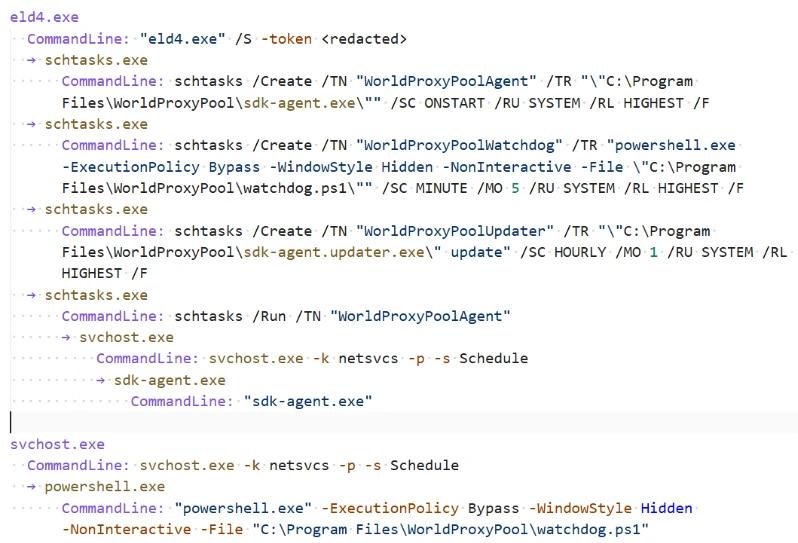
This is why deleting the original download can leave the problem behind. The installer has moved from a file in Downloads to recurring activity managed by Windows Task Scheduler. A reboot can start the agent again. For an investigator, the task names together with files under C:\Program Files\WorldProxyPool\ are stronger leads than the original lure’s name.
A different offer spends computing resources
The FabFilter chain led to a different outcome: silent installation of CharityEngine/BOINC and supporting software, including VirtualBox. Microsoft observed compute components launching and communicating with CharityEngine infrastructure. BOINC is a legitimate distributed-computing platform; finding it on a PC is not, by itself, evidence of infection. The question is whether its installation and work were knowingly authorized.
A third branch delivered AW Manager or Windows Manager software, with components such as AdvancedWindowsManager.exe. These were alternative monetization paths in the campaign, not a claim that every victim received the same three-part package.
The resulting symptoms can be ambiguous. Unexplained CPU load, newly installed software or background network activity are reasons to investigate the installation timeline, not a diagnosis on their own. A process name, an Inno temporary directory or VirtualBox can also belong to legitimate software.
If you ran the installer, check the whole session
If you only downloaded the suspicious file, do not run it to see what happens. Quarantine or remove it. If you launched it and then saw an alert, preserve the alert details, download location and approximate execution time. On a work device, disconnect it from the network and contact the IT team so the installation and persistence evidence can be reviewed.
For a personal Windows PC, removing the visible payload is only the start. A loader, scheduled task, service or another bundled program may remain after the first detection. Download and install Gridinsoft Anti-Malware from its official site, update the database, run a Full Scan, review and remove detected threats, then restart. If alerts or background activity return, scan again and review the related startup tasks and software installations. A scan can help find remaining components; it cannot prove that nothing else happened.
Cracks, repacks, and activators can add Defender exclusions, startup tasks, services, browser changes, stealers, or miners outside the folder you meant to install. Scan for those changes before trusting the PC.
Scan this Windows PCKeep the distinction between a suspicious bundle and an intentionally installed tool. Do not delete every BOINC, VirtualBox or PowerShell-related item simply because its name appears in this report. Correlate it with the untrusted installer, new tasks, file paths and security findings. Broader OfferCore bundler guidance explains why the advertised download and the unwanted extras need separate attention.
The practical lesson from this case is specific: a blocked offer is not a clean bill of health for the entire installer session. Check what succeeded, what became persistent and what is still running.
References
- Microsoft Security Research and Jiacen Xu. Fake-download campaign uses trojanized installers to deliver monetization payloads. Microsoft Security Blog, November 3, 2026.