The “First Abu Dhabi Bank Funds Transfer Documents” email is not a real payment notice. It is an advance-fee and phishing lure that impersonates a bank transfer process, promises a large payment, and asks the recipient to send personal and banking details. Do not reply, do not send documents, and do not pay any “release,” “processing,” or “clearance” fee.
The version tracked for this topic claims that a funds-transfer review involving First Abu Dhabi Bank, the World Bank, and the IMF has approved a USD 3,700,000 payment. That combination is the warning sign: real banks and international organizations do not release unexpected multi-million-dollar transfers through unsolicited email threads or ask random recipients to prove themselves by sending identity and banking details.
What This Email Tries To Do
The scam is built to make the recipient believe a dormant payment is waiting and only needs a final confirmation. It may use wording such as “funds transfer documents,” “part-payment,” “beneficiary,” “release within five working days,” or “stop communicating with other officials.” Those phrases are meant to create urgency and isolate the victim from safer verification channels.
The goal is usually one or more of these outcomes:
- collect full name, address, phone number, age, identity details, and banking information;
- push the victim into paying a fake release, tax, certificate, courier, or processing fee;
- move the conversation to a personal mailbox, messaging app, or fake “claims officer”;
- attach a document that may lead to a credential page or a later malware download.
Example
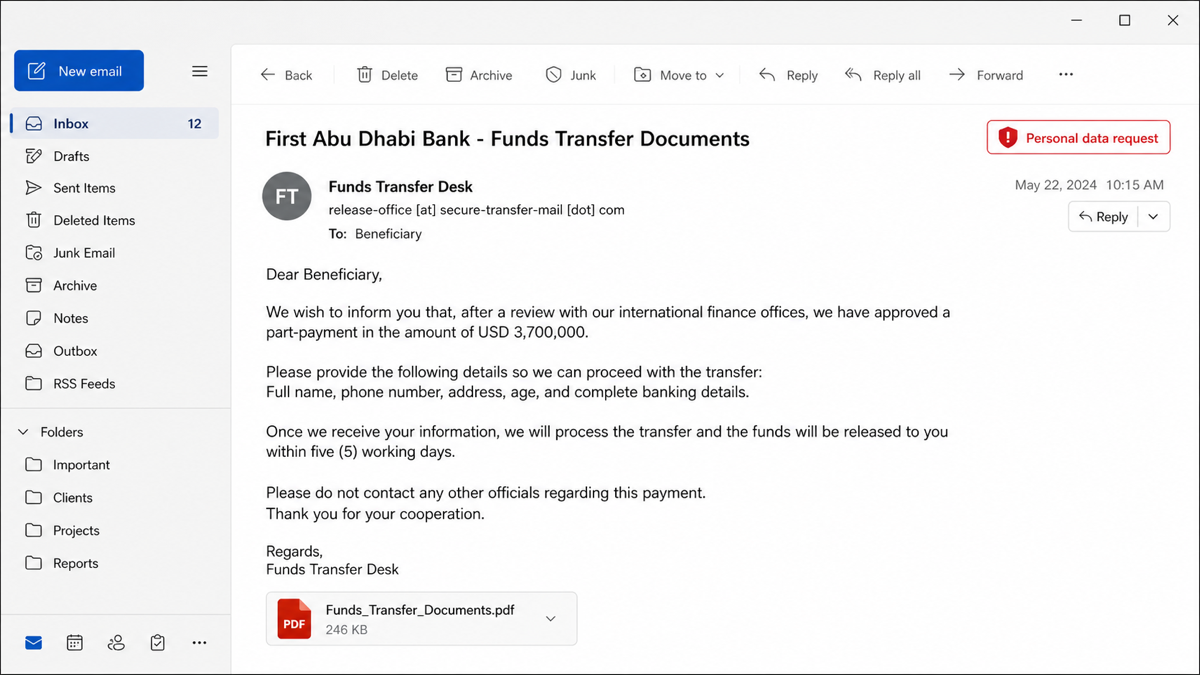
Subject: First Abu Dhabi Bank – Funds Transfer Documents
From: Funds Transfer Desk <release-office [at] secure-transfer-mail [dot] com>
Dear Beneficiary,
After a review with our international finance offices, a part-payment in the amount of USD 3,700,000 has been approved for release. To proceed, send your full name, phone number, address, age, and complete banking details.
Once your information is received, the transfer will be processed within five working days. Do not contact any other officials regarding this payment.
Attachment: Funds_Transfer_Documents.pdf
Why The FAB, World Bank, And IMF Names Are Misused
Scammers borrow trusted names to make a weak story feel official. In this lure, “First Abu Dhabi Bank” makes the message sound like a bank transfer, while “World Bank” and “IMF” make it sound like an international approval process. The official safety guidance tells a different story: verify suspicious bank communications through real bank channels, and treat unexpected messages that misuse World Bank or IMF names as possible scams [1] [2] [3].
Do not use phone numbers, email addresses, or document links from the message itself. If you need to verify something that claims to involve a bank, use the bank’s official website or app, a known card number, or a branch contact you found independently.
Red Flags In The Funds Transfer Documents Email
- Unexpected money: the message promises a large payment you did not request or earn.
- Mixed authority names: it combines a bank, World Bank, IMF, or other official-sounding entities in one story.
- Personal-data request: it asks for identity and banking details by email.
- Isolation language: it tells you not to contact other officials or previous contacts.
- Fast release promise: it says funds will arrive in a few working days after you comply.
- Suspicious attachment: a PDF, DOC, ZIP, or cloud link is used to make the claim look formal.
- Sender mismatch: the display name may mention a bank while the sender domain is unrelated, newly created, or free-mail based.
What To Do If You Received It
- Do not reply. Replying confirms that the mailbox is active and may bring more targeted messages.
- Do not send documents or banking details. A legitimate transfer issue does not require you to email identity data to an unknown sender.
- Do not pay any fee. Release fees, clearance certificates, anti-terrorism certificates, and courier fees are common advance-fee steps.
- Verify outside the message. Use official bank channels or official organization websites, not links or contact details inside the email.
- Report and delete it. Mark it as phishing or spam in your mail provider, then delete it.
- Warn anyone else copied in. If the message reached a work mailbox or shared inbox, tell the mailbox owner or IT team.
If You Already Replied Or Sent Details
If you sent only a reply, expect follow-up pressure and more scams. Block the sender, preserve the message for evidence, and be careful with any new “recovery,” “bank officer,” or “law enforcement” emails that reference the same transfer.
If you sent identity documents, banking details, or payment information, act faster:
- contact your bank through an official number and ask what protections or account changes are needed;
- watch for unauthorized transfers, card activity, loan applications, and SIM-swap or account-recovery attempts;
- change passwords for email and financial accounts from a clean device;
- enable multi-factor authentication where possible;
- save the original message, sender address, payment requests, and receipts for bank or law-enforcement reporting.
If You Opened The Attachment Or Link
A simple preview of a PDF in a modern mail client is usually less risky than running a downloaded file, but do not assume every attachment is harmless. If the message pushed you to download a file, enable macros, install a viewer, open a ZIP, add a browser extension, or run a support tool, treat the computer as exposed until checked.
Delete the downloaded file, close the browser tab, and scan the file or system before continuing with passwords or banking. Gridinsoft Online Virus Scanner can check a suspicious file or link, and Gridinsoft Anti-Malware can scan the PC for hidden files, startup entries, browser changes, bundled apps, and persistence left by a phishing download.
If the page or email made you download an invoice, coupon, tracking app, browser extension, or support tool, scan the PC before opening it again or logging into sensitive accounts.
Scan after this emailHow To Verify A Real Bank Transfer Safely
If there is any chance the message relates to a real transaction, separate verification from the email. Open your bank app manually, call a known official number, or contact the organization through a verified website. Do not forward the suspicious attachment to personal accounts, and do not paste personal data into a reply just to “test” whether the sender is real.
For workplace inboxes, route the message to the security or finance team. Fake funds-transfer emails can become business email compromise attempts when the attacker learns who approves payments or which vendor relationships exist.
If the message names a law-enforcement office instead of an international bank review, the same advance-fee logic can appear as an FBI Funds Recovery Dept email scam: a fake recovery notice, a large promised payout, and document names that pressure the recipient to reply.
FAQ
Is the First Abu Dhabi Bank Funds Transfer Documents email real?
No. An unsolicited email promising a USD 3,700,000 transfer and asking for personal or banking details is a scam pattern. Verify any real bank matter through official bank channels, not through the email thread.
Why does the email mention World Bank or IMF approval?
Those names are used to make the story sound official. Scammers often combine banks, international organizations, and fake officers to make a payment promise feel legitimate.
Should I open the attached funds transfer PDF?
Do not open attachments from this message. If you already opened one and it asked you to sign in, enable content, download another file, or install anything, change passwords from a clean device and scan the computer.
What if I sent my bank account number?
Contact your bank immediately using an official number, explain what you sent, and follow their guidance. Watch for unauthorized activity and be prepared for follow-up scams that reference the same fake transfer.
Can I recover money paid to the scammers?
Contact your bank or payment provider as soon as possible. Recovery depends on the payment method and timing. Be cautious of anyone who asks for another fee to “recover” the money.
References
- First Abu Dhabi Bank. “Detecting Fraud.” FAB, accessed June 25, 2026. https://www.bankfab.com/en-ae/about-fab/security-and-certifications/detecting-fraud
- World Bank. “Fraudulent Scams.” World Bank, accessed June 25, 2026. https://www.worldbank.org/en/about/legal/scams
- International Monetary Fund. “Integrity Hotline.” IMF, accessed June 25, 2026. https://www.imf.org/en/about/office-of-internal-investigations/integrity-hotline