
A FedEx voicemail scam can move from a failed-delivery story to a website that appears to check whether you are human. In a November 16 sample from fedexyc[.]com, that checkbox was a doorway: its code was set up to report the click and redirect to moqthm[.]shop, an unrelated host hidden behind the word fedex in the address. If a voicemail sends you to a similar page, close it and check the shipment through the FedEx app or a site you open independently.
The revealing detail is the destination: https://fedex@moqthm[.]shop/query. The word before @ is not the website you would visit. Understanding that distinction is more useful than memorizing a list of look-alike domains.
The voicemail lets the domain supply the brand
A public Scam Archive record describes a 22-second voicemail warning of an unsuccessful delivery attempt. It names fedexyc[.]com, sets a November 16 deadline, and says the package will go back to the sender if the issue remains unresolved. The spoken transcript does not actually say “FedEx”; the brand association comes from the domain. This is a reported message, not a call we received. [1]
Example
“Please visit fedexyc[.]com by November 16 to verify your order or delivery information.”
The deadline gives you a reason to hurry, while the familiar beginning of the address gives you a reason to trust it. But fedexyc[.]com is a separate domain, not a page under fedex.com. A voice message can be the first step of vishing, even when the next action happens in a browser rather than on the call.
What the fake Cloudflare checkbox actually does
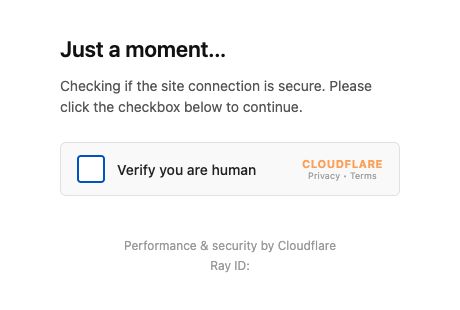
Our captured page contains no parcel record or tracking-number field. It presents a “Verify you are human” checkbox with Cloudflare branding. The small Ray ID beneath it looks like a technical detail, but the page’s own script creates that value with Math.random(). It is decoration generated by this page, not evidence that FedEx has verified a shipment.
Reading the page source reveals three operations behind the checkbox:
- Mark the box as checked. The page changes its appearance locally.
- Attempt to report the click. It uses
navigator.sendBeacon()to contact a click-report endpoint on the same domain, with identifiers for the link and destination. A fallback attempts a background POST request. - Prepare the next website. It decodes a stored Base64 string and schedules
location.replace()after 200 milliseconds. That navigation method replaces the current history entry, so the fake gate is not retained as the previous page.
Base64 is a way to package text, not encryption. Decoding the saved value exposes the destination without clicking the box. Crucially, the navigation is not conditioned on receiving a successful verification response: the source proceeds to the redirect independently of the click report. The reassuring checkmark is therefore not a reason to trust the next page.
Scope of the check: we read the public HTML and JavaScript as text; we did not execute the checkbox or test whether its report reached an operator. A separate public request to the decoded destination returned another security-check page. Its source directed a click to /__theme/runtime/site/verify, with /query as a return destination. We stopped there. No later payment form, credential collection, download, or successful theft was observed.
Responses can change. A later request during the same review redirected the starting domain to Apple’s website, while the destination returned an access-denied response. That does not establish why the responses differed or make the earlier page safe. The mechanism above describes the saved November 16 sample. It also does not establish that other FedEx-looking domains have the same operator or destination.
Why “fedex” before @ is not the real website
In the captured destination, fedex occupies the URL’s username field. The host comes after @: moqthm[.]shop. The final /query is a path on that host. This is URL structure, not a FedEx login or a FedEx subdomain. [3]
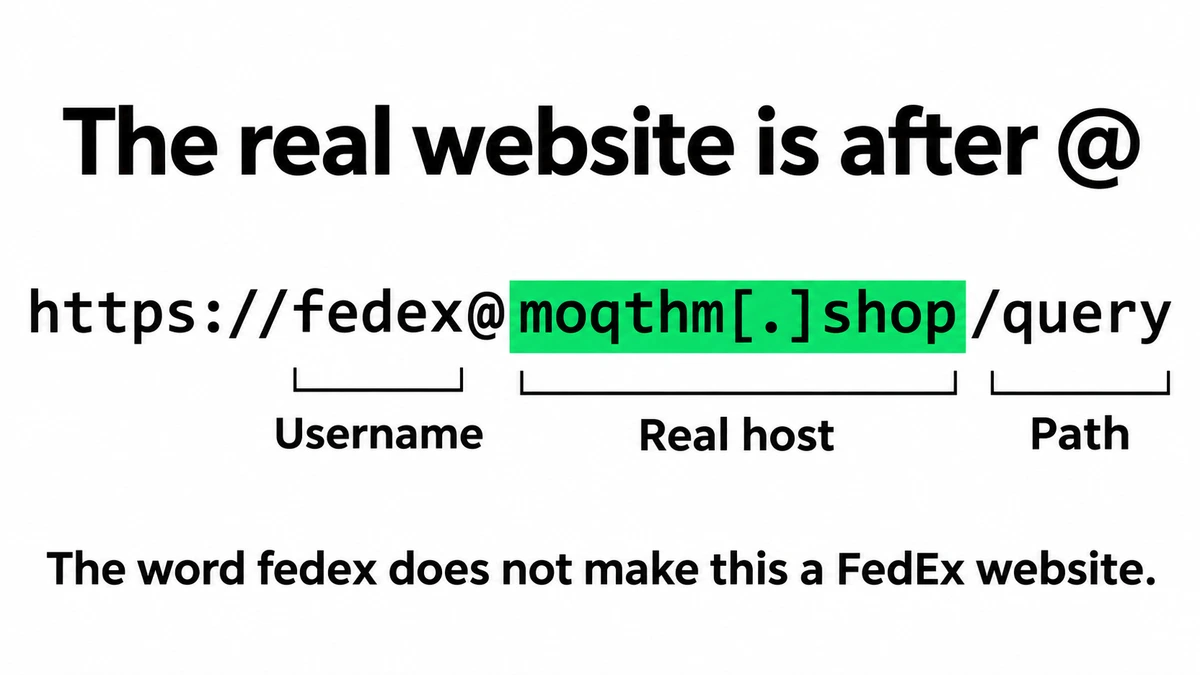
For this address, the decisive question is which server the browser is being directed to. It is the unrelated .shop host, regardless of the familiar name on its left. The https prefix does not turn that host into FedEx, either. Do not open the address to investigate it; use the official app or type the known official domain yourself.
Check the delivery without returning to the lure
Start from your retailer’s order history or the FedEx app you already use. If the retailer supplies a FedEx tracking number, check it through an independently opened FedEx page. If the shipment details do not match, contact the seller or FedEx using contact information from their official service, not the voicemail or redirected page.
FedEx’s current fraud guidance specifically warns about messages pointing to .shop addresses. It also makes an important distinction: genuine international shipments can generate email or SMS requests for duties and taxes. FedEx says those messages and amounts can be verified through its Import Tool. A payment request should therefore be checked through the genuine shipment record, rather than accepted because it looks familiar or dismissed solely because money is mentioned. [2]
What to do after the voicemail, a click, or disclosure
Respond to what actually happened. The following branches describe possible exposures; they are not claims about an unseen stage of this particular page.
You only heard the voicemail.
Do not visit the named site or call back using the supplied number. Verify any expected delivery independently. Report the call through your phone provider’s spam controls.
You visited or clicked the checkbox, but supplied nothing.
Close the page. Check whether anything downloaded or whether you granted a browser permission. A click alone does not establish that malware was installed or that your accounts were accessed. There is no reason to enter information to “finish” the check.
You entered a password or shared a sign-in code.
Open the real service independently. Change the exposed password and any reused copies, review active sessions and account-recovery settings, and enable multifactor authentication. If access is lost, use that service’s recovery process.
You supplied card details or paid.
Contact the card issuer or payment provider immediately through a trusted channel. Explain the exposure, ask about securing the account and disputing or reversing the payment, and retain the message and transaction record. Recovery is not guaranteed. [4]
You shared an address, identity document, or other personal information.
Keep a record of exactly what you disclosed. Expect follow-up impersonation attempts. For sensitive identity information, use the identity-theft guidance of the relevant issuing authority or your country’s consumer-protection service.
You installed something or allowed remote access.
End remote access and stop using that device for sensitive accounts until checked. Remove the unwanted access software and run a security scan. Handle password and financial recovery from a separate trusted device.
If a file actually ran on Windows, Gridinsoft Anti-Malware can check for malicious files and persistence: update its database, run a Full Scan, review the detections, and apply cleanup. A scan does not recover a disclosed password or reverse a payment. An unexpected shipping spreadsheet is a different exposure; our FedEx e-Order attachment guide covers that branch.
The useful test is not whether a page displays a familiar logo or checkmark. It is whether you can confirm the delivery through a service you reached independently.
References
- The Scam Archive. “Fake FedEx ‘unsuccessful delivery’ voicemail that asks you to visit fedexyc.com.” Record observed November 16, 2026; accessed November 16, 2026. Published voicemail record.
- FedEx. “How to recognize and help prevent fraud.” Accessed November 16, 2026. Fraud warnings and shipment-verification guidance.
- WHATWG. “URL Standard.” Living standard, updated November 14, 2026; accessed November 16, 2026. URL components and parsing.
- Federal Trade Commission. “What To Do if You Were Scammed.” Consumer Advice; accessed November 16, 2026. Actions after payment or information disclosure.