A job interview booking can become an account takeover before the promised call begins. In research published on October 14, Malwarebytes describes fake Calendly pages advertising interviews at Meta, then collecting Facebook passwords and verification codes and drawing visitors into a second, fake Google sign-in.
The important turn comes after choosing a time: a page that should arrange a conversation starts asking for control of unrelated accounts. If you entered a password or approved a phone prompt in this flow, stop interacting with the recruiter and secure the affected accounts directly.
The calendar supplies the cover story
Researcher Stefan Dasic found pages with an ordinary-looking appointment picker, a time-zone selector and a 30-minute call. Available slots came from the attackers’ server. The next screen requested contact details, followed by an image-selection CAPTCHA and a supposed Facebook login.
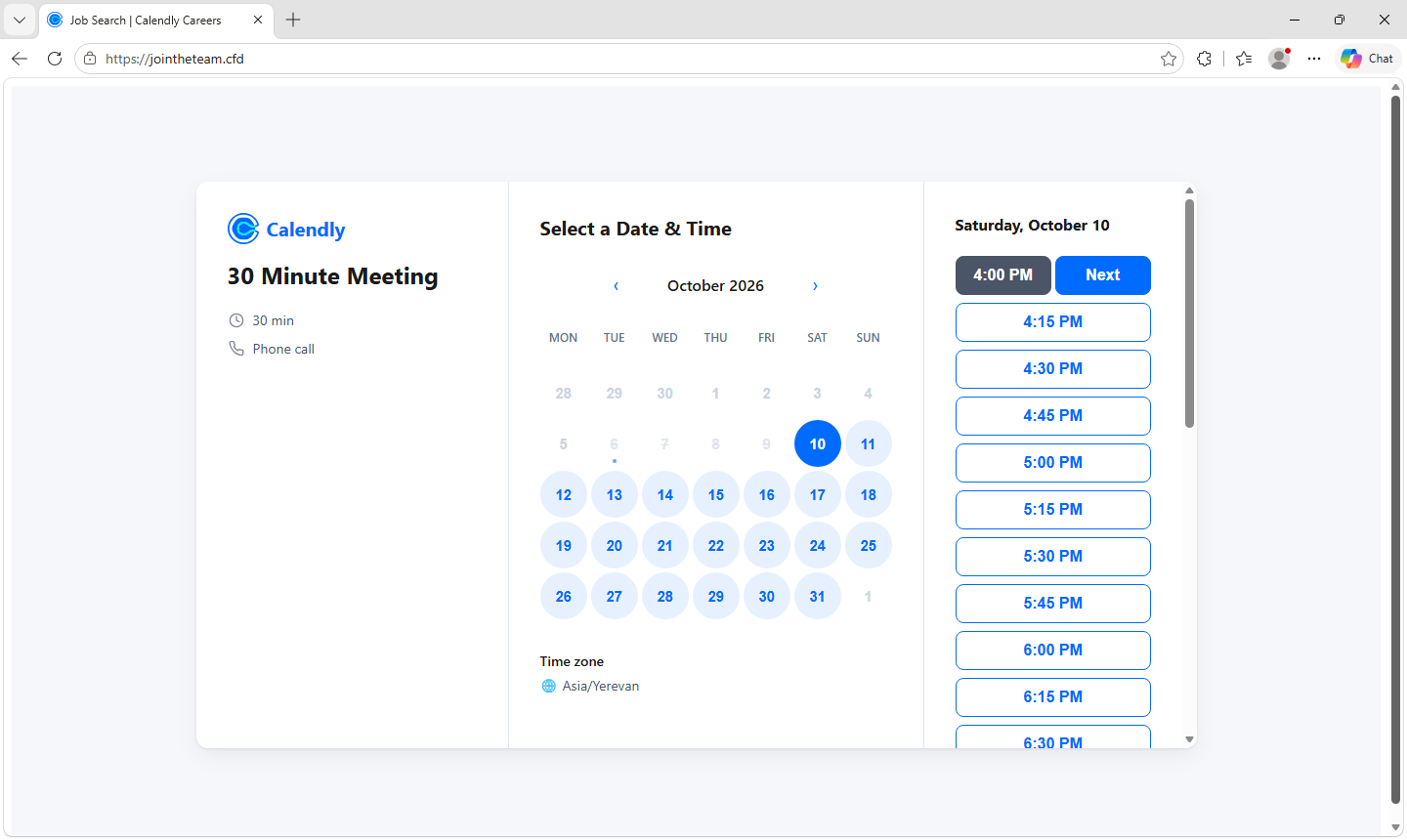
That sequence matters. Choosing a slot and supplying a phone number are plausible interview tasks. The later authentication demand arrives wrapped in work the applicant has already started. The CAPTCHA adds another familiar ritual, but completing one does not establish who owns a page.
The published examples include jointheteam[.]cfd, joinhire[.]info and joinquest[.]works. These are indicators from this investigation, not a complete list of possible imitations. A different domain spelling does not make the same login demand safe.
The address bar inside the page is part of the deception
The Facebook window is drawn within the recruiting page, including its apparent browser controls and Facebook address. The browser’s real address bar remains on the unrelated recruiting domain. A familiar URL printed inside a webpage is no more proof of ownership than a logo.
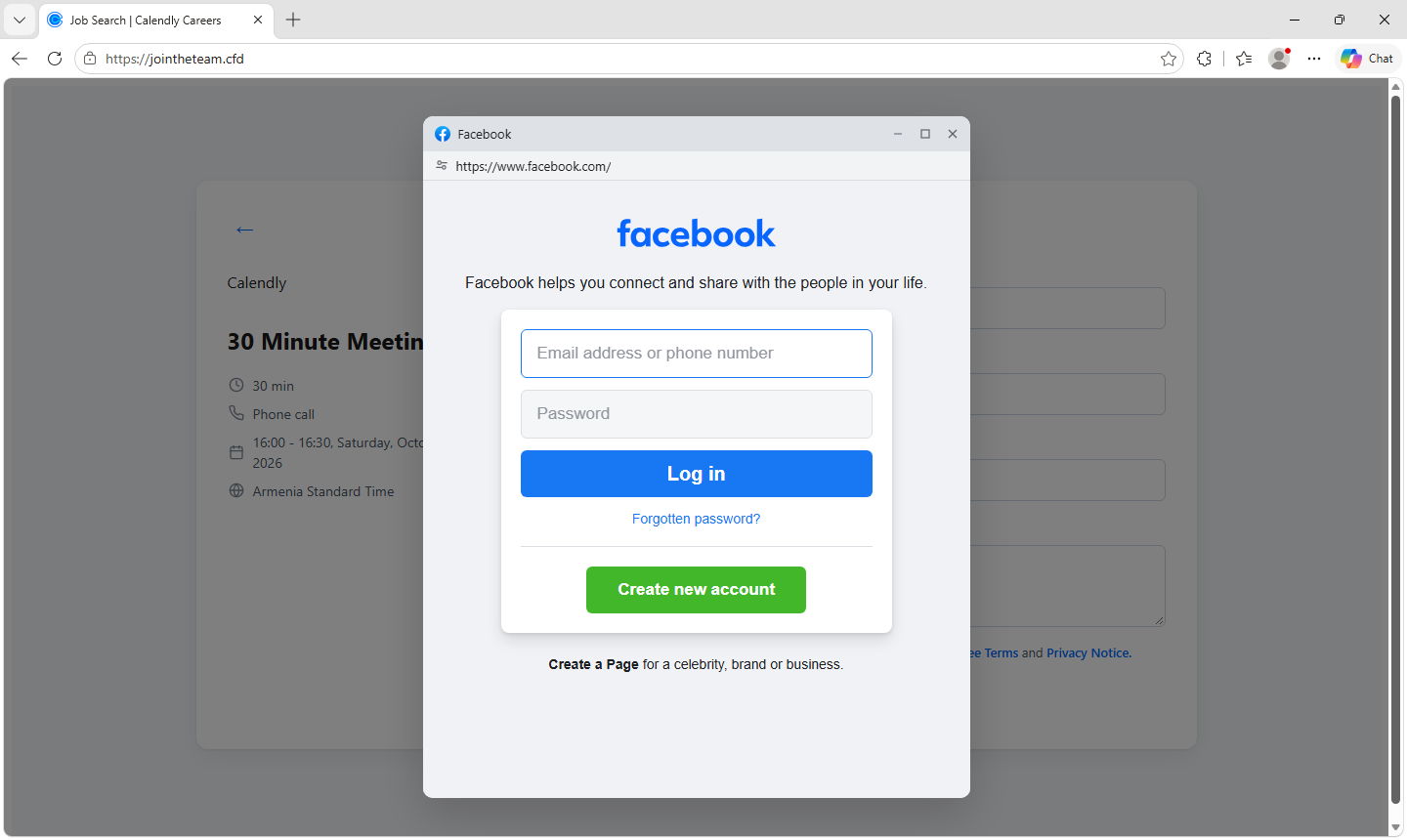
This is the decision point worth remembering: check the address controlled by your browser, rather than the address painted inside the form. Independently verify the recruiter and role through the company’s official careers site or a contact you already trust. Finding a real vacancy does not authenticate the person who sent the booking link.
Our Facebook job-scam guide covers the broader recruitment checks. A Gridinsoft Website Reputation Checker lookup can supply additional context about an unfamiliar domain; a clean or missing result does not validate the recruiter or a request for passwords.
A real security code can approve the wrong login
According to the report, the fake page stays in contact with the collection server and changes screens as the operator attempts a genuine login elsewhere. A fresh code supplied by the applicant can therefore satisfy the attacker’s challenge. An error screen can ask for another attempt.
The flow then presents Google authentication as an additional security step. Approving a genuine phone notification is dangerous when someone else initiated that login. The authenticity of the notification does not authenticate the recruiting page.
Keep two-factor authentication enabled. The failure here is giving another party the approval intended for your own sign-in. Google explains that passkeys resist phishing because they are tied to the service where they were created. That benefit does not protect a separate password-and-code fallback you voluntarily complete on a fake page.
Close the session, then check what access changed
If you only viewed the page, that alone does not establish account compromise. If you supplied contact details, expect more convincing follow-up messages. If you entered credentials, reused a password elsewhere or approved a login, use a trusted device and navigate directly to each affected service.
For Google, review recent security events and signed-in devices, remove unfamiliar access, change the exposed password and verify recovery details. Check Gmail forwarding and filters for changes you did not make. For Facebook, use Meta’s recovery route and inspect active sessions and any business pages or advertising access you manage. Secure an affected email account promptly because it can become the recovery route to other accounts.
The report establishes a phishing flow, not a breach of Meta, Google or Calendly, and it does not establish how many accounts were taken over. Its useful lesson is narrower and concrete: an interview slot is not a reason to hand a recruiter your social password, one-time code or approval of someone else’s sign-in.
References
- Stefan Dasic. Fake Calendly “Meta Careers” pages steal Facebook and Google logins. Malwarebytes, October 14, 2026.
- Google Account Help. Sign in with a passkey instead of a password. Accessed October 14, 2026.
- Google Account Help. Secure a hacked or compromised Google Account. Accessed October 14, 2026.
- Meta. Facebook account recovery. Accessed October 14, 2026; sign-in may be required.