A domain that looks like disposable text in a software manual can still belong to somebody. Manifold Security found third-party[.]com serving a fake Cloudflare check to Windows visitors, then traced two more example domains to advertising chains that sometimes delivered scams on Macs. Its September 23–24 reports expose a trust gap: the document can stay unchanged while the destination changes.
The distinction matters before copying a sample into a browser or a working application. A familiar-looking address is not automatically reserved for examples, and a verification page that asks you to run a command is asking for control of your computer.
A documentation link becomes a Windows command
Manifold’s investigation began when a domain reference in a public AI skill triggered a phishing alert. Its Windows test received a counterfeit verification page that placed a PowerShell command on the clipboard and directed the visitor to open the Run dialog, paste and execute it. Non-Windows requests received a decoy.
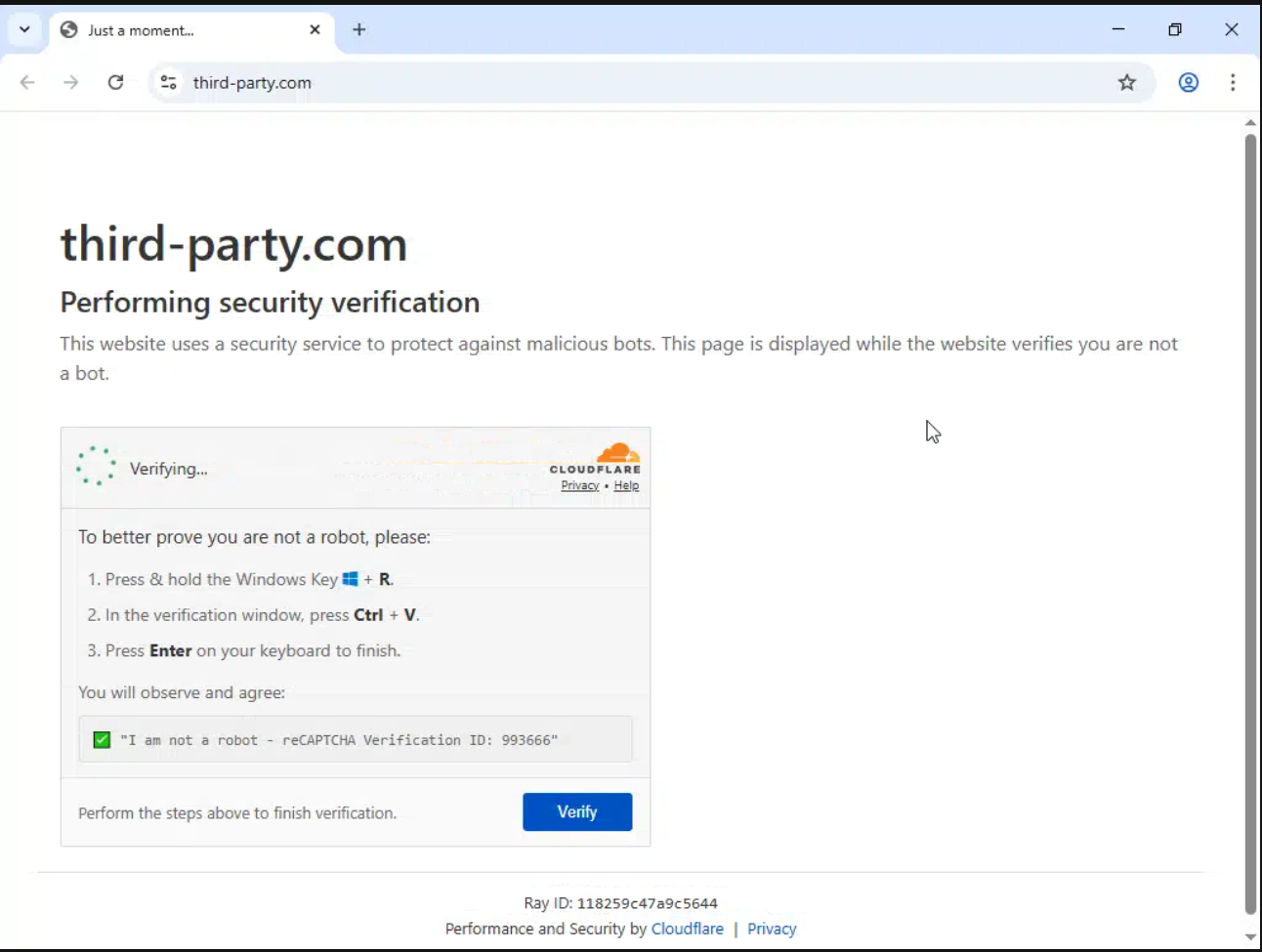
The clipboard command was meant to retrieve and execute a remote script. That second-stage host was offline during Manifold’s test; the report does not establish a completed infection or identify a delivered malware family. Nor does a domain reference prove that the repositories containing it were compromised.
This is the important boundary in ClickFix attacks: a webpage’s request becomes an operating-system action only when the person follows the execution instructions. A mention in a document, a browser visit and running a pasted command are different events.
The follow-up found scams behind ordinary ads
The September 24 follow-up examined yoursite[.]com and your-domain[.]com. Out of 24 browser renders, two reached scams, both on macOS: a counterfeit news investment pitch and a fake security warning. Other runs mostly saw parking pages or ordinary advertising; those observations are a limited test, not an infection rate.
Here the redirect happened after JavaScript ran. A text-only fetch could therefore miss the destination. Manifold also followed one scareware exit through affiliate tracking to a genuine McAfee page. It reported no evidence that McAfee participated in the deception. The legitimate final website did not make the preceding virus claims truthful.
That makes a single clean-looking visit a weak answer to a different question: what might another visitor see? The evidence supports variable advertising routes, not a claim that every request is malicious or that these domains share one attack campaign.
Reserved example domains solve a different problem
IANA maintains example.com and example.org for documentation; they cannot be registered or transferred. Its example-domain web service is provided on a best-effort basis and is not intended to support production applications. That is a specific reservation, not a rule covering any name that sounds illustrative.
For maintainers, the useful review is consequently about behavior as well as spelling. Does a URL appear only in explanatory prose, or does copied code load a script, make an API request or open a browser? Replace illustrative addresses with reserved examples. For executable tests, use a controlled fixture or mock; for a real integration, configure and verify the actual service endpoint.
These changes address different risks. A reserved name avoids handing an example to an unrelated owner. A controlled test endpoint also prevents a tutorial’s network dependency from silently becoming part of a running system.
If you followed the verification instructions
If you only viewed the page, close it and do not paste its clipboard contents into Run or a terminal. Viewing this lure alone is not evidence that its command executed. If you ran it on a work device, contact your IT or security team and retain the time and page address for investigation.
For a personal Windows PC where a command ran, check for malicious files and persistence. Removing a visible payload can leave a loader, scheduled task or browser change behind. Run a Gridinsoft Anti-Malware scan, and investigate any continuing activity; a clean scan cannot prove that no data was accessed.
The lesson is precise: documentation can explain a URL without controlling it. Verify the destination before turning an example into a connection, and never turn a website’s human-verification request into a local command.
References
- Ax Sharma. Analysis of the third-party[.]com ClickFix lure. Manifold Security, September 23, 2026.
- Cody Nash. Investigation of scams reached through example-domain advertising. Manifold Security, September 24, 2026.
- IANA. Example Domains. Accessed September 25, 2026.