


A genuine GitHub sign-in page can still authorize the wrong person’s computer. Microsoft’s November 17 research demonstrated that trap against GitHub Copilot CLI: a test user approved a device code requested by an attacker-controlled client, giving that client access under the user’s identity.
This was a controlled laboratory simulation. Microsoft says it has not observed the four demonstrated outcomes in real attacks. The result nevertheless exposes a useful distinction for developers: checking the website’s address does not establish who started the authorization.
The code connects your account to somebody else’s client
The OAuth device flow exists for tools that cannot conveniently handle a browser login. A command-line application requests a code, and the user approves it through the service’s website. The application waiting for approval then receives access. GitHub documents this flow separately from an ordinary password login.
The deception changes the first step. Someone else starts the request and sends you its code, perhaps dressed up as a license check or an IT instruction. You can complete every browser step on the real service while connecting your account to that person’s client. The code is an authorization request, not evidence that the sender represents GitHub.
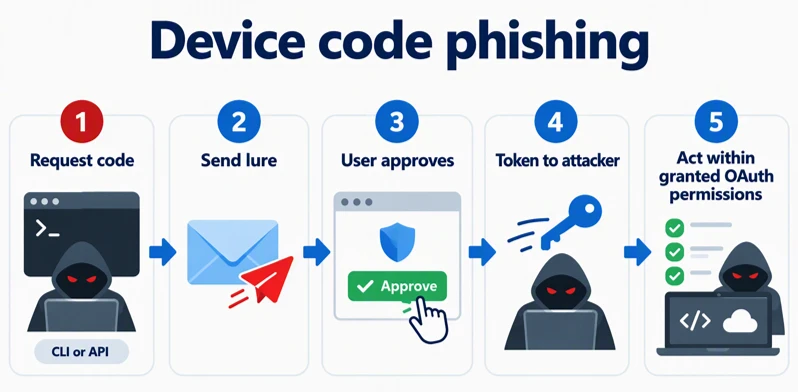
That explains why an application’s familiar name is also insufficient. A public client identifier identifies an application; it is not a secret proving that the particular running copy belongs to you. The meaningful question is whether you started this sign-in in the tool you are actually using.
What the lab reached—and what it did not
Microsoft tested four consequences: interacting with a remotely controllable Copilot CLI session, adding misleading agent memory, reading cloud-synchronized sessions, and reaching private repositories. Each depended on the test account’s permissions and enabled capabilities. This was not an unauthenticated command-execution vulnerability or a claim that every Copilot installation is exposed.
GitHub’s remote-control documentation makes the session boundary especially important. Remote interaction requires an active, online session with remote control enabled and permitted by organizational policy. Local tool approvals and operating-system permissions still govern what runs. A closed session, an offline machine, and a session with remote control disabled do not meet that remote-execution scenario.
Cloud history and live control are separate decisions. A synchronized conversation can expose work context without granting control of a running terminal. Likewise, repository access follows the account and OAuth permissions; it does not magically reach repositories outside that authorization. The lab’s memory result concerns saved information that could influence later interactions, rather than proof that every future answer becomes attacker-controlled.
Check the authorization, then the agent’s reach
If a message asks you to enter a device code, first return to your own terminal. Approve only the sign-in you started there. An unsolicited code should not become trustworthy because its link points to GitHub.
If you already approved an unexpected request, open GitHub independently and use Settings → Applications → Authorized OAuth Apps. Review the application and revoke unexpected access using GitHub’s controls. For a work account, give your security team the message, time, application name, and details of what you approved so it can check the authorization against activity.
Then examine what that identity could reach: remotely enabled sessions, cloud session history, repository permissions, and saved agent memory. Stopping a running session addresses one capability; it does not substitute for revoking the account authorization. Our guide to OAuth consent phishing and app-access recovery explains that separate recovery task.
The practical lesson is precise: a valid website can process an approval that benefits the wrong client. Verify that the request originated from your own workflow before granting it.
References
- Oren, U.; Edry, D.; Microsoft Security Research. The risks of device code authentication for AI coding agents. Microsoft Security Blog, November 17, 2026.
- GitHub. Authorizing OAuth apps. GitHub Docs. Accessed November 18, 2026.
- GitHub. Remote control of GitHub Copilot CLI sessions. GitHub Docs. Accessed November 18, 2026.
- GitHub. Reviewing your authorized OAuth apps. GitHub Docs. Accessed November 18, 2026.