
SnapSpy.net generates its Snapchat “scan” results with random numbers and scheduled messages. In the public code we reviewed, the photo, video and conversation totals come from JavaScript’s random-number generator. The GPS coordinates are already written into the page. Those results do not demonstrate access to someone’s private Snapchat account, and they give you no sound reason to pay the advertised $9.99 to unlock it.
The revealing part is how the page turns those numbers into an apparent success: it announces a connection to Snapchat, reports that two-factor authentication has been bypassed, then presents a locked report. We traced that sequence in SnapSpy’s own files.
Scope: we examined the public HTML and JavaScript at snapspy[.]net on November 16, 2026, and viewed its landing page and FAQ. We did not enter anyone’s account details, make a purchase or test the paid service. This review concerns that website, not other apps or domains using the SnapSpy name.
The photo count comes from a formula, not a Snapchat account
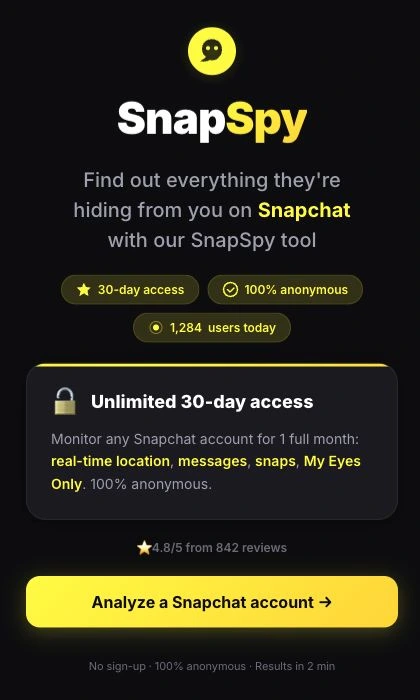
The landing page offers access to private messages, location information and My Eyes Only, Snapchat’s passcode-protected area for private Snaps. It invites the visitor to analyze an account and emphasizes anonymity. [1]
Inside the site’s app.js file, the function named runTerminal() prepares the apparent scan. Before its progress messages run, it calculates the totals that will later appear as retrieved content. The photo count is calculated as follows: [2]
const photos =
  67 + Math.floor(
    Math.random() * 31
  ) - 15;
Math.random() supplies a random value; the rest of the expression turns it into a whole number between 52 and 82. That is the displayed photo total. The neighboring formulas similarly choose 19–29 videos and 92–132 conversations. The entered username is not part of any of those calculations.
This matters because a changing result can look personalized. A different photo count on another attempt would fit this code without any change in the account being named—or any account data being retrieved at all. The numbers describe what the page generated.
The “2FA bypass” is a line on a timer
The same function contains a prepared list of terminal-style messages. Each has a delay telling the browser when to display it. A connection message is scheduled first; the line claiming a successful 2FA bypass follows at 1.7 seconds. The My Eyes Only success message appears later, using the photo and video numbers generated above. [2]
These are instructions to print text, not responses from the authentication or decryption operations they describe. The function uses setTimeout() to add each line to the page. Its progress bar advances with elapsed time, and another callback is scheduled for 5.8 seconds to copy the generated totals into the results screen.
The location claim is even easier to check. Both the terminal text and the downloaded HTML contain the fixed coordinates 40.7128° N, 74.0060° W. The results page also contains ready-made chat previews before a visitor supplies a username. In this flow, a familiar username above those fields makes the presentation look personal; it does not make the coordinates or previews belong to that person. [1] [2]
If someone shows you this screen as proof they accessed your My Eyes Only or located you, the screen does not establish that. Real account activity needs to be checked separately. In particular, do not reset a forgotten My Eyes Only passcode because of this display: Snapchat says that reset deletes the Snaps saved under the old passcode. [4]
The search itself is data the site can collect
The page’s promise of anonymity is also worth reading carefully. It is presented as anonymity from the person being monitored. That is different from keeping the search private from SnapSpy itself.
After a username is submitted, app.js passes up to its first 60 characters into a username_submitted analytics event. The separate tracker.js file queues events with a session identifier, device category and referring source, then is configured to send them by POST to snapspy[.]net/api/t. [2] [3]
That is a concrete distinction: the supposed account findings are locally generated, while the actual search term is included in an outgoing analytics payload. Our code review establishes that collection logic; it does not establish what the server retained or how anyone later used it. Avoid entering another person’s username simply to see whether the site knows something about them.
What the $9.99 offer actually establishes
The results page advertises 30 days of access for a one-time $9.99 payment with no renewal. Its unlock link points to a redirect on a different domain, jobnow[.]fr. Those are observations about the offer and its link—not verification of the eventual checkout, merchant identity or delivered service. We did not follow a purchase through. [1]
There is a more immediate contradiction within SnapSpy’s own descriptions. The landing page promises private messages and My Eyes Only content. Its FAQ describes searching public databases, and its Terms describes an open-source intelligence tool querying publicly accessible information. Public-source searching does not explain the claimed access to private, passcode-protected material. [2]
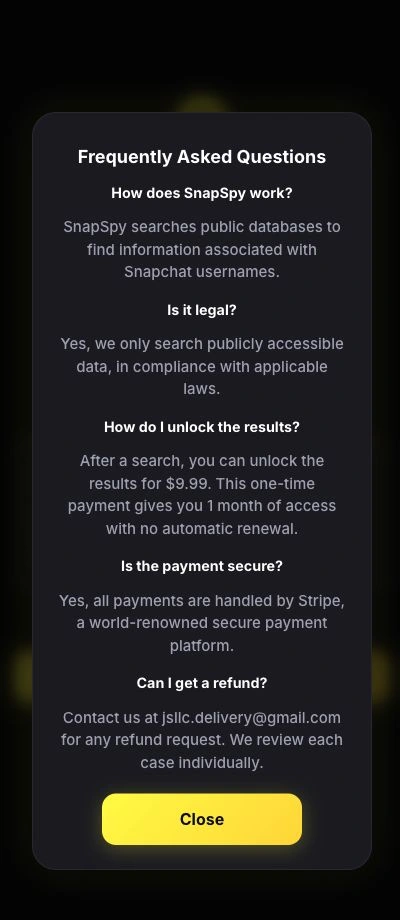
The refund wording also changes between screens. The offer promises a full refund within 24 hours without conditions; the FAQ says refund requests are reviewed individually. Save the wording shown to you if you paid. Neither statement is evidence that a particular refund was processed. [1] [2]
A public review by dush, dated October 28, 2026, on Gridinsoft’s SnapSpy report describes paying about $10, receiving nothing for more than two days and getting no reply to an order inquiry. The reviewer wrote, “waited for over 2 days and got nothing.” That is an attributed customer report, not our own purchase test or proof of what happened to every buyer.
The payment decision does not depend on assuming every complaint has the same outcome. The pre-payment display already fails as evidence of the promised private-account access: its most persuasive details are generated by the page itself.
If you already used SnapSpy
Respond to what you actually shared or installed:
- Only visited or entered a username: close the page and stop the lookup. Its generated totals are not evidence of an account breach. The code does include the search term in analytics; entering a username is still different from giving away a password.
- Paid but received no service: keep the receipt, merchant name, offer and refund wording, and your support correspondence. Request a refund from the merchant identified on the receipt. If unresolved, ask your payment provider about its dispute process and deadlines. Describe the payment and non-delivery accurately; do not pay another fee to release the results or obtain a refund.
- Shared a password or login code: open Snapchat independently, change the exposed password and review unfamiliar sessions. Follow our Snapchat account-security guide for the wider recovery steps.
- Installed an app, extension or downloaded program: use the platform-specific fake-viewer cleanup guidance. Device scanning is relevant to software that actually ran; it cannot resolve a payment dispute. Our review did not establish that merely visiting SnapSpy infects a device.
SnapSpy’s apparent extraction can be explained by its public page code. Treat the random totals, scripted success messages and fixed location as a sales presentation, not recovered private information.
References
- SnapSpy. “Anonymous Snapchat Monitoring,” public landing page and pre-payment interface. Accessed November 16, 2026. Page examined.
- SnapSpy. app.js, public client-side script;
startAnalysis(),runTerminal()and legal-text definitions. Accessed November 16, 2026. Source of the displayed results and terms. - SnapSpy. tracker.js, public client-side analytics script. Accessed November 16, 2026. Event collection code.
- Snap Inc. “I forgot my My Eyes Only passcode.” Snapchat Support; accessed November 16, 2026. Forgotten-passcode reset warning.