A reverse shell and a backdoor both mean unauthorized remote access, but they are not the same threat. A reverse shell is a live command session where the compromised device connects outward to an attacker. A backdoor is the hidden way attackers keep or regain access later. If you found signs of either one on a personal computer, server, or website, treat it as a compromise until you prove otherwise.
For a recent macOS backdoor case, the FlutterShell Mac backdoor guide explains the user-facing signs and cleanup decisions after a malvertising download.
Reverse shell vs backdoor
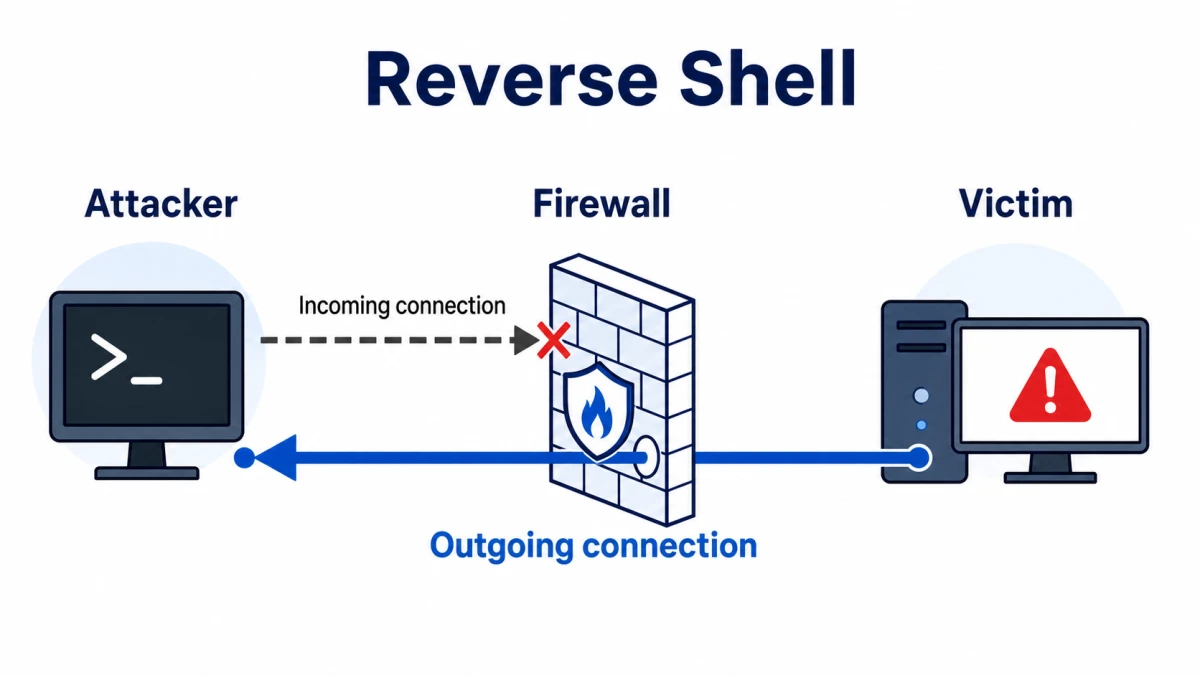
- Reverse shell: the victim system starts an outbound connection and exposes a command shell.
- Bind shell: the victim system listens on a port and waits for the attacker to connect.
- Backdoor: a persistent hidden access path, such as a web shell, service, scheduled task, startup entry, SSH key, rogue account, or remote-access trojan.
- Practical risk: a reverse shell may be temporary, but attackers often use it to install a backdoor before they leave.
Reverse shell vs backdoor: the main difference
The easiest way to separate the terms is connection direction versus persistence. A reverse shell describes how a command session connects. A backdoor describes how access survives or returns after the first session ends.
| Question | What it usually means |
| Who initiates the connection? | In a reverse shell, the compromised device connects outward to an attacker-controlled listener. In a bind shell, the compromised device listens for inbound access. |
| Does it survive reboot? | A plain reverse shell often dies when the process stops. A backdoor is designed to return through persistence. |
| What should defenders look for? | For reverse shells, focus on unusual outbound network sessions tied to shells or scripting engines. For backdoors, inspect persistence points, new accounts, web files, services, tasks, and remote-access tools. |
| Can they appear together? | Yes. Attackers may get a reverse shell first, then create a backdoor. A backdoor may later open a reverse shell for interactive control. |
What is a reverse shell?
A reverse shell is a technique where a compromised system opens an outbound connection and gives the remote side command-line control. Attackers like this pattern because many networks block unsolicited inbound traffic but still allow outbound connections to common destinations. In real incidents, the suspicious part is not the word “shell” by itself; it is the unexpected process tree and network behavior around it.
On Windows, warning signs can include powershell.exe, cmd.exe, wscript.exe, mshta.exe, Python, Node.js, or another interpreter launching from a strange folder and creating a network connection. On Linux or web servers, watch for unexpected sh, bash, PHP, Python, Perl, or Java child processes spawned by a web server, cron job, container, or service account.
If the alert is specifically tied to PowerShell network activity, use our PowerShell outbound connection guide to triage the process path, parent process, and persistence clues. If the alert mentions NetCat or similar tooling, our HackTool:Win32/NetCat guide explains when that tool is legitimate and when it looks like remote-control abuse.
Bind shell vs reverse shell
Search results often mix this article with “bind shell vs reverse shell” guides, so here is the short version: a bind shell opens a listener on the victim system, while a reverse shell makes the victim system call out. Reverse shells are common in attack writeups because outbound connections may pass through NAT and firewall rules more easily than inbound connections. A bind shell is easier to reason about in a lab, but it is often noisier on a real network because it exposes a listening port.
For defenders, the response is similar: do not focus only on the shell type. Find the entry point, the user account, the parent process, the persistence method, and any follow-on malware. A one-time shell session can still mean the attacker had time to steal credentials, drop files, or create another access path.
What is a backdoor?
A backdoor is any unauthorized method that bypasses normal access controls or lets an attacker return later. It can be a remote-access trojan, hidden service, scheduled task, startup item, rogue administrator account, SSH key, malicious browser extension, modified login page, or web shell. MITRE ATT&CK tracks many of these behaviors under execution and persistence techniques, including command interpreters and web shells.
Backdoors are especially dangerous because they can stay quiet after the obvious alert is removed. A cleanup that kills only the current shell process may leave behind a service, task, web file, or stolen credential that lets the attacker reconnect.
What victims usually search for
People do not usually search for “reverse shell vs backdoor” in the middle of an incident. They search for symptoms. These are the patterns this page now covers more directly:
- An antivirus or EDR alert says a shell, remote admin tool, web shell, or backdoor was detected.
- A firewall reports blocked outbound traffic from PowerShell, a browser child process, PHP, Python, Java, or a strange executable.
- A website owner finds an unknown PHP/JSP/ASP file, modified plugin file, suspicious cron job, or unexpected admin user.
- A Windows user sees a new startup entry, unknown service, scheduled task, remote-access tool, or login from an unfamiliar location.
- A server has odd outbound connections to unknown IPs shortly after a vulnerability, weak password, malicious plugin, or exposed admin panel was abused.
How to detect reverse shells and backdoors safely
You do not need to run attack commands to investigate. Look for behavior that should not exist in your environment:
- Review outbound connections from shell processes, scripting engines, web-server workers, container processes, and service accounts.
- Check process ancestry: a browser, Office app, PDF reader, web server, or archive tool spawning a shell is more suspicious than an administrator opening a terminal directly.
- Inspect Windows Startup folders, Task Scheduler, Services, Run/RunOnce registry keys, WMI persistence, and newly created local users.
- On Linux and web servers, inspect cron entries, systemd services, SSH keys, web upload directories, modified CMS/plugin files, and recently changed executable scripts.
- Search for new remote-access tools, tunneling utilities, encoded scripts, renamed binaries, and files created around the first alert time.
- Correlate alerts with phishing, cracked software, fake updates, exposed web apps, weak passwords, and recently exploited vulnerabilities.
What to do if you find one
- Isolate the system. Disconnect it from the network or restrict outbound access so the attacker cannot keep controlling it.
- Preserve evidence before cleanup. Save alert names, file paths, process names, connection destinations, timestamps, and affected accounts.
- Remove persistence, not only the visible process. Check services, tasks, startup entries, web shells, remote-access tools, SSH keys, and admin users.
- Patch the entry point. Fix the vulnerable plugin, exposed service, weak password, malicious download source, or misconfiguration that allowed the shell.
- Rotate credentials from a clean device. Prioritize admin, email, browser-synced, SSH, hosting, VPN, and banking credentials.
- Scan broadly. Run a reputable security scan on the affected host and any systems that shared credentials or network access. Gridinsoft Anti-Malware can help check suspicious files and remove malware persistence on Windows endpoints.
- Rebuild when trust is low. If a server had a confirmed backdoor, unknown root/admin access, or multiple persistence points, a clean rebuild from known-good backups is safer than chasing every modified file.
After uninstalling the suspicious app or deleting the visible threat, use Gridinsoft Anti-Malware to check hidden files, startup entries, scheduled tasks, bundled apps, browser changes, and other persistence points that can restore malware.
Download Anti-MalwareFAQ
Is a reverse shell always malware?
No. Reverse shells can be used in authorized security testing and labs. On a personal computer, production server, or website where nobody approved that activity, an unexpected reverse shell is a serious compromise indicator.
Can a reverse shell become a backdoor?
A reverse shell does not become persistent by itself, but attackers commonly use the session to create persistence: a service, scheduled task, web shell, account, SSH key, startup entry, or remote-access trojan.
Is a web shell a backdoor?
Yes. A web shell is a backdoor on a web server. It lets an attacker run commands, manage files, and sometimes pivot deeper into the network through the compromised site.
What is worse, a reverse shell or a backdoor?
A backdoor is usually worse for long-term risk because it is meant to survive and allow return access. A reverse shell is still dangerous because it may be the live session used to steal data or install that backdoor.
Should I wipe the system after finding a backdoor?
For a home Windows PC, full malware removal plus password rotation may be enough if you can identify the source and no high-value accounts were exposed. For servers, business systems, or cases with admin/root access, rebuild from a trusted backup and rotate credentials.
References
- MITRE ATT&CK. “Command and Scripting Interpreter (T1059).” MITRE, accessed June 7, 2026. https://attack.mitre.org/techniques/T1059/
- MITRE ATT&CK. “Server Software Component: Web Shell (T1505.003).” MITRE, accessed June 7, 2026. https://attack.mitre.org/techniques/T1505/003/
- CISA. “CISA Shares Lessons Learned from Incident Response Engagement.” Cybersecurity Advisory AA25-266A, 2025, accessed June 7, 2026. https://www.cisa.gov/sites/default/files/2025-09/AA25-266A_advisory_cisa_shares_lessons_learned_from_ir_engagement.pdf