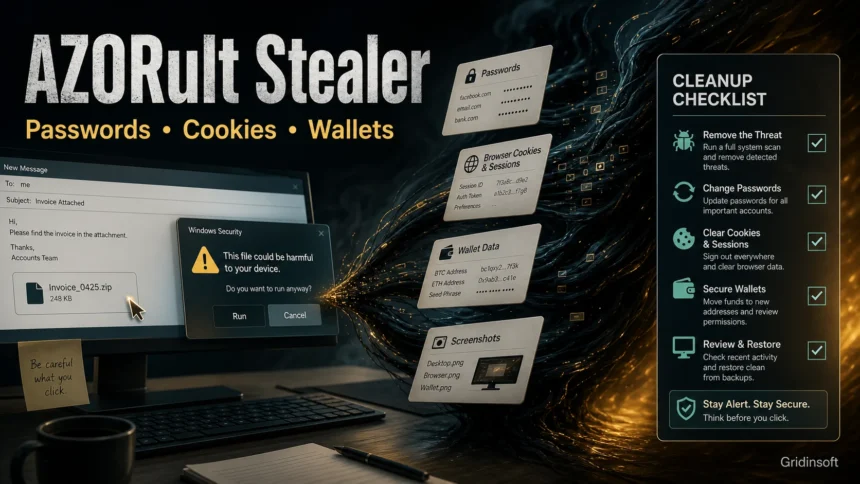
AZORult is a Windows information stealer that can collect saved browser passwords, cookies, session data, wallet files, screenshots, and basic system details. If you opened a suspicious ZIP, shortcut file, fake invoice, cracked installer, or email attachment and then saw an AZORult detection, treat it as a credential-theft incident: disconnect from risky accounts, remove the malware, scan for persistence, then change passwords from a clean device.
The older article on this page covered the 2024 return of AZORult through phishing and LNK files. This update keeps that campaign context, but turns the page into a practical cleanup guide for users searching for AZORult, AZORult stealer, Trojan:Win32/Azorult, and related removal questions.
What Is AZORult?
AZORult, also written as AZORult or Azorult, is a commercial stealer family observed in the wild since 2016. MITRE tracks it as malware used to steal information from compromised Windows hosts, including cryptocurrency-related data and credentials. Microsoft Defender detects multiple variants under names such as Trojan:Win32/Azorult.
The practical risk is not only the file on disk. A stealer can take data quickly, send it to a command-and-control server, and leave the victim with accounts that remain exposed even after the visible file is quarantined. That is why cleanup and account recovery need to happen together, in the right order.
Why AZORult Is Harder Than a Normal Unwanted App
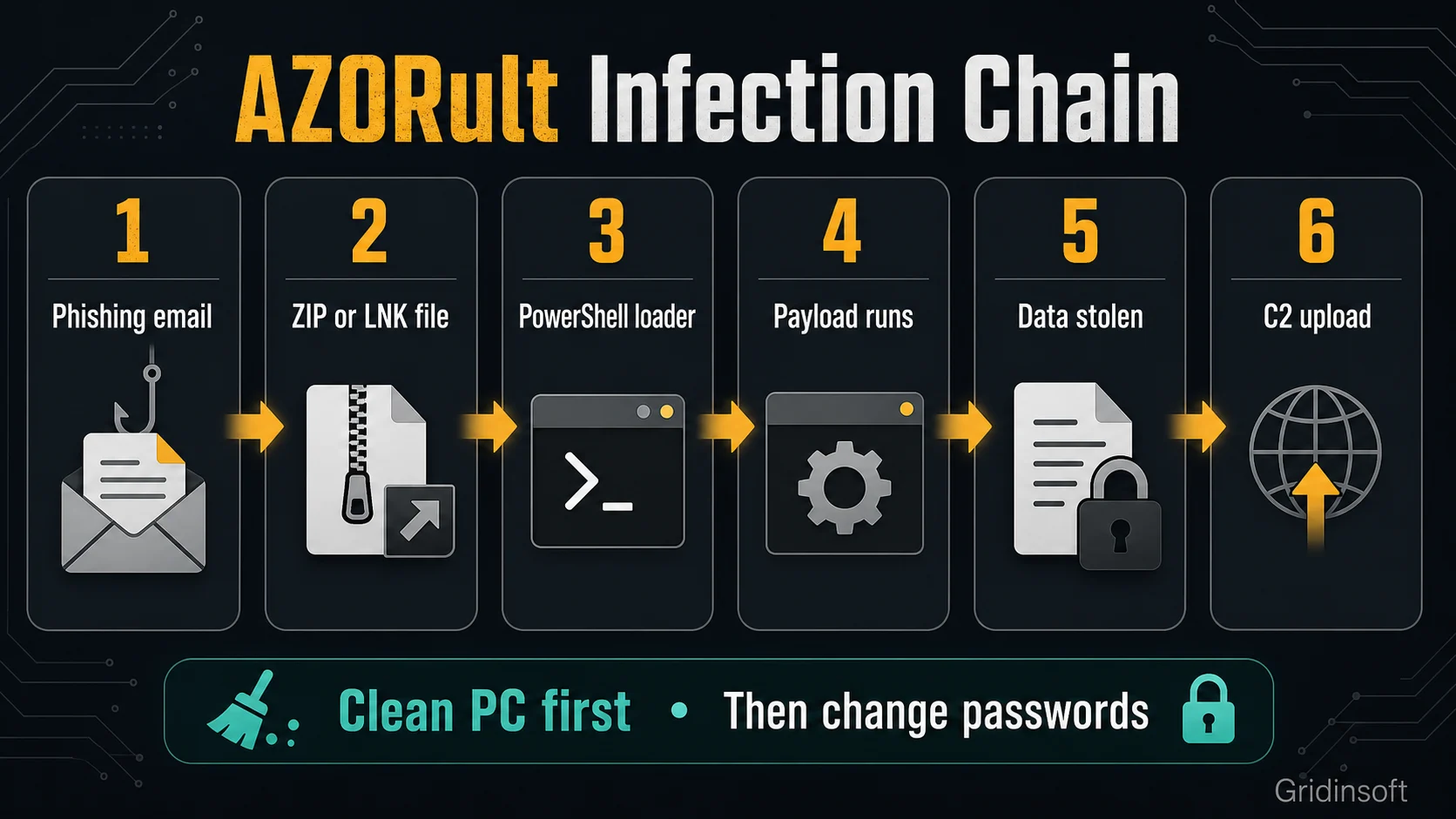
AZORult is built for theft, not for showing obvious pop-ups. A user may see no clear symptom except a security-tool alert, a suspicious script, a browser warning, a strange ZIP/LNK attachment, or unusual account activity later. Campaigns have used phishing emails, fake documents, LNK shortcuts disguised as PDFs, JavaScript, PowerShell loaders, scheduled tasks, and in-memory execution chains.
Common AZORult Infection Signs
- A security alert for Trojan:Win32/Azorult, Spyware.AzorUlt, Trojan-PSW.Win32.Azorult, or a similar stealer detection.
- A suspicious attachment such as an invoice, statement, job document, archive, shortcut, fake PDF, or cracked installer.
- PowerShell, JavaScript, batch files, or scheduled tasks appearing after an attachment was opened.
- Unexpected browser sign-outs, password-reset emails, wallet activity, game-account trade attempts, or new login alerts.
- New files in
%TEMP%,%APPDATA%,%LOCALAPPDATA%, Downloads, Startup folders, or Task Scheduler entries that match the time of the incident.
What AZORult Can Steal
AZORult variants and campaigns differ, but the family is known for collecting browser data, credentials, cookies, cryptocurrency information, screenshots, system details, and sometimes files selected by the operator. Some variants can also act as downloaders, which means another payload may arrive after the initial infection.
| Data at risk | What to do after cleanup |
|---|---|
| Saved browser passwords | Change important passwords from a clean device and use unique passwords for every account. |
| Cookies and sessions | Sign out of all sessions, revoke trusted devices, and clear browser data after the PC is clean. |
| Wallet files and seed phrases | Move funds to a new wallet if a seed phrase or wallet file may have been exposed. |
| Email, Steam, Discord, banking, work accounts | Enable 2FA, review login history, remove suspicious OAuth/app access, and warn contacts if messages were sent. |
How to Remove AZORult Safely
- Disconnect from risky activity. Stop using the affected PC for banking, email, crypto, work admin panels, and password changes until it is scanned.
- Keep the suspicious file quarantined. Do not restore or rerun the ZIP, LNK, EXE, script, cracked installer, or fake document to “check” it.
- Run a full Gridinsoft Anti-Malware scan. AZORult incidents may involve a loader, scheduled task, startup entry, script, browser change, or bundled payload that recreates symptoms after the first file is removed. A full scan helps check detections, hidden files, startup entries, scheduled tasks, bundled apps, browser changes, and persistence.
- Remove detected items and reboot. After reboot, scan again if the alert returns or if suspicious PowerShell, JavaScript, Task Scheduler, or startup activity continues.
- Check browser extensions and sessions. Remove unknown extensions, clear cookies after cleanup, and sign out of all active sessions for important accounts.
- Change passwords from a clean device. Start with email, password manager, banking, crypto, Steam/Discord/game accounts, work accounts, and anything reused elsewhere.
- Watch for follow-up abuse. Check mailbox forwarding rules, account recovery emails, wallet activity, pending trades, and messages sent from your accounts.
If AZORult was found after a phishing attachment, fake invoice, crack, repack, or “document viewer” ran, the visible detection may not be the whole incident. Clean the machine first, then rotate credentials; changing passwords before cleanup can hand the new password to a still-active stealer.
If a token stealer ran here, logging back in can hand the attacker your new Discord session, email cookie, Steam token, or wallet access. Scan this Windows PC first, then reset passwords from a clean device.
Scan and clean AZORult leftoversIs AZORult a False Positive?
A false positive is possible with any security product, but AZORult detections deserve caution because the family is a real credential stealer. Treat the alert as likely malicious when it came from an email attachment, fake invoice, archive, crack, unknown installer, browser download, suspicious PowerShell command, or a file in a temporary/user-profile path.
Do not restore the file just because a quick scan later looks clean. If you believe the detection is wrong, submit the exact file to the vendor that detected it, keep it isolated, and scan the system for related scripts, startup entries, scheduled tasks, and browser changes before allowing anything back.
2024 Return: Phishing, LNK Files, and PowerShell
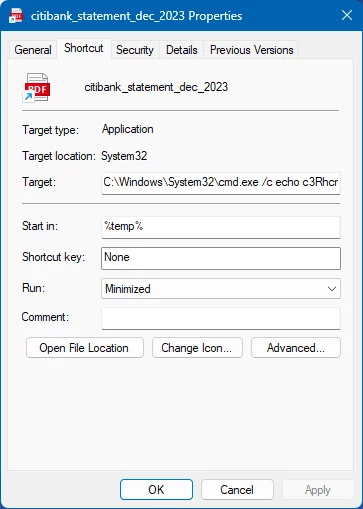
The AZORult return that triggered the original news post used phishing-style delivery and shortcut files disguised as documents. A file named like a bank statement could start a chain that downloads JavaScript and PowerShell components before the final stealer runs. That style matters for users because the dangerous part may look like a harmless document, and the loader may leave behind scripts or tasks even if the final payload is caught.
Prevention Checklist
- Show file extensions in Windows so
.pdf.lnk,.doc.js, and similar double-extension tricks are easier to catch. - Do not open invoice, shipping, tax, bank, HR, or job-application attachments from senders you did not verify.
- Avoid cracks, activators, repacks, and “viewer required” downloads; stealers often arrive through software people already expect antivirus to dislike.
- Keep browsers and Windows updated, but do not rely on updates alone after a stealer has already run.
- Use a password manager, unique passwords, and 2FA so one stolen credential does not unlock every account.
- For phishing examples and safe verification habits, see Gridinsoft’s guide on how to spot a phishing email.
FAQ
Should I reinstall Windows after AZORult?
A clean reinstall is the strongest recovery option when a stealer definitely ran and the device handled high-value accounts, work admin access, or crypto. For many home users, a full malware cleanup, reboot, second scan, browser/session cleanup, and password rotation may be enough if no persistence or follow-up payload remains.
Should I change passwords immediately?
Change passwords from a clean device or after the affected PC is cleaned. If you change them on a still-infected PC, the stealer may capture the new credentials too.
Can AZORult steal browser cookies?
Yes, AZORult is associated with browser data theft, including credentials, cookies, history, and related profile data. After cleanup, sign out of sessions, clear cookies, and revoke trusted devices where possible.
What if Microsoft Defender says AZORult was removed?
Keep the file quarantined, but still check for the delivery chain. A loader, script, scheduled task, or browser/session compromise can remain relevant even when the detected payload was removed.
References
- MITRE ATT&CK. “Azorult, Software S0344.” MITRE, accessed June 14, 2026. https://attack.mitre.org/software/S0344/
- Microsoft Security Intelligence. “Trojan:Win32/Azorult.FW.mtb threat description.” Microsoft, accessed June 14, 2026. https://www.microsoft.com/en-us/wdsi/threats/malware-encyclopedia-description?Name=Trojan%3AWin32%2FAzorult.FW.mtb
- Cyble Research and Intelligence Labs. “Sneaky Azorult Back in Action and Goes Undetected.” Cyble, January 15, 2024, accessed June 14, 2026. https://cyble.com/blog/sneaky-azorult-back-in-action-and-goes-undetected/