A now-fixed flaw in the Adobe Acrobat PDF extension for Chrome could let a malicious website read text already rendered inside WhatsApp Web. The vulnerability, CVE-2026-48294, affected extension versions 26.5.2.2 and earlier; users should verify that Chrome has installed version 26.5.2.3 or later. Guardio Labs named the proof-of-concept chain HermeticReader and reported it to Adobe, which shipped a fix over the same weekend [1] [2].
This was not a WhatsApp encryption break, and the reviewed public evidence does not show active exploitation. The risk came from the Acrobat extension’s privileged browser messaging and its new WhatsApp integration. A person still had to visit an attacker-controlled or compromised page while the vulnerable extension was installed.
Who should check the Adobe Acrobat extension?
Check the extension if you use WhatsApp Web in Chrome and have Adobe Acrobat: PDF edit, convert, sign tools installed. The affected extension ID is efaidnbmnnnibpcajpcglclefindmkaj. Adobe Acrobat Reader on the desktop and WhatsApp on a phone are not enough by themselves to match this exact browser-extension exposure.
| What you have | What to do |
|---|---|
| Extension version 26.5.2.2 or earlier | Update immediately. If Chrome does not offer a newer build, remove the extension and reinstall it from Adobe’s verified Chrome Web Store listing. |
| Version 26.5.2.3 or later | The known CVE is patched. Keep automatic extension updates enabled. |
| No Adobe Acrobat Chrome extension | This specific chain does not apply, even if Acrobat Reader is installed on Windows or macOS. |
| WhatsApp Desktop or mobile only | The demonstrated HermeticReader chain targeted WhatsApp Web in a browser tab, not the mobile app. |
What HermeticReader could actually read
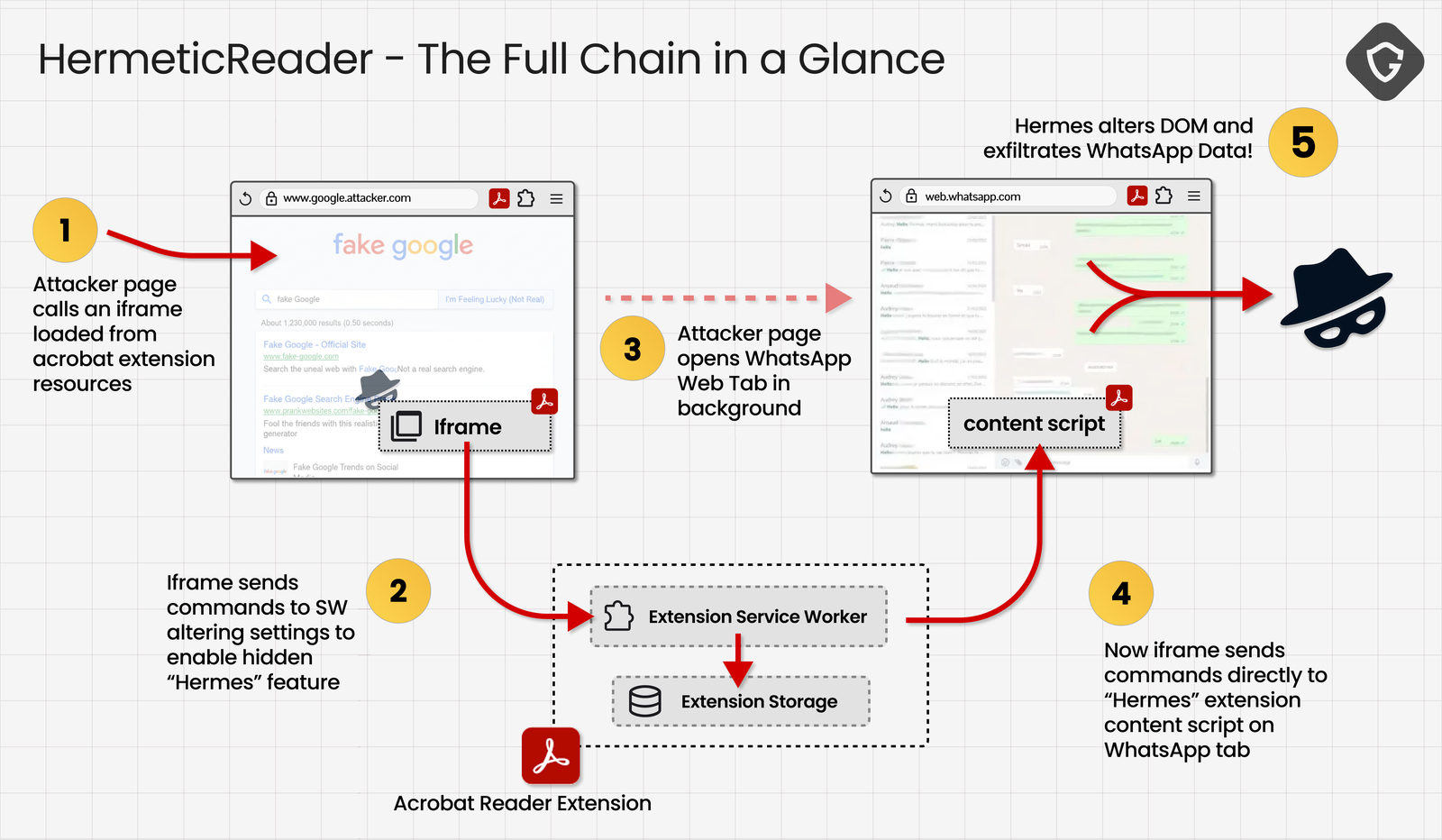
The chain combined several ordinary-looking trust failures. An attacker page could load a web-accessible Acrobat extension frame, write a feature flag into extension storage, activate the dormant Hermes integration, predict the WhatsApp tab ID, and send commands through the extension’s service worker. The final step moved WhatsApp’s rendered page text into a form and submitted it to an attacker-controlled server [1].
The proof of concept exposed the rendered chat list, contact names, message previews, the profile name, and the visible text of the open conversation. It did not automatically retrieve every old message that had never loaded into the page, break end-to-end encryption, steal a WhatsApp password, or install malware. That boundary matters: the attack read what the authenticated browser session had already placed in the page.
How to check and update the extension
- Open Chrome and enter
chrome://extensionsin the address bar. - Find Adobe Acrobat: PDF edit, convert, sign tools and open Details.
- Check the version. Anything newer than 26.5.2.2 is outside the affected range recorded for CVE-2026-48294 [3].
- If the old version remains, return to the extensions page, enable Developer mode, and select Update. Restart Chrome and check again.
- If updating fails, remove the extension and reinstall it only from Adobe’s verified publisher page in the Chrome Web Store. If you never use its browser features, leaving it removed reduces the browser’s privileged extension surface.
This browser-extension issue is separate from malicious PDF files. The PDF safety guide explains how to handle an untrusted document, while the WhatsApp VBS malware guide covers the higher-risk case where a chat attachment was downloaded and executed.
What to do if you visited a suspicious page
- Update or remove the Acrobat extension first. Closing the suspicious tab alone does not repair a vulnerable build.
- Review WhatsApp linked devices from your phone. Remove sessions you do not recognize. A separate QR-replacement scenario required the victim to scan the attacker’s substituted code; if you scanned an unexpected QR code, treat the linked session as suspicious.
- Consider what was visible in WhatsApp Web. Review sensitive conversations, contact names, message previews, and one-time codes that were on screen during the visit. Rotate a password or session only when the exposed chat content creates a real account risk.
- Do not assume malware was installed. HermeticReader was a browser data-disclosure chain. Run a malware scan only if the page also downloaded a file, requested an extension, opened a command prompt, or left other device symptoms.
- Keep evidence if this happened on a work device. Record the page URL, visit time, extension version, browser profile, and linked-device list before a security team resets the environment.
References
- Shaked Biner. “HermeticReader — The Vulnerability That Turned Adobe’s 300M-Install Extension Into a Full WhatsApp Takeover.” Guardio Labs, July 22, 2026, accessed July 22, 2026. Guardio Labs technical report.
- Adobe Product Security Incident Response Team. “Acknowledgments.” Adobe, updated July 21, 2026, accessed July 22, 2026. Adobe acknowledgment for CVE-2026-48294.
- National Institute of Standards and Technology. “CVE-2026-48294 Detail.” National Vulnerability Database, published June 17, 2026, accessed July 22, 2026. NVD vulnerability record.