Cyberbullying is repeated online harassment, threats, humiliation, or exclusion that uses phones, social media, games, chats, or other digital spaces to hurt or control someone. If it is happening now, do not argue with the person. Save proof first, report the abuse to the platform or school, block safely, and get help from a trusted adult, administrator, counselor, or law enforcement when threats, stalking, sexual images, doxxing, or hate crimes are involved.
If you need to stop cyberbullying today
- Do not reply in anger. A reaction can escalate the situation and gives the bully more material.
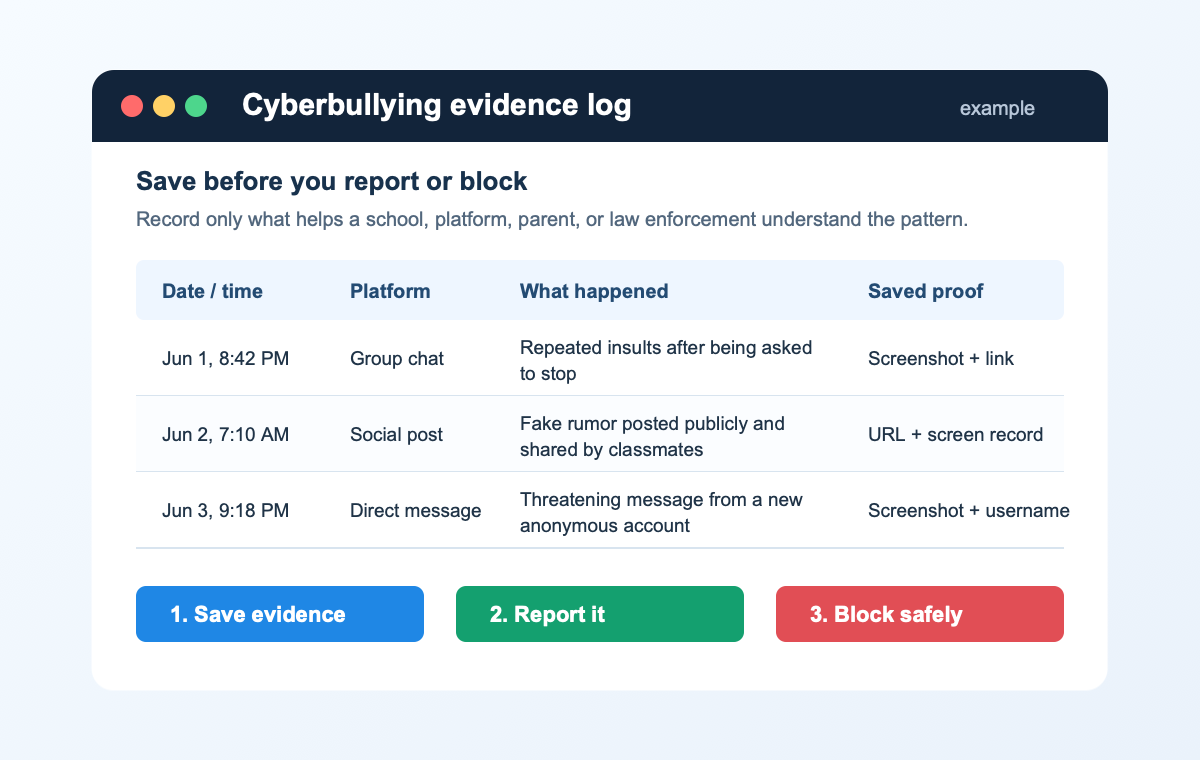
- Save evidence. Keep screenshots, profile links, URLs, usernames, dates, times, and a short description of what happened.
- Report it where it happened. Use the platform’s abuse report, school reporting channel, workplace channel, or game/moderation tools.
- Block after saving proof. Blocking is useful, but saving proof first helps if the person creates new accounts or denies the behavior.
- Escalate serious cases. Threats of violence, stalking, image-based abuse, sexual exploitation, hate crimes, or doxxing should be reported to the right authority, not handled alone.
What Counts as Cyberbullying?
Cyberbullying can happen through text messages, group chats, social networks, gaming voice chat, forums, school apps, email, live streams, or anonymous accounts. StopBullying.gov describes cyberbullying as bullying that takes place over digital devices, and the digital part matters because posts can spread quickly, stay visible, and follow someone outside school or work.
Common examples include:
- repeated insults, name-calling, mockery, or humiliation in comments or chats;
- spreading rumors, edited screenshots, private messages, or embarrassing images;
- posting from fake accounts to impersonate or shame someone;
- excluding someone from online groups to punish or isolate them;
- threatening messages, stalking, doxxing, swatting threats, or harassment through many new accounts;
- pressure to send or keep quiet about intimate images, blackmail, or image-based abuse.
Cyberbullying vs. Online Harassment, Threats, and Doxxing
People often use the word “cyberbullying” for many online harms, but the response changes when the behavior becomes a safety issue. A cruel comment may need reporting and blocking. A threat, stalking pattern, leaked address, or sexual-image demand needs escalation.
| What is happening | What to do first |
|---|---|
| Mean comments, repeated insults, rumors, or group-chat humiliation. | Save evidence, report to the platform or school, block, and ask a trusted person to help track the pattern. |
| Fake accounts, impersonation, or edited screenshots. | Save profile URLs and screenshots, report impersonation, tighten account privacy, and tell people not to engage with the fake account. |
| Threats of violence, stalking, hate crimes, or doxxing. | Preserve proof and contact school/work administrators or law enforcement. If there is immediate danger, call emergency services. |
| Intimate images, blackmail, or threats to post sexual content. | Do not pay or negotiate. Save proof, report to the platform, and use specialized reporting channels or law enforcement, especially when a minor is involved. |
| Suspicious links, hacked accounts, or someone using private files against you. | Change passwords, enable two-factor authentication, remove unknown sessions, scan devices, and check whether malware or account theft is involved. |
How to Stop Cyberbullying Without Losing Evidence
Blocking immediately can feel good, but it can also remove messages or make it harder to prove what happened. When it is safe to do so, capture the evidence before you block.
- Take screenshots with context. Include the username, profile URL, date, time, and the surrounding conversation so the message cannot be dismissed as a single cropped line.
- Copy links and account names. Save the direct post URL, profile URL, group name, server name, phone number, email address, or game handle.
- Record the pattern. Write a short timeline: when it started, how often it happens, which accounts are involved, and whether it moved between platforms.
- Report through the right channel. Use the platform’s abuse report for content removal, a school or workplace channel for behavior tied to real life, and law enforcement for threats or crimes.
- Block, mute, restrict, or filter. After the report is filed, use privacy settings to stop new contact, limit who can comment, and hide message requests.
- Ask someone to help review the evidence. A parent, counselor, teacher, manager, trusted friend, or moderator can help decide whether the next step is platform reporting, school action, or a safety report.
What to Report to Platforms
Most platforms remove or limit content that violates harassment, bullying, impersonation, hate, sexual exploitation, or threat policies. Reports work better when they include the exact content and account, not only a general complaint.
- For social media: report the post, comment, message, profile, or impersonation account directly in the app. Use privacy settings to restrict comments, tags, mentions, and message requests.
- For messaging apps: save the chat, report the user if the app supports it, block the number or account, and keep a backup of screenshots outside the app.
- For games and Discord-style communities: report the user to moderators, include message IDs or links when available, and leave servers or voice channels where moderators ignore abuse.
- For search results or copied posts: report the original source first, then request removal from search only when the content is already removed or exposes private information.
When Parents, Schools, or Law Enforcement Should Get Involved
Cyberbullying often connects to real-life relationships: classmates, ex-friends, teammates, coworkers, or local groups. That is why a platform report alone may not stop it.
Get a parent, school, employer, or counselor involved when the abuse repeats, affects school or work, includes classmates or coworkers, moves across platforms, or causes fear, anxiety, or isolation. Contact law enforcement or emergency services when there are threats of violence, stalking, sexual exploitation, hate crimes, doxxing, extortion, or a realistic risk of physical harm.
If the situation has created thoughts of self-harm or you are worried about someone else’s safety, treat it as urgent. In the United States, call or text 988 for the Suicide & Crisis Lifeline; outside the U.S., contact local emergency or crisis services.
How to Protect Accounts During Cyberbullying
Some cyberbullying is purely social. Some involves account takeover, leaked private information, suspicious links, tracking, or malware. When harassment includes hacked accounts or private files, handle it like a security incident too.
- Change passwords for email and social accounts. Start with the email account used for password resets.
- Turn on two-factor authentication. Use an authenticator app or hardware key where possible.
- Remove unknown sessions and devices. Check account security pages for logins you do not recognize.
- Review privacy settings. Limit who can see friends, posts, phone number, email, location, tags, and old public posts.
- Check devices if links or files were involved. If you clicked suspicious links, installed unknown apps, or see popups and account alerts, scan the device with a trusted security tool such as Gridinsoft Anti-Malware.
- Check suspicious links before opening them. If someone sends a shortened or threatening link, verify it first with a URL scanner such as Gridinsoft URL Scanner.
How Bystanders Can Help
A bystander can make cyberbullying worse by liking, sharing, laughing, or arguing in a way that amplifies the attack. A better role is to become an upstander: support the person privately, report abusive content, refuse to share screenshots for entertainment, and help preserve evidence when the target is overwhelmed.
- Do not forward humiliating posts or private images.
- Report abusive posts instead of debating under them.
- Send the target a calm private message: “I saw this. Do you want help saving screenshots or reporting it?”
- If the target is a minor or seems unsafe, tell a trusted adult, school staff member, or local support service.
Why This Page Was Not Ranking Well
The old version of this article explained cyberbullying in broad terms, but it did not give the immediate answer Google now rewards: what to do first, how to preserve evidence, when to report, and how to protect accounts. Search results for this topic are dominated by UNICEF, StopBullying.gov, Mayo Clinic, Healthline, and other high-authority safety or health sources. To compete, a Gridinsoft article needs a narrower practical lane: online evidence, reporting flow, account safety, suspicious links, and device-security steps.
Cyberbullying should not be handled alone. Save evidence before it disappears, report the exact content, block safely, involve trusted people when the pattern repeats, and escalate threats or image-based abuse. If the harassment includes hacked accounts, suspicious links, or private files, protect the account and device as part of the response.
FAQ
What is cyberbullying in simple words?
Cyberbullying is repeated online behavior meant to hurt, scare, shame, exclude, or control someone through digital tools such as messages, social media, games, forums, or group chats.
What should I do first if I am being cyberbullied?
Do not argue back. Save screenshots, usernames, links, dates, and times first, then report the content, block the person, and ask a trusted person to help if it continues.
Should I block a cyberbully immediately?
Block when you need safety or peace, but save evidence first if you can. Screenshots and links help if the person makes new accounts or if you need to report the pattern.
When is cyberbullying a police matter?
Escalate to law enforcement or emergency services when there are threats of violence, stalking, doxxing, sexual exploitation, extortion, hate crimes, or a realistic risk of physical harm.
Can cyberbullying involve hacked accounts?
Yes. If someone uses private messages, stolen files, suspicious links, or account access as part of the harassment, change passwords, enable two-factor authentication, remove unknown sessions, and scan the device.
References
- StopBullying.gov. “What Is Cyberbullying.” U.S. Department of Health and Human Services, reviewed December 11, 2024, accessed June 1, 2026. https://www.stopbullying.gov/cyberbullying/what-is-it
- StopBullying.gov. “Report Cyberbullying.” U.S. Department of Health and Human Services, reviewed December 11, 2024, accessed June 1, 2026. https://www.stopbullying.gov/cyberbullying/how-to-report/index.html
- Pew Research Center. “Teens and Cyberbullying 2022.” Pew Research Center, December 15, 2022, accessed June 1, 2026. https://www.pewresearch.org/internet/2022/12/15/teens-and-cyberbullying-2022/
- Federal Trade Commission. “Image-Based Abuse: What To Know and Do.” FTC Consumer Advice, accessed June 1, 2026. https://consumer.ftc.gov/articles/image-based-abuse-what-know-and-do
- SAMHSA. “988 Suicide & Crisis Lifeline.” Substance Abuse and Mental Health Services Administration, accessed June 1, 2026. https://www.samhsa.gov/find-help/988