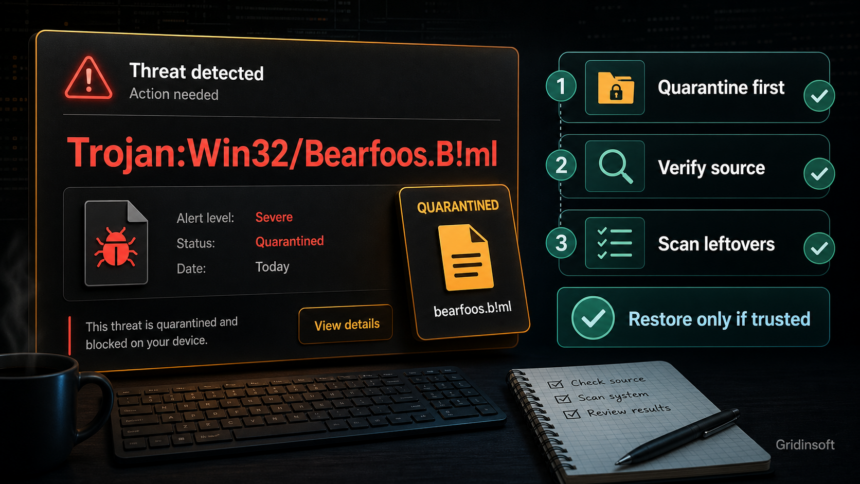
Trojan:Win32/Bearfoos.B!ml is a Microsoft Defender detection for a Windows file that looks capable of suspicious or malicious behavior. Keep it quarantined first. A false positive is possible, especially with newly compiled apps, unsigned utilities, or developer builds, but keep it isolated while you verify the exact release and seek developer or Microsoft review. A signature, familiar path, or clean scan alone does not establish that the file is safe. If the file came from a crack, game mod, fake update, archive, chat link, or it already ran, treat the alert as a real infection risk and scan for leftovers before using the PC normally.
What should you do with Bearfoos.B!ml?
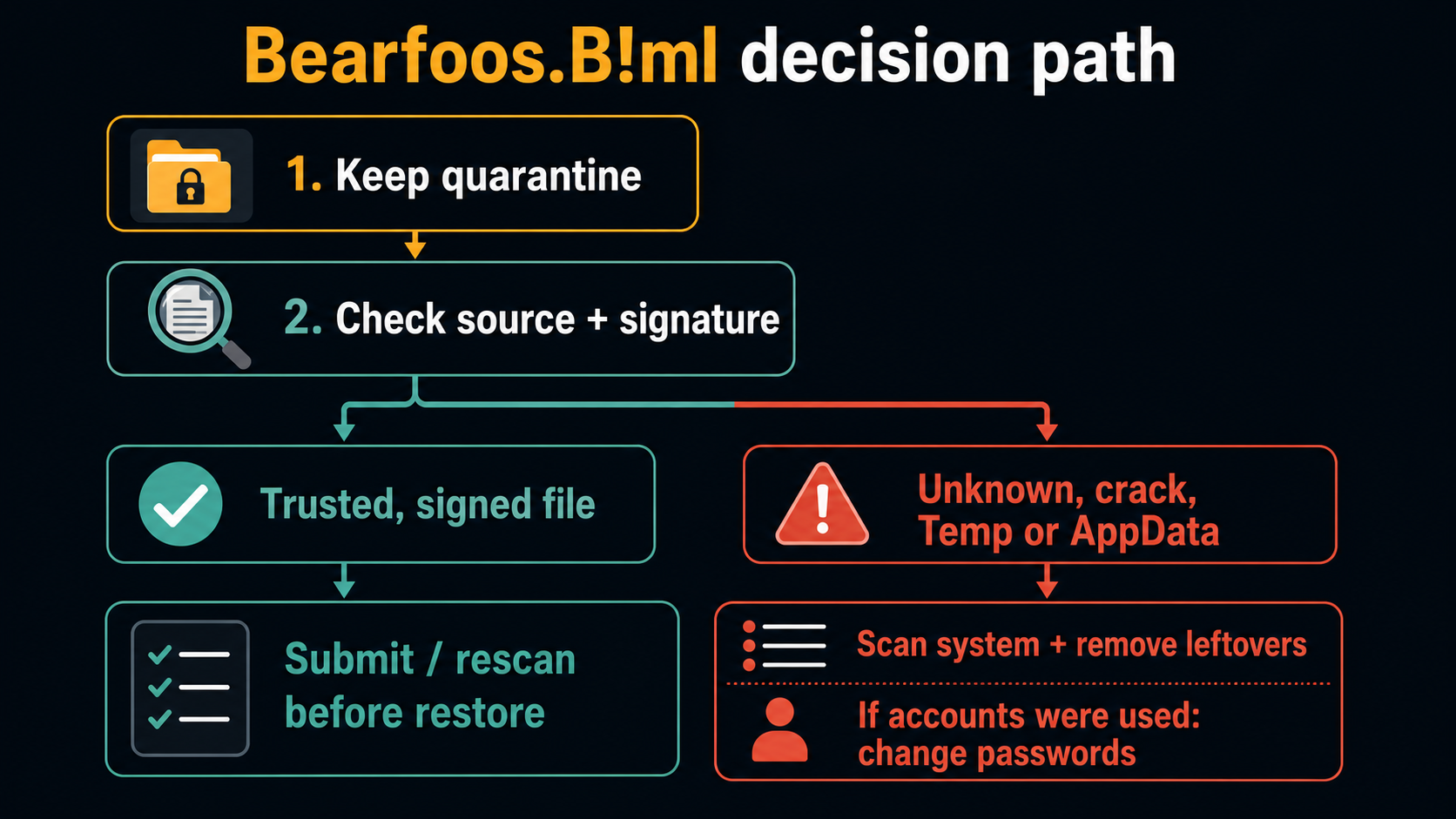
- Leave quarantine enabled. Do not restore or exclude the file just because the name contains
!ml. - Check the affected item path. Record the full path and download source. Legitimate apps also use
Downloads,Temp, andAppData; a crack, repack, fake update, or unsolicited chat download adds stronger risk context. - Review false-positive clues. Compare the exact release, any available publisher signature or published hash, and the developer’s response. An unsigned developer build needs verification too.
- If the file ran, scan for persistence. Run a full cleanup scan; if fresh alerts remain, use the optional startup, task, service, extension, and exclusion checks below.
- If accounts were used after execution, protect them. Change important passwords from a clean device and enable two-factor authentication.
Defender detection context: This guide belongs to our Microsoft Defender detection reference. The affected file, source, action status, and execution history matter more than guesses based on the suffix.
| Detection | Trojan:Win32/Bearfoos.B!ml, often searched together with Trojan:Win32/Bearfoos.A!ml |
| Detected by | Microsoft Defender Antivirus |
| Type | Trojan detection label |
| False positive? | Possible; verify the exact file and release rather than deciding from the name alone. |
| Best action | Quarantine, verify, scan leftovers, then restore only if the file is genuinely trusted. |
What is Trojan:Win32/Bearfoos.B!ml?
Bearfoos.B!ml is not a normal Windows component. It is a Microsoft Defender detection label for a file or behavior pattern that Defender considers dangerous. Microsoft lists both Trojan:Win32/Bearfoos.B!ml and Trojan:Win32/Bearfoos.A!ml as threats detected by Defender, and notes that infections can leave remnant files or system changes after automatic removal [1] [2].
Microsoft describes suffixes beginning with ! as internal indicators; its public naming guide does not define !ml as a complete explanation of how this particular alert was produced. The .A and .B parts are variant letters. Neither part proves a false positive or tells you whether the file executed. Check the file’s origin, action status, and behavior instead. [4]
Users often see Bearfoos after running or downloading an installer, game mod, activation tool, archive, browser helper, automation utility, developer-built executable, or unknown setup file. The affected item path in Windows Security is the fastest clue.
Bearfoos.B!ml vs Bearfoos.A!ml
For a home user, the safe response is almost the same for Bearfoos.B!ml and Bearfoos.A!ml: quarantine first, identify the source file, then decide whether this is a trusted false-positive case or a risky download. The letter variant is less important than the file path and source.
| You saw B!ml | Use this page as the main workflow. Verify the file before restore and scan the system if it ran. |
| You saw A!ml | Follow the same decision path. Microsoft has a separate A!ml entry, but the user decision is still source, signature, behavior, and cleanup. |
| You only saw Bearfoos | Open Protection History and copy the full detection name, affected item path, and Defender action status. |
Is Bearfoos.B!ml a false positive?
It can be. An intentional download from the developer’s real release page gives you something concrete to verify: the version, package name, published hash when available, and any release-specific detection notice. A valid signature is one clue, not a required feature of every legitimate utility or a guarantee of safety. A clean second scan also does not settle the question. Microsoft accepts suspected false positives for analysis, including submissions from software developers. [3]
| More likely false positive | An exact official release or your own documented build, consistent package details, and a developer or Microsoft review that addresses that version and detection. |
| More likely real risk | An unknown installer, crack/repack, fake update, or unexplained new alert after removal. A temporary folder or absent signature alone cannot distinguish this from a legitimate installer or developer build. |
| Higher-impact case | The file ran before quarantine, browser sessions were open, or banking, email, crypto, Steam, Discord, Instagram, or password-manager accounts were used afterward. |
How to check the detected file safely
- Record the alert first. In Windows Security → Protection History, expand the card and record its full detection name, timestamp, affected item path, and current action status. Note whether you ran the file before the alert. [5]
- If the file is quarantined or gone, use the record. Do not restore it, add an exclusion, or disable protection merely to open Properties or calculate a hash. Missing access to the file is expected after isolation; it is not a reason to undo it.
- Verify the exact download. Open the developer’s official release page independently. Compare version and package name, and use a hash already recorded by your security tool when available. Compare an archive hash with that archive’s published digest, not with the executable inside it. If no hash is available, tell the developer that instead of restoring the file to obtain one.
- Inspect only an already accessible file without launching it. If protection permits access, Properties → Digital Signatures can show the signer. Check whether it matches the expected publisher. If Defender blocks inspection, stop; missing or invalid signing information needs explanation but is not by itself a malware verdict.
- Request review for a plausible false positive. Give the developer the release, detection, date, and security-intelligence version. Ask them to submit their release artifact to Microsoft. If you already have an accessible sample and are permitted to share it, use Microsoft’s submission process; otherwise leave quarantine in place while the developer investigates. [3]
- For your own build, preserve the build context. Record the source revision, compiler, dependencies, and packaging step, then investigate unexpected changes and request review. Your authorship or open-source status alone does not rule out an affected dependency or build environment.
How to remove Trojan:Win32/Bearfoos.B!ml
- Let Defender quarantine or remove the detected item. Keep a suspected false-positive file isolated while it is reviewed.
- If the source was an unwanted installer or archive, remove that source too so reopening or extracting it cannot recreate the detection.
- For a file that ran, an unknown download, or a fresh recurring alert, install Gridinsoft Anti-Malware through the download below, update it, run a Full Scan, review detections, apply the appropriate cleanup, and restart. Check whether a new alert or the original symptom returns. Keep Windows security intelligence current too.
- Optional, if fresh alerts remain: inspect Startup Apps, Task Scheduler, Services, browser extensions, and exclusions for entries tied to the recorded path and time. Do not delete everything in a folder or remove settings you cannot identify; ask IT on a managed PC.
- If the file executed and accounts may have been exposed, use a clean device for recovery without waiting for a scan to prove the PC clean. Change important passwords, revoke sessions, review recovery settings, and enable two-factor authentication. Start with email, banking, social media, Steam/Discord, crypto, and password-manager accounts.
Defender may quarantine the visible file while a loader, scheduled task, service, browser change, exclusion, or bundled module remains. This is where Gridinsoft Anti-Malware is useful: it gives you a focused cleanup pass after the built-in alert, so you are not relying only on the first quarantine event.
If you ran the suspicious file or the alert returns, use Gridinsoft Anti-Malware for a second-opinion scan. Check for unwanted programs and startup items that may bring the alert back.
6-day full trial for eligible new users, including cleanup. Email activation; no credit card.
Download Anti-Malware for WindowsWhy Bearfoos.B!ml keeps coming back
First compare the timestamp, action status, and affected path with the previous card. An old quarantined or removed event is different from a new detection; do not clear history merely to hide it. If the status says action is needed or remediation is incomplete, open the current card and follow the remaining action. [5]
A new timestamp immediately after you reopen or extract the same archive points to the source package being detected again. Stop using that package. If a new file appears after reboot without another download or extraction, investigate what recreated it. After the full-scan route above, these are optional places to correlate with the alert:
If Defender instead names a recurring hidden or pasted PowerShell command, use the Commando.A!ml repeated-alert guide to trace the task, script, or other launcher rather than deleting PowerShell itself.
%UserProfile%\Downloadsand extracted archive folders.%Temp%,%LocalAppData%, and unknown folders underAppData.- Task Scheduler entries created near the detection time.
- Startup apps and services with random names or unknown publishers.
- Browser extensions, notification permissions, and recently installed helpers.
- Defender exclusions that you did not create deliberately.
When can you restore the file?
Consider using the file again only when release-specific evidence and developer or Microsoft review resolve the concern. Prefer an updated official release after the detection is corrected. A developer-built executable may legitimately be unsigned; that makes release and build verification more important, not unnecessary. If the origin or behavior remains unexplained, leave it quarantined. Do not restore it just to complete this checklist, and do not repeatedly download a still-flagged package.
FAQ
What does the !ml suffix mean?
Microsoft’s public naming guide describes suffixes starting with ! as internal indicators. Do not use !ml alone to infer the exact detection method or a false-positive verdict. [4]
Can I restore Bearfoos.B!ml from quarantine?
Keep it quarantined until release-specific verification and developer or Microsoft review resolve the alert. A signature is neither mandatory for every legitimate developer build nor sufficient to establish safety. Never restore solely to inspect or hash the file.
Is Bearfoos.A!ml the same as Bearfoos.B!ml?
They are separate Defender detection labels in the same Bearfoos family. For users, the response is similar: keep quarantine, verify the file, and scan for leftovers if it ran.
Should I factory reset after Bearfoos.B!ml?
Usually not as the first step. Quarantine, delete the source package, run full scans, and protect accounts if the file executed. Consider a reset only if scans keep finding new threats, system tools are disabled, or account/session abuse continues.
References
- Microsoft Security Intelligence. “Trojan:Win32/Bearfoos.B!ml.” Microsoft, published January 20, 2019, accessed June 20, 2026. https://www.microsoft.com/en-us/wdsi/threats/malware-encyclopedia-description?Name=Trojan%3AWin32%2FBearfoos.B%21ml
- Microsoft Security Intelligence. “Trojan:Win32/Bearfoos.A!ml.” Microsoft, published December 18, 2018, accessed June 20, 2026. https://www.microsoft.com/en-us/wdsi/threats/malware-encyclopedia-description?name=Trojan%3AWin32%2FBearfoos.A%21ml&threatid=2147731250
- Microsoft Security Intelligence. “Submit a file for malware analysis.” Microsoft, accessed June 20, 2026. https://www.microsoft.com/en-us/wdsi/filesubmission
- Microsoft. “Malware names.” Microsoft Learn, updated September 10, 2026, accessed September 22, 2026. Malware naming conventions
- Microsoft. “Protection History in the Windows Security App.” Microsoft Support, accessed September 22, 2026. Protection History and action statuses