
RUNE64.dll is a filename associated with unofficial game packages, including GTA V Enhanced releases. The name alone cannot tell you whether your copy is malware or a false positive. If an antivirus has quarantined it, leave it isolated while you check the detection and the exact file. A game that stops launching after quarantine has lost a dependency; that does not establish that the dependency was safe.
The useful question is what happened on your PC: was the DLL blocked before you ran the package, or did the installer or game already execute? Start there before following a video that tells you to restore the file or exclude the entire game folder.
Check the PC with Gridinsoft Anti-Malware
Close the game and stop running the installer. Keep RUNE64.dll quarantined and note the alert’s full file path, detection name and time. If the package already ran, another bundled component or startup entry may remain after the visible DLL is isolated. A full-system scan checks beyond that single file.
- Download and install Gridinsoft Anti-Malware from its official product page, then update the malware database.
- Run a Full Scan. Include the drive where the game and installer were saved. Do not restore a quarantined DLL just to make it available for another scan.
- Review the detections and apply cleanup. Compare the reported paths with the game folder and the original download. Save the report if you need to dispute a result.
- Restart when prompted, then check for new alerts. If the file returns, scan again and check whether you re-extracted the same archive or reran the installer. A returning file can also mean that another component is recreating it.
A clean result is useful evidence, but it does not certify an unofficial game package or prove that nothing happened before the scan. If there are unfamiliar account sessions or password changes, use the account-recovery steps below from a trusted device as well.
What is RUNE64.dll?
A DLL contains code that another program can load. In discussions about RUNE64.dll, the surrounding package is often a cracked or modified game, and the error appears when that package cannot find or load its accompanying library. It is not a Windows system component that you should replace in C:\Windows\System32.
Different releases can contain different files with this name. File size, a familiar game folder and the word “RUNE” are clues about context, not authentication. A harmless-looking name can also be reused by an unrelated file.
Do not treat every game DLL alike. For example, GameAssembly.dll can be a normal Unity game component; that explanation does not automatically apply to RUNE64.dll. Likewise, a HackTool:Win32/Crack label describes a different detection category from a specific Trojan verdict. Record the label your security tool actually displayed.
Is RUNE64.dll a virus or a false positive?
There is no universal answer for every file with this name. A false positive is possible, but “it is a crack” is not a file-specific explanation that clears a Trojan detection. Conversely, a detection for one RUNE64.dll sample does not establish the behavior of every other copy.
For a useful review, collect the following without launching the suspect file:
- The full path and package source. Distinguish the installed game from its download archive, a separate “DLL fix,” or an unexpected copy elsewhere.
- The exact detection and scan date. A generic heuristic result, an unwanted-application label and a named malware family are different findings.
- The SHA-256 fingerprint. Compare the full hash with the report being discussed, not just the filename or a screenshot’s detection count.
- Whether anything already ran. An alert during extraction and an alert after launching the installer call for different follow-up.
If the file is still accessible, PowerShell can calculate its fingerprint without executing it: Get-FileHash -Algorithm SHA256 -LiteralPath 'D:\Games\Example\RUNE64.dll'. Replace the example path with the actual one. If the file is quarantined, keep it there; use the security product’s report or ask its support team how to identify the sample safely.
What the public Gridinsoft reports actually show
Two public Gridinsoft Malware Check reports illustrate why the hash matters. Both name RUNE64.dll and record Trojan.Heur!.022120A2, but they describe different files:
- Report for SHA-256 beginning a184efddc60f: 11,666,944 bytes; the displayed analysis date is August 29, 2026.
- Report for SHA-256 beginning 558f78598eef: 2,277,888 bytes. Open the report for its full fingerprint and displayed database version.
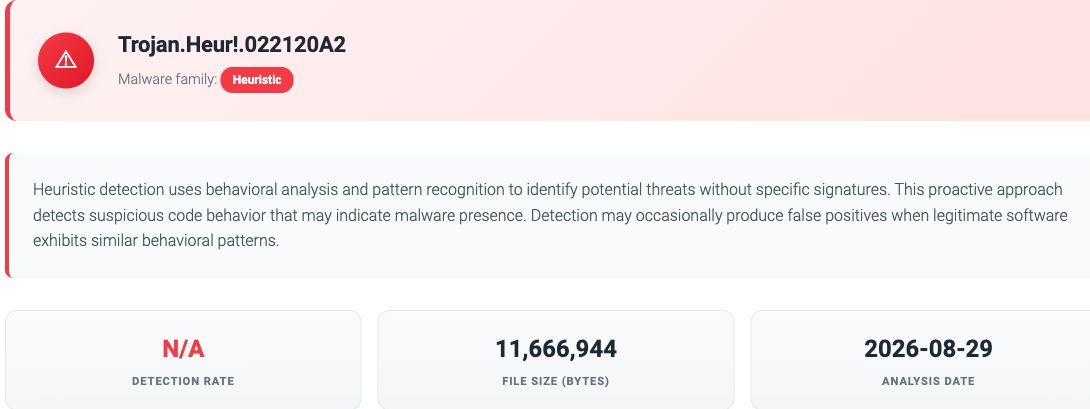
These are existing online file reports, not a new desktop scan of your PC. Their heuristic label records a suspicious-file finding; the public summary does not establish a specific theft, persistence or network-communication sequence. Use the full matching hash and a current vendor review when assessing your own copy.
Does a large VirusTotal detection count settle it?
Many detections are a reason to stop and investigate, not something to dismiss because other players say the game works. However, the total is not a percentage probability that a file is malicious. Read the individual labels, check the hash and analysis date, and distinguish scanner verdicts from documented behavior.
VirusTotal aggregates participating vendors’ results. Its false-positive guidance directs users to reanalyse an existing report and contact the vendor responsible for a disputed detection. Until there is a resolution for the matching file or affected build, keep it isolated. A forum reassurance or an uneventful game session does not resolve that review.
“Could not find RUNE64.dll” or “Could not load RUNE64.dll”
“Could not find” means the program could not locate the library it expected. Quarantine is one possible explanation, alongside an incomplete installation or missing package files. “Could not load” can also indicate an incompatible or damaged dependency. Neither message by itself diagnoses a Windows infection.
- Check the security history first. In Windows Security, open Virus & threat protection → Protection history and expand the relevant event. Compare the affected path and time with the failed launch. Microsoft distinguishes a quarantined threat from a removed threat or incomplete remediation; an old entry is not necessarily a new detection.
- If RUNE64.dll was quarantined, resolve the alert before trying to launch again. Restoring it puts the file back. Adding an exclusion stops normal checking in that scope; neither action repairs or validates the file.
- For a game you obtained through an official client, use that client’s repair process. After the alert is resolved, Steam users can open Library → right-click the game → Properties → Installed Files → Verify integrity of game files. Finish the malware scan before verification. This checks the game’s supplied files; it does not certify unrelated files added by a repack or mod.
- If the error belongs to an unofficial build, replace that installation with an official copy. Do not try to reconstruct it by downloading a loose RUNE64.dll from a file-sharing link or a DLL directory. If an official installation still shows the error, remove the third-party additions through their supported uninstall process and contact the game’s support.
Running sfc /scannow, installing unrelated runtime packages or registering this DLL with regsvr32 is not a justified first fix for this exact warning. Those actions do not resolve the trust question about a quarantined game-package file.
What if the game or installer already ran?
Stop using the suspect package and follow the Full Scan steps above. If you see active suspicious traffic, repeated detections or unauthorized account activity, disconnect that PC from the network while you contain the problem. Use another trusted device to obtain recovery help or an installer if needed.
Unfamiliar Steam, Discord or email sessions require a separate response: change affected passwords from a trusted device, revoke unknown sessions and review recovery settings. Start with the email account that controls password resets. Our guide to infostealers after a game or mod download covers that recovery sequence. Removing local malware cannot revoke a session an attacker already stole.
If the only event was a blocked download and nothing from the package ran, that is a different exposure level. Keep the file isolated, remove the untrusted package and review the scan findings; the DLL alert alone is not evidence that your accounts were accessed.
FAQ
Should I restore RUNE64.dll so the game works?
Only consider a restore after the detection has been resolved for the exact file or build through a credible developer or security-vendor review. A missing-file error is not that confirmation. Prefer obtaining the corrected file through the official game client.
Can I check RUNE64.dll without running it?
Yes. You can scan an accessible file and calculate its hash without loading it as code. Do not remove it from quarantine solely for this purpose. A local Full Scan also checks the wider PC, while an online report describes the submitted file.
Why does RUNE64.dll come back after removal?
Re-extracting the same archive, reinstalling the package or rerunning its installer can recreate it. If a new copy appears without those actions, investigate continuing activity with a full scan and support assistance. Compare timestamps and paths to distinguish a fresh event from an old history entry.
References
- Microsoft. Protection History in the Windows Security App. Microsoft Support. Accessed November 15, 2026.
- VirusTotal. I am experiencing a false positive, my file or site should not be detected. VirusTotal Documentation. Accessed November 15, 2026.
- Valve. Verify Integrity of Game Files. Steam Support. Accessed November 15, 2026.