
BlackFog has analyzed MedusaHVNC, a Windows remote access trojan sold as malware-as-a-service. Its defining feature is a hidden desktop where an attacker can open Chrome, Edge, or Firefox and interact with a browser session that is already logged in on the infected PC. The victim can keep using the visible desktop without seeing the second browser window.
The report confirms one recovered five-stage sample, an operator panel, and a hard-coded command server. It does not identify a current delivery lure, victim count, or universal filename. A hidden-desktop concept alone is therefore not proof of infection; the practical decision depends on matching artifacts, process history, network traffic, and unexpected account activity.
Who should check a Windows PC now
Most home users do not need to search for MedusaHVNC simply because they use virtual desktops or remote-access software. Investigate when a security alert, forensic record, or suspicious download is linked to one or more of these observations:
wscript.exelaunched an unknown JScript file and rebuilt files under%TEMP%\Nx2981Okkr2\.- A batch file named
AFLlvOscPj.batappeared in the current user’s Startup folder. - An unsigned AutoIt component named
eepcxlhgdz.exeor an extensionless file namedzorsxklxfehdoalsappeared in the same chain. - The normal Windows utility
C:\Windows\System32\charmap.exeran as a child of an unknown AutoIt process or showed injection-related behavior. - The endpoint contacted
51.89.204.28:4444, especially when correlated with the file and process evidence above.
These indicators come from the sample BlackFog analyzed. Attackers can change filenames, folders, and infrastructure, while unrelated files can occasionally share a short name. Treat a single isolated string as a lead, not a final verdict.
How the five-stage MedusaHVNC chain works
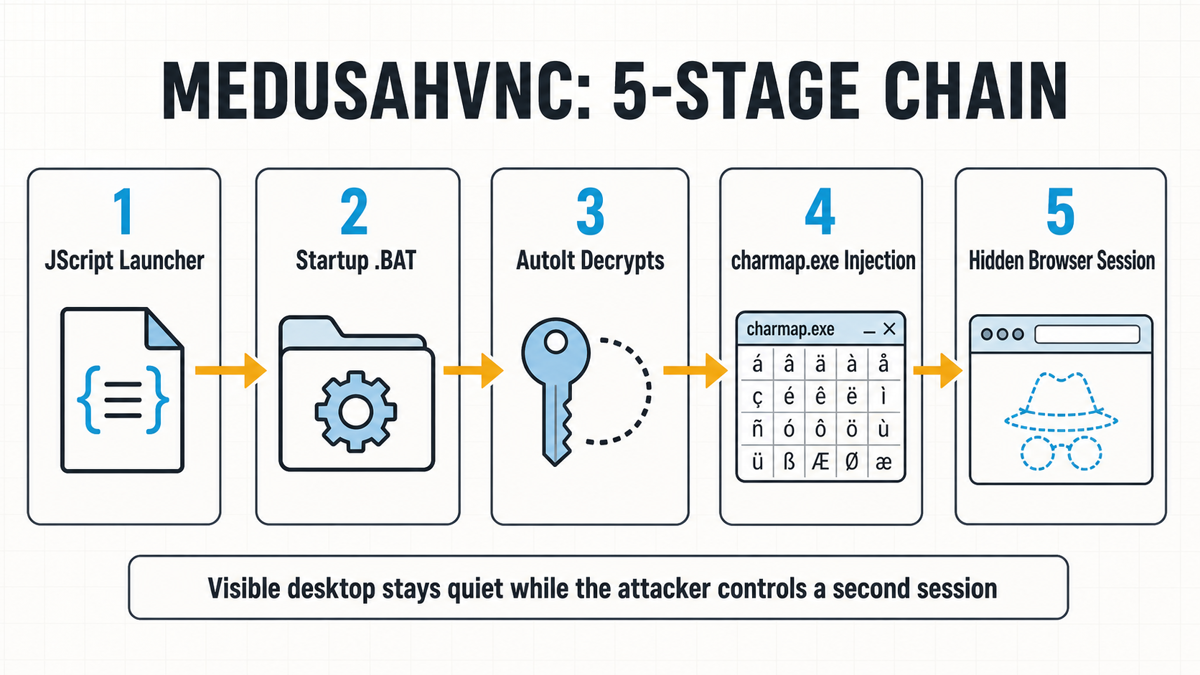
- JScript launcher: Windows Script Host runs obfuscated JScript, waits 7,584 milliseconds, and reconstructs embedded files in the temporary folder.
- Staging and persistence: the script drops an AutoIt interpreter, configuration data, an encrypted payload, and a batch file in Startup so the chain can run after reboot.
- AutoIt decryption: the legitimate automation runtime decrypts the staged payload without displaying a normal window.
- Character Map launch: AutoIt starts
charmap.exe, and the loader uses this trusted Windows process as a host before unpacking the final payload through XOR and ChaCha20 layers. - Hidden session: the recovered 64-bit payload communicates over a custom TCP protocol and exposes the screen-capture, input, window-management, and clipboard functions needed to control a separate desktop.
Windows supports multiple desktop objects inside one user session. That legitimate capability is different from the virtual desktops shown in Task View: software can create another desktop, start processes there, and keep its windows outside the victim’s visible desktop. The hVNC technique predates this sample and has appeared in other malware operations.
Why logged-in browser sessions matter
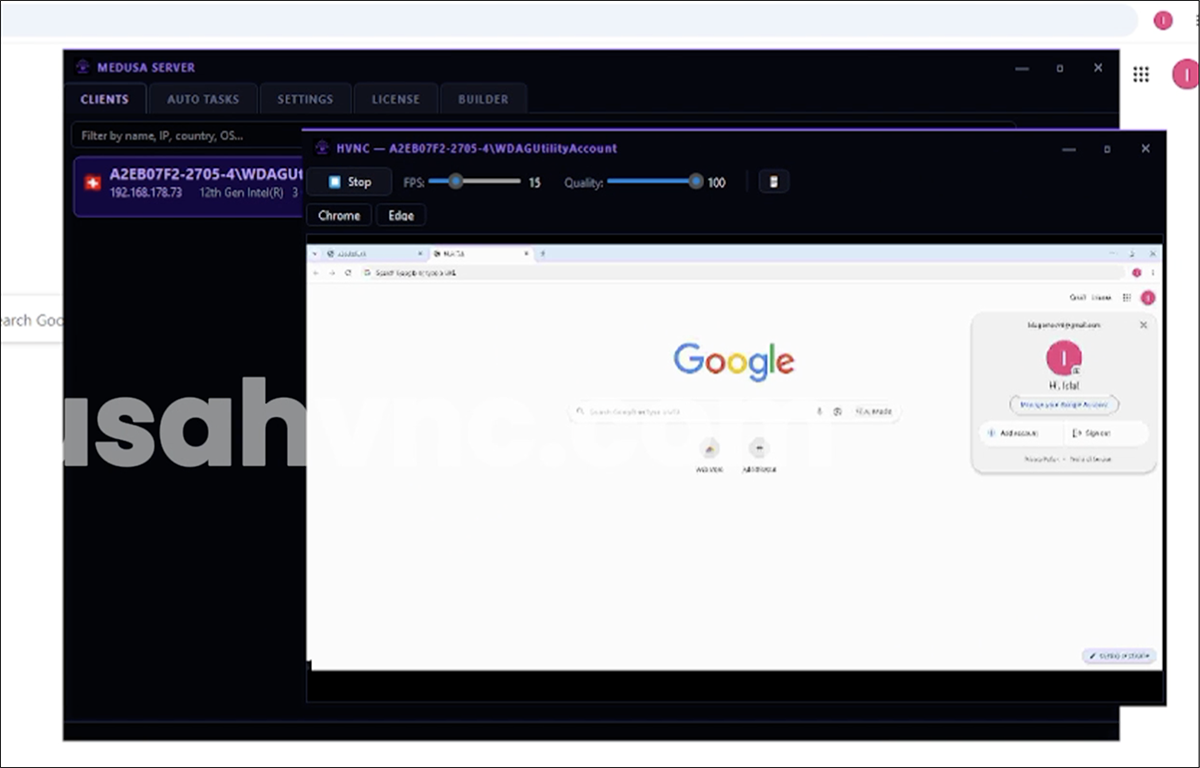
MedusaHVNC does not need to show a new login page to the victim. If the hidden browser loads the person’s existing profile, it may inherit cookies and session state for email, social networks, work portals, banking, shopping, or cryptocurrency services. Actions can also originate from the familiar device and network, which may reduce the value of a simple “new device” alert.
Another platform named Heisenberg RAT has been advertised with dual-HVNC access, but its public capabilities remain seller claims without a sample-backed campaign. Compare the evidence level before reusing MedusaHVNC indicators for another family.
This does not mean every saved password, cookie, or account was stolen. The analyzed functions support screen capture, synthetic input, keyboard hooks, and clipboard access, while the seller advertises broader browser recovery. Confirmed exposure depends on what the operator actually opened and what network or account logs show.
A previous fake Slack installer campaign also delivered hidden-desktop malware, but it used a different lure and loader chain. The overlap is the response problem: an apparently normal Windows desktop does not prove that the browser session was untouched.
What to do after a matching alert or suspicious file
- Disconnect the PC from the network. This interrupts the live command channel and reduces the chance of further session use or data transfer.
- Preserve the context before deleting files. Record the original download, archive or script name, path, time, security alert, parent process, and any matching IP connection. On a work device, contact the security team before destroying evidence.
- Run a full malware scan. Check the Startup folder, scheduled tasks, services, security exclusions, unknown scripts, injected processes, and temporary staging folders. Removing one JScript or batch file does not prove the final payload and persistence are gone.
- Use a clean device for account recovery. Secure primary email and the password manager first, then terminate browser sessions, revoke connected apps and OAuth grants, rotate important passwords, and review MFA/recovery settings.
- Review high-risk activity. Check mailbox rules, cloud and SSO logs, payment and banking history, crypto-wallet activity, developer tokens, and new trusted devices. A password reset alone may not invalidate every active session.
- Escalate when trust cannot be restored. For a business endpoint, sensitive financial machine, or system with unexplained persistence, preserve evidence and consider a clean rebuild rather than assuming a quick file deletion was enough.
If the alert returns after reboot or the suspicious script already ran, a loader, Startup item, service, task, or injected process may remain after the visible file is removed. Gridinsoft Anti-Malware can scan for detected payloads and persistence, but malware removal cannot cancel stolen sessions or restore the secrecy of exposed credentials.
For the account side of the incident, follow the broader infostealer recovery sequence. For another example of a remote-access trojan delivered through a deceptive download, see the ScreenConnect and AsyncRAT campaign.
False assumptions to avoid
- “I would see the attacker moving my mouse.” Not necessarily. The operator can interact with a second desktop while the visible one appears normal.
- “charmap.exe proves MedusaHVNC.” No. Character Map is a legitimate Windows binary. The suspicious signal is its parent process and surrounding injection, file, and network evidence.
- “Changing my password ends the incident.” It may not terminate browser cookies, OAuth grants, or other sessions. Revoke them explicitly from a trusted device.
- “No screen activity means no data left the PC.” The hidden session still requires outbound communication. Network telemetry can reveal activity the visible desktop does not.
FAQ
Will MedusaHVNC appear in Windows Task View?
Do not rely on Task View. The malware uses a separate Windows desktop object, not an ordinary user-created virtual desktop that is meant to appear in the normal interface.
Is an IP match enough to declare a MedusaHVNC infection?
No. IP ownership and malware infrastructure can change. Correlate the connection with the JScript, temporary folder, Startup batch file, AutoIt process, charmap.exe relationship, and endpoint alerts.
Should passwords be changed on the suspected computer?
No. Isolate and scan the Windows PC first, then change passwords and revoke sessions from another trusted device so an active hidden session cannot capture the new credentials.
References
- Darren Williams. “MedusaHVNC: A Hidden Desktop That Steals Live Windows Sessions.” BlackFog, July 2026, accessed July 27, 2026. BlackFog MedusaHVNC analysis.