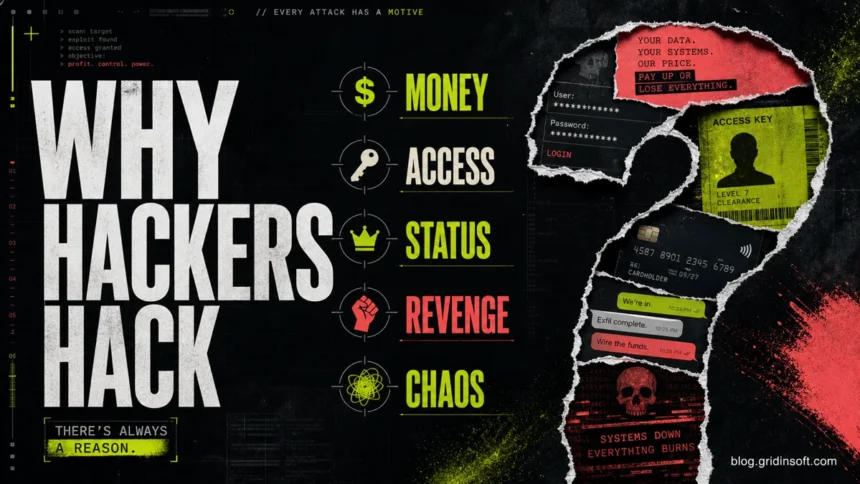
Hackers usually hack because access has value. For a victim, the useful question is not whether the attack was personal; it is what the attacker can turn into money, leverage, attention, or a foothold for the next attack. A hacked email inbox can reset other accounts. A stolen password can be resold. A compromised PC can steal browser cookies, crypto wallets, or work documents. A business mailbox can launch invoice fraud. In other words, most hacking starts with one motive: the attacker sees something they can use.
Why do hackers hack?
Most malicious hacking falls into five motives: money, access, data, influence, or recognition. Money is the most common driver because stolen accounts, ransomware payments, payment-card data, and business email fraud are easy to monetize. Access matters because one login can unlock cloud storage, work mail, social media, banking, or a company network. Data matters because personal records can be sold, used for identity theft, or used to pressure the victim. Influence covers espionage, hacktivism, and political disruption. Recognition covers attackers who want status in a group, proof of skill, or public attention.
This is why “why do hackers hack?” is not just a psychology question. It is also a risk question. If you know what attackers want, you can decide what to check first after a suspicious login, malware alert, phishing message, or account takeover attempt.
Why would a hacker target me?
Most victims are not hand-picked at first. Attackers often scan leaked passwords, exposed remote access, vulnerable websites, reused credentials, or people who can be tricked through email and social media. You may become interesting because your account works, your device is infected, your browser stores useful sessions, or your workplace can be reached through you.
Personal targeting can happen, especially with revenge, stalking, insider conflict, or scams aimed at a specific business role. But for many home users, the attack begins as a numbers game: the criminal tests many accounts and keeps the ones that open a door.
What hackers want from victims
| Motivation | Common attack | What the victim should check |
|---|---|---|
| Money | Ransomware, banking fraud, crypto theft, fake invoices | Bank activity, crypto wallets, saved cards, suspicious payments, new forwarding rules |
| Account access | Credential stuffing, phishing, password reset abuse | Recent sign-ins, unknown devices, changed recovery email or phone, active sessions |
| Data resale | Infostealer malware, database theft, browser cookie theft | Saved browser passwords, work files, identity documents, password reuse |
| Pressure | Extortion, doxxing threats, sextortion, data leak threats | What data may be exposed, whether the threat includes real evidence, whether contacts were messaged |
| Status or ideology | Website defacement, data leaks, public disruption | Public accounts, website admin panels, social media posts, business reputation risks |
Financial gain is the default motive
Money explains a large share of malicious hacking because it gives attackers many paths to profit. They can steal funds directly, sell passwords, rent botnet access, deploy ransomware, or use a hacked mailbox for payment fraud. The FBI Internet Crime Complaint Center reported record-high losses in its 2025 Internet Crime Report, with investment fraud, business email compromise, ransomware, extortion, and phishing among the recurring categories victims report.
That is why a “small” compromise can still matter. A social media account can be used to scam friends. An email inbox can reset shopping, banking, or cloud accounts. A Windows infection can collect browser sessions and saved credentials before the victim notices anything unusual. If you suspect malware was involved, scan the system before trusting password changes made from that same device.
Access can be more valuable than the first account
Attackers often value access because it lets them move from one place to another. A hacked email account can receive password reset links. A stolen work login can open VPN, cloud storage, or payroll systems. A compromised website admin account can be used to inject malicious scripts, redirect visitors, or host phishing pages.
This is where reused passwords and weak recovery settings create outsized risk. If one leaked password works on your email, social media, and cloud storage, the attacker does not need a sophisticated exploit. They only need patience, automation, and a list of old credentials.
Stolen data can be sold or reused later
Some hackers steal data without using it immediately. Payment-card numbers, identity documents, browser cookies, email dumps, and corporate files can be resold to other criminals. That second buyer may be the one who performs the fraud, phishing, or identity theft months later.
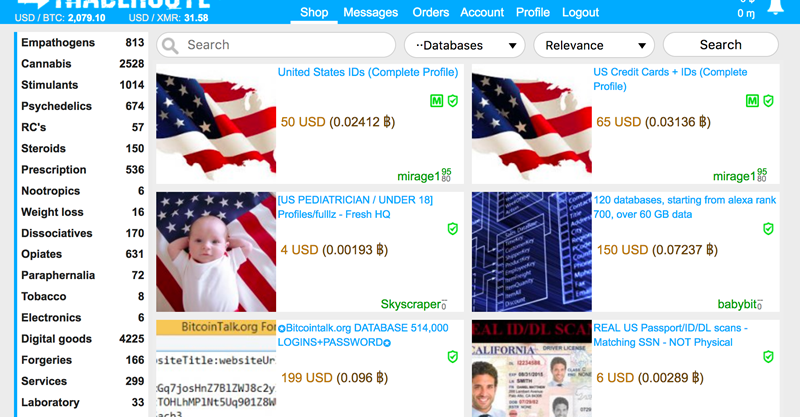
For victims, this means the cleanup is not finished when one password is changed. Review recovery email and phone numbers, revoke active sessions, check forwarding rules, replace reused passwords, and monitor financial accounts. If an attacker had access to your browser profile, assume saved sessions and passwords may be exposed.
Extortion and blackmail create pressure
Some attackers hack to create leverage. Ransomware encrypts files and demands payment. Data-extortion groups threaten to publish stolen documents. Sextortion scams pressure victims with fear and embarrassment, even when the sender only has an old password from a breach and no real video evidence.
The motive is not always to understand you personally. It is to make you act quickly. If the attacker can make you panic, they can push you into paying, clicking, or replying before you verify the facts.
Status, curiosity, and proving a point
Not every hacker starts with a direct financial plan. Some chase status in a community, try to prove a skill, or deface websites for attention. Others are beginners experimenting with tools they do not fully understand. Curiosity can be harmless in a legal lab, but it becomes abuse when someone tests that curiosity on accounts, devices, or websites they do not own.
This is where the word “hacker” can confuse readers. A hacker may be an ethical security researcher, a criminal intruder, or someone in between. The difference is permission, intent, and harm. If you want the taxonomy, the types of hackers guide separates white hat, black hat, gray hat, and related labels.
Revenge, ideology, and espionage
Some attacks are personal or political. A former employee may try to damage a company. A stalker may try to break into personal accounts. Hacktivists may deface a site or leak data to make a statement. Nation-state groups may steal intelligence, monitor targets, or disrupt services. Microsoft’s 2025 Digital Defense reporting highlights how extortion, ransomware, and politically motivated activity continue to shape real-world cyber risk.
These motives are less common for ordinary home users than money-driven crime, but they matter when the victim is a business, journalist, activist, public figure, administrator, or someone involved in a dispute.
Selling malware and cybercrime services
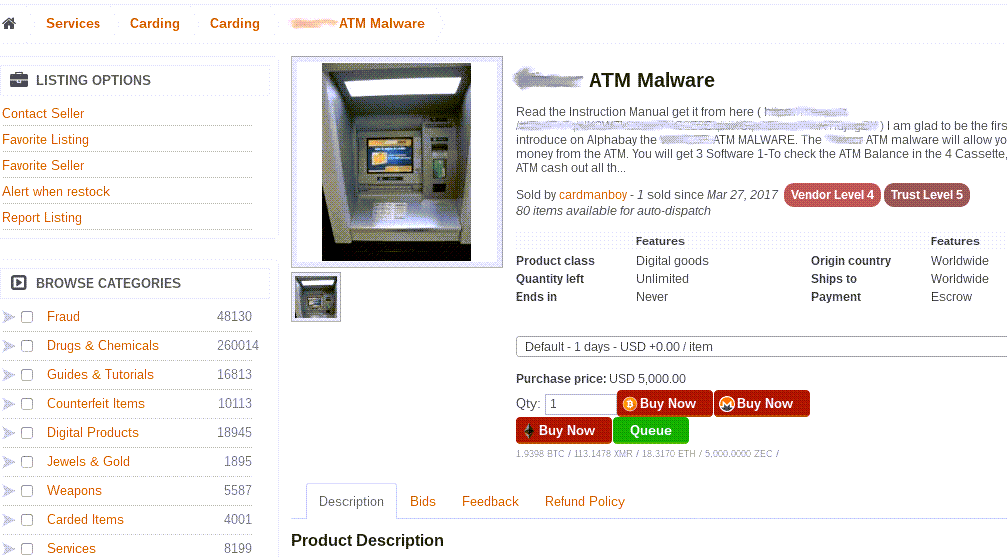
Some hackers do not attack victims directly. They build malware, phishing kits, exploit tools, or access brokers’ inventories and sell them to other criminals. This cybercrime-as-a-service model lowers the skill needed for attacks: one person writes the malware, another buys access, and a third runs the scam or ransomware campaign.
How to make your accounts less valuable to hackers
- Use unique passwords for email, banking, cloud storage, social media, and work accounts.
- Turn on multi-factor authentication, especially for email and financial accounts.
- Remove unknown devices and sessions from important accounts after any suspicious login.
- Keep Windows, browsers, password managers, and security tools updated.
- Do not store seed phrases, identity documents, or password lists in plain text cloud notes.
- Be careful with cracked software, fake installers, browser extensions, and “verification” downloads.
- Use a trusted malware scan if a suspicious file, browser redirect, or unknown process appeared before the account problem.
If the incident started with a file download, fake update, cracked app, or browser pop-up, treat the device as part of the problem. Gridinsoft Anti-Malware can help check Windows for infostealers, trojans, adware, and other threats that may keep collecting credentials after the first password reset.
What to do if you think you were targeted
- Change the password for your primary email first, from a clean device.
- Review account recovery options and remove anything you do not recognize.
- Sign out of all sessions where the account provider offers that option.
- Check mailbox forwarding rules, filters, payment settings, and linked apps.
- Change reused passwords on other accounts, starting with banking, cloud storage, and social media.
- Scan the device if malware, fake updates, cracked software, or suspicious browser behavior may be involved.
- Warn contacts if the attacker sent messages, links, invoices, or investment pitches from your account.
- Report financial fraud, extortion, or business email compromise to the relevant platform, bank, and law-enforcement reporting channel.
FAQ
Do hackers target random people?
Often, yes. Many attacks begin with automated scans, leaked password lists, phishing campaigns, or malware spread through downloads. The victim becomes “interesting” when a login works, a device is infected, or the account can be monetized.
Can someone hack me just for fun?
It can happen, but most real-world attacks still lead back to money, access, data, revenge, or status. Even attackers who start for fun may sell access, leak data, or damage accounts after they get in.
Are all hackers criminals?
No. Ethical hackers test systems with permission and help fix weaknesses. Criminal hacking is different because it involves unauthorized access, theft, extortion, disruption, or privacy abuse.
What is the first thing to check after a suspicious login?
Start with the email account that controls password resets. Change its password from a clean device, enable multi-factor authentication, remove unknown sessions, and check recovery options and forwarding rules.
References
- Federal Bureau of Investigation, Internet Crime Report 2025, Internet Crime Complaint Center, 2026. Accessed June 8, 2026.
- Microsoft, Microsoft Digital Defense Report 2025: extortion and ransomware drive over half of cyberattacks, Microsoft Source, 2025. Accessed June 8, 2026.