Malvertising on Google Search is an unpleasant occurrence where malicious ads appear in search engine results. These ads are meant to help users find relevant information. But unfortunately, some cybercriminals use paid advertisements to entice users to visit harmful websites and deceive them into downloading malicious software.
If you clicked a malicious ad or opened a suspicious file
Gozi, also called Ursnif or ISFB, and IcedID, also known as BokBot, are banking-trojan and loader families. A search ad, fake software page, phishing attachment, ZIP, ISO, or installer is usually only the start of the problem. If a file ran, treat the case as possible credential theft and follow-up malware, not just one bad download.
| What happened | What to do next |
|---|---|
| You only opened the fake page or ad | Close it, clear the download if nothing ran, and use a typed official site for the software or service you wanted. |
| You downloaded an installer, archive, ISO, or document | Do not run it. Delete the file, empty the browser download prompt, and scan the file or system before trying another download. |
| You ran the file or enabled document content | Disconnect from sensitive accounts, run a full malware scan, reboot, scan again, and check startup entries, scheduled tasks, browser extensions, and recent downloads. |
| You signed in to email, banking, crypto, work, or social accounts afterward | Change passwords from a clean device, revoke active sessions, enable MFA, and review payment, forwarding, and recovery settings. |
| A business computer may be involved | Preserve logs, isolate the endpoint, and escalate to incident response because IcedID/BokBot and Gozi/Ursnif activity can precede wider credential theft or additional payloads. |
For related cleanup paths, use our guides on what to do after a possible infostealer download, phishing protection and recovery, and fake update malware cleanup. The goal is to verify whether the ad led only to a blocked download or to a loader that changed the system.
How does malvertising work?
Malvertising is an attack where malicious code is inserted into legitimate online advertising networks. This code usually leads users to harmful websites.
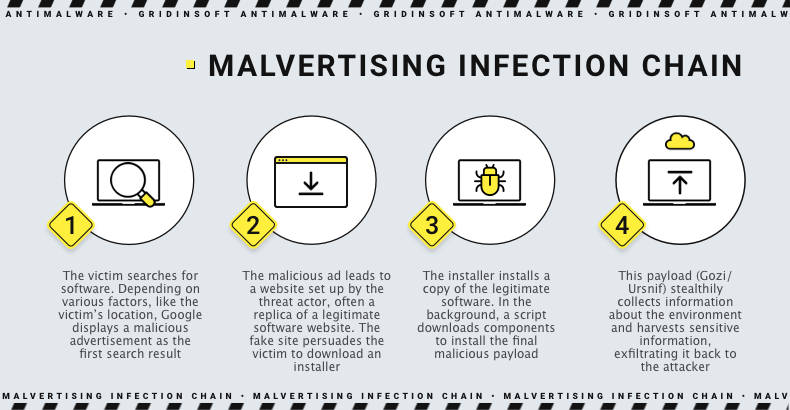
Some malicious actors create fake websites that mimic legitimate software sites, using tactics like typosquatting (using misspelled versions of well-known brand and company names as their URL) or combosquatting (combining popular names with random words for their URL). This makes the fake sites appear legitimate to unsuspecting users, as their domain names reference the original software or vendor. The fake web pages are designed to look identical to the real ones, and the threat actors pay to promote the site through search engines to boost its visibility.
Fake WinRar ad on Google
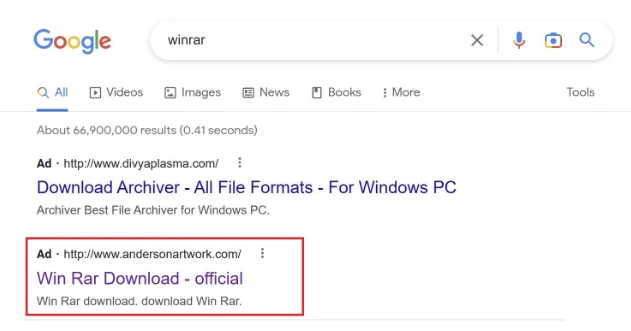
Google has a vast user base, processing over 8 billion daily queries. This makes their search results one of the largest advertising networks available. Unfortunately, a single malicious ad can potentially be viewed by millions of people, causing thousands to click on it. The situation worsens exponentially when at least ten topics contain negative Google ads.
BatLoader as malware loader
BatLoader is a type of malware that enables cybercriminals to download more advanced and harmful malware onto a targeted system. The batch script can download two specific types of malware: IcedID, and Gozi/Ursnif, a backdoor.
It’s worth noting that the BatLoader campaign is still using malvertising, unlike IcedID. What’s particularly interesting is that there has been a shift in the type of users being targeted. While malicious ads previously targeted those searching for IT tools in late 2022 and early 2023, more recent campaigns now use AI-related lures to target users searching for devices such as Midjourney and ChatGPT.
IcedID Malware
IcedID (a.k.a BokBot) is a type of malware that was first discovered in 2017 and classified as both a banking Trojan and a remote access Trojan (RAT). Experts say IcedID is as powerful as other advanced banking Trojans like Zeus, Gozi, and Dridex. To infect a system, IcedID relies on other malware like Emotet to get initial access. Once it’s in, IcedID can steal financial information and even drop malware like ransomware. It’s also capable of moving through a network with ease.
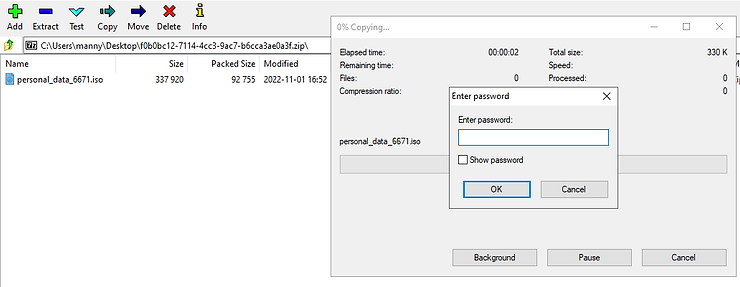
The group called Shatak often sends phishing emails to spread malware called IcedID. They attach Microsoft Office documents with macros, .iso files, or encrypted .zip archives. Once the malware infects a system, it searches for the best way to spread and gain control. It does this by looking for a way to install itself without being detected and then waits for the system to reboot before activating its main module. By doing this, IcedID can blend in with legitimate processes, making it harder to detect.
Gozi backdoor/banking trojan
URSNIF, the malware known as Gozi that attempts to steal online banking credentials from victims’ Windows PCs, is evolving to support extortionware. This banking trojan has been around since the mid-2000s and is one of the oldest. It has multiple variants and has been known by names such as URSNIF, Gozi, and ISFB. These are the most effective methods for protecting yourself from attack: encountering other malware families, and its source code has been leaked twice since 2016. According to malware analysts, it is now considered a “set of related siblings” rather than a single malware family.
Malware Mitigation and Prevention
Detecting and mitigating malvertising attacks can be challenging, and both end users and publishers must take action to combat this threat. Implementing a comprehensive cybersecurity program at the enterprise level is the best way to protect against malvertising. Organizations can reduce their risk of falling victim to these attacks by taking appropriate precautions.
These are the most effective methods for protecting yourself from attack:
- Antivirus software can protect certain types of threats, such as drive-by downloads or malicious code that malvertising may execute.
- Ad blockers can provide adequate protection against malvertising since they block all ads and their potentially harmful components.
- By updating your browser and plugins, you can prevent numerous malvertising attacks, especially the ones that occur before the user clicks on an advertisement.
- It is recommended to prioritize critical systems and implement Zero Trust solutions whenever feasible.
- Implementing multi-factor authentication for all essential services, particularly online banking and cryptocurrency accounts, is advisable.
- It is recommended to conduct user awareness training to educate employees about phishing techniques. Additionally, it is advisable to establish standard operating procedures (SOPs) for dealing with suspicious emails and documents.
Knowing standard social engineering tactics like phishing and malspam techniques to detect malware attacks is essential. While network traffic analysis can help see known versions of malware after infection, developers frequently update their malware with new methods to evade detection. This makes reliably detecting malware infections difficult without advanced endpoint protection products.