SourTrade malware is being assembled inside the victim’s browser before it is offered as a Windows download. Confiant documented fake TradingView, Solana and Luno pages that use JavaScript workers, build instructions and a clean Bun runtime to create a different executable for each session. The pages arrive through malvertising and are designed to show analysts a blank screen while presenting selected visitors with a convincing trading-platform clone.
The browser technique is unusual, but the user decision is familiar: the dangerous step is downloading and running an executable from a sponsored result or lookalike site. Simply opening the landing page is not the same as executing the finished file. If you saw the page and closed it without downloading, running a file, entering credentials or approving a wallet action, the report does not show that your PC was automatically infected.
Who SourTrade targets
Confiant says the operation has run ads since late 2024 and targets retail traders and cryptocurrency users in 12 countries and 25 languages. Observed lures impersonate TradingView, Solana and Luno. The campaign uses visitor fingerprinting and cloaking: likely researchers, security scanners and unwanted traffic receive a harmless white page, while selected users see the fake download page.
| Observed detail | What it means for the reader |
|---|---|
| Fake TradingView, Solana and Luno pages | The legitimate brands are not the malware source; the risk is the lookalike domain and its download. |
| ServiceWorker and SharedWorker code | The page prepares a streamed download path and assembles components in browser memory. |
| Clean Bun runtime plus actor-supplied data | A clean component does not make the final combined executable trustworthy. |
| Per-session random bytes | Two victims can receive files with different hashes, reducing the value of hash-only checks. |
| Current payload not named | Do not claim a specific stealer from the July report alone; respond to the untrusted executable and possible account exposure. |
How the browser builds the executable
The landing page first registers a ServiceWorker to manage the download stream and creates a SharedWorker from JavaScript embedded in the page. The worker requests a /config response containing a template, a clean runtime location and per-session values. The browser then combines the clean Bun runtime, actor-controlled PE and .bun section data, and locally generated AES-CTR bytes. Finally, the ServiceWorker returns the assembled stream through a same-origin download path.
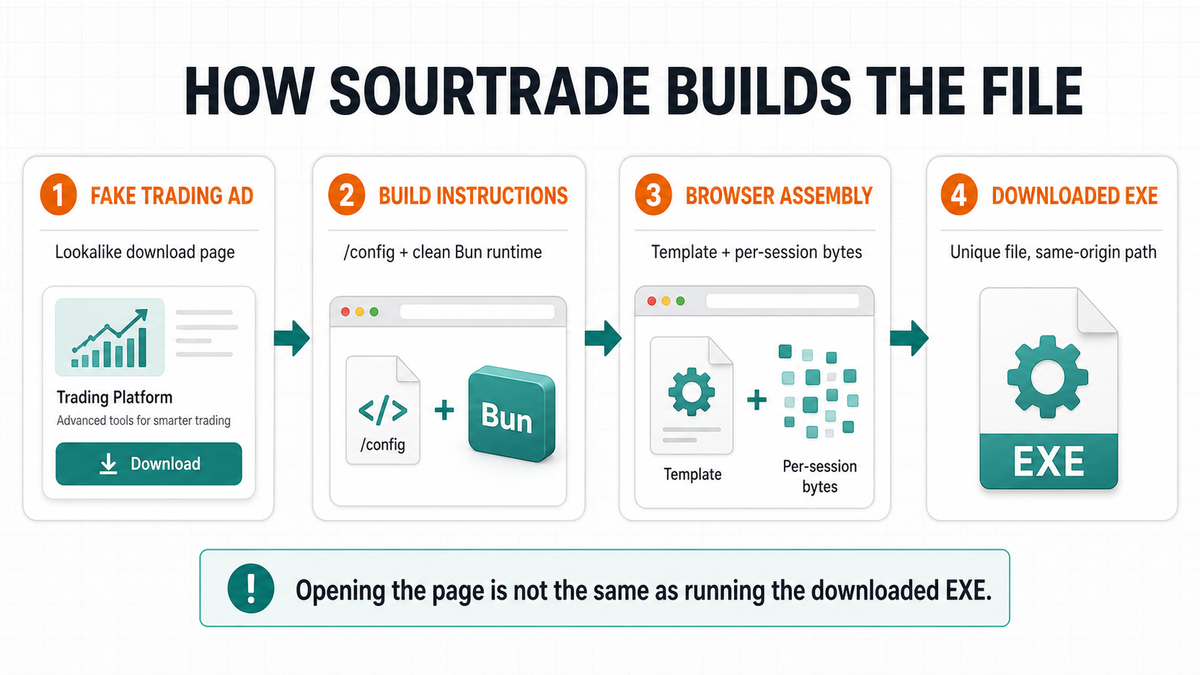
This design means there is no single finished malware file moving across the network for defenders to collect. The clean runtime, build instructions and payload material must be evaluated as one chain. It also explains why a normal-looking download source in Mark of the Web metadata or one clean component is not enough to approve the finished file.
What to do after a fake trading download
| What happened | Recommended response |
|---|---|
| You only saw the ad or opened the page | Close it, do not use its download button, and reopen the real service by typing its official domain or using a trusted bookmark. No reset or password change is required from this report alone if nothing else happened. |
| The EXE downloaded but you did not run it | Quarantine or delete the file and scan it before any restore decision. The downloaded-but-not-opened checklist explains why a saved file and an executed file are different exposure levels. |
| You ran the installer | Disconnect the PC from the network, stop trading and account logins on that device, preserve the file name and download source, then run a full malware scan. Use a different clean device to revoke active sessions and change important passwords. |
| You used a crypto wallet afterward | Review wallet activity and browser extensions from a clean device. If a seed phrase was entered into the fake page, move funds to a new wallet created on a trusted device; changing a site password does not replace an exposed seed phrase. |
Confiant did not identify the current payload in its July analysis. Earlier Bitdefender research connected the same broader TradingView malvertising cluster with malware capable of stealing cookies, passwords and wallet data, among other functions. Treat that as historical context, not proof that every current SourTrade file has the same feature set.
If the executable ran, removing the visible installer alone is not enough. A loader, scheduled task, service, browser change or credential-stealing component may remain after the first cleanup pass. Run a full Gridinsoft Anti-Malware scan, remove detections, reboot, and scan again if alerts, unknown startup entries or outbound connections return. Then follow the infostealer account-recovery sequence for passwords, browser sessions and wallet exposure when relevant.
How to recognize this campaign without relying on one hash
- A sponsored result, social ad or video offers free Premium access, a special trading build or an unofficial desktop app.
- The download page copies a known trading or crypto brand but is not on its official domain.
- The page selectively loads for some visitors and appears blank for others.
- The downloaded Windows file has a different hash from samples reported by another victim.
- Network records show a clean runtime component and a same-origin download, but not the complete assembly process.
Confiant published three example SHA-256 hashes and a much larger domain list. Useful examples include 9a29d26b94b708830c6eaea8a6c17616ec677adaf09114190d0e129564b2ca1b, noxani[.]info, lunavo[.]club and purelogicbox[.]org. These indicators can support an investigation, but absence from the list does not prove a download is safe because the infrastructure and file bytes can rotate.
Use the official download path
TradingView’s own security guidance says its desktop and mobile apps should come only from tradingview.com or official app stores. The same rule applies to any financial platform: ignore “free premium,” “developer,” “cracked” and private beta offers in ads or comments, and verify the publisher and digital signature before running an installer. A valid signature identifies a publisher and file state; it does not make a lookalike page or a multi-component download chain legitimate.
References
- Steele, Michael; Confiant Threat Intelligence. “SourTrade: Browser-Assembled Malware Delivered Through Malvertising.” Confiant, published July 23, 2026, accessed July 25, 2026. https://blog.confiant.com/p/sourtrade-browser-assembled-malware
- TradingView. “Staying Safe on TradingView.” TradingView, accessed July 25, 2026. https://www.tradingview.com/security/
- Moloce, Alin; Baltariu, Ionut Alexandru; Bîzgă, Alina. “The Scam That Won’t Quit: Malicious ‘TradingView Premium’ Ads Jump from Meta to Google and YouTube.” Bitdefender Labs, published September 25, 2025, accessed July 25, 2026. https://www.bitdefender.com/en-us/blog/labs/the-scam-that-wont-quit-malicious-tradingview-premium-ads-jump-from-meta-to-google-and-youtube