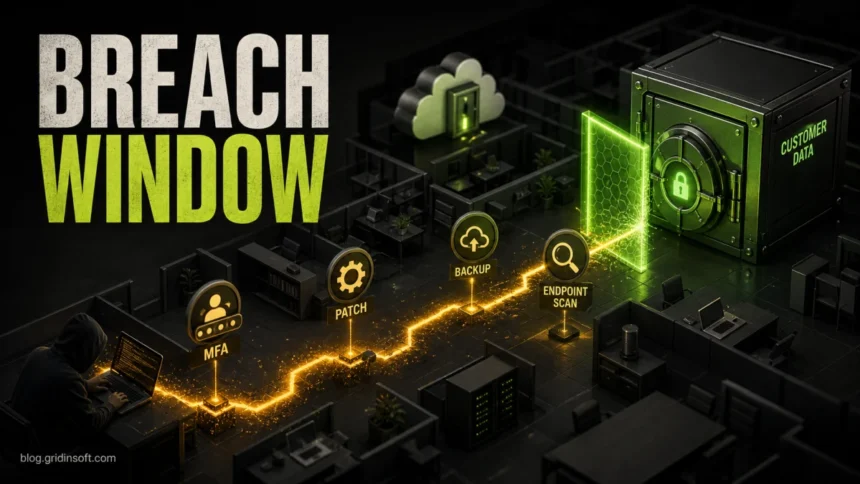
Small companies are no longer too small to be targeted. Attackers usually look for the fastest opening: an unpatched remote-access tool, a reused password, a fake invoice email, an exposed cloud account, or a workstation with old malware. The practical goal is not to make a business impossible to hack; it is to close the most common entry points, keep clean backups, and know exactly what to do in the first hours if something gets through.
This checklist is written for owners, office managers, and small IT teams that need a realistic starting point. If you can do only a few things this week, start with multi-factor authentication, patching, backups you have tested, endpoint protection, and a simple incident-response plan. Those controls map directly to the risks that keep appearing in current breach data: exploited software flaws, social engineering, stolen credentials, ransomware, and third-party access abuse [1].
Why Companies Get Hit in 2026
Cyberattacks against businesses are usually not cinematic break-ins. They are often quiet, repeatable workflows: scan for a known vulnerability, buy or steal a password, send a believable payment or file-sharing message, run malware on one endpoint, then move toward email, accounting, customer data, backups, or admin tools.
Verizon’s 2026 DBIR reported that vulnerability exploitation became the top breach entry point, while ransomware, social engineering, stolen credentials, and third-party involvement remained major problems [1]. That changes the priority order for small companies: training still matters, but patching, exposed systems, vendor access, and recovery planning now deserve the same first-screen attention as phishing.
Small Business Cybersecurity Checklist
Use this as a board-level or owner-level checklist first, then turn each item into a recurring task. A control that nobody owns will quietly stop working.
| Control | What to do now |
|---|---|
| Accounts and MFA | Require MFA for email, cloud storage, accounting, admin panels, remote access, and password managers. Start with owners, finance staff, admins, and vendor accounts. |
| Passwords | Use unique passwords stored in a password manager. Disable shared logins and remove accounts immediately when employees or contractors leave. |
| Patching | Turn on automatic updates where safe. Prioritize browsers, operating systems, VPN/remote-access tools, firewalls, CMS plugins, accounting apps, and anything exposed to the internet. |
| Endpoint protection | Run reputable endpoint protection on every business laptop and desktop. If a device shows pop-ups, unknown startup items, browser redirects, or repeated detections, isolate and scan it before it reaches shared drives. |
| Email security | Train staff to verify payment changes, file-sharing links, QR codes, and urgent executive requests. Use SPF, DKIM, and DMARC so attackers have a harder time spoofing your domain. |
| Backups | Keep at least one backup that ransomware cannot rewrite. Test restoration, not just backup creation. Document who can restore payroll, customer records, accounting files, and the website. |
| Admin access | Separate admin accounts from daily-use accounts. Give people the access they need, not permanent all-access rights. |
| Vendor and cloud access | Review MSP, SaaS, payment, web hosting, and contractor accounts. Remove stale integrations and require MFA for external access. |
| Logging and alerts | Keep login, mailbox, endpoint, website, and cloud-account logs long enough to investigate. Alert on impossible travel, new admin users, mailbox forwarding rules, and mass file changes. |
| Incident response | Write a one-page plan: who isolates systems, who calls the bank, who contacts customers, who restores backups, and who makes legal/insurance notifications. |
What to Do First if an Attack May Already Be Happening
If employees are seeing ransom notes, suspicious MFA prompts, fake invoices from a real mailbox, unknown browser extensions, or antivirus alerts, treat it as an active incident until proven otherwise. Do not spend the first hour debating whether it is “serious enough.”
- Isolate affected devices. Disconnect suspicious computers from Wi-Fi, Ethernet, VPN, and shared drives. Do not power them off if you may need forensic evidence; if encryption is actively spreading, prioritize containment.
- Protect accounts. Reset passwords from a clean device, revoke suspicious sessions, disable unknown forwarding rules, and require MFA re-enrollment for affected users.
- Preserve evidence. Save screenshots, ransom notes, suspicious emails, file names, wallet addresses, domains, IPs, and timestamps. This helps your IT provider, insurer, bank, and law enforcement.
- Check backups before restoring. Confirm the last known-good backup date and scan restored files before reconnecting them to production.
- Scan endpoints and suspicious files. Use endpoint protection and a second-opinion scanner before returning devices to work. Gridinsoft users can check suspicious files with the Online Virus Scanner or run a full endpoint scan with Gridinsoft Anti-Malware.
- Contact the right parties. Notify your bank if payments or payroll may be affected. Contact your IT provider, cyber insurer, legal counsel, and required regulators or customers according to your response plan.
The Biggest Gaps Competitors Often Miss
Many cybersecurity checklists tell companies to “train users” and “use antivirus,” but they do not make the owner decide who owns the work. That is where small companies fail: backups exist but nobody tests them, MFA is enabled for email but not accounting, a vendor keeps an old admin account, or a website plugin is patched months after public exploitation starts.
For a smaller business, the winning security program is boring and measurable. Assign one owner for accounts, one for backups, one for patching, one for vendor access, and one for incident calls. Review the checklist monthly until it becomes a normal business process, not an emergency project.
Protect the Most Common Entry Points
Email and Business Email Compromise
Payment fraud and mailbox takeover are high-impact because attackers can use a real account to request wire changes, payroll edits, gift cards, or customer refunds. Teach staff to verify any payment change through a second channel. For examples of warning signs, see our guide on how to spot a phishing email and our explainer on business email compromise.
Unpatched Software and Exposed Services
Inventory what you run before you try to secure it. Small businesses often forget remote desktop tools, old routers, website plugins, NAS devices, printers, accounting software, and abandoned test sites. If a product is unsupported, replace it or isolate it. If a system must be internet-facing, patch it quickly and monitor logins.
Malware and Endpoint Drift
Endpoint protection is not only for ransomware day. It should catch unwanted browser extensions, fake updates, suspicious scripts, infostealers, and persistence mechanisms before one workstation becomes a company-wide incident. If a user reports redirects, pop-ups, unknown startup apps, or repeated detections, isolate the device and scan it instead of assuming it is “just ads.”
Insiders and Departing Employees
Insider risk is not always malicious. It can be a former contractor with lingering access, an employee using personal cloud storage, or a manager forwarding company mail to a private inbox. Keep an access inventory, remove accounts during offboarding, and review admin rights regularly. Our separate guide explains how to reduce insider threat risk.
Build a One-Page Cyberattack Plan
The FTC and NIST both point small businesses toward practical risk management rather than one-size-fits-all security spending [2] [3]. A one-page plan is enough to start:
- Critical assets: email, accounting, payroll, website, customer database, file shares, cloud storage, payment systems.
- Emergency contacts: owner, IT provider, web host, bank, insurer, legal counsel, key vendors.
- Isolation steps: how to disconnect devices, revoke sessions, disable accounts, and pause shared drives.
- Recovery order: which systems must return first for the business to function.
- Notification rules: who decides whether customers, regulators, or law enforcement must be notified.
- Practice schedule: a tabletop drill at least once or twice a year.
FAQ
What is the first cybersecurity step for a small business?
Enable MFA on email, finance, cloud storage, admin, and remote-access accounts. Then test backups and patch internet-facing systems. These three actions reduce the most common ways attackers turn a small incident into a business crisis.
Can a small company prevent every cyberattack?
No. The realistic goal is to reduce easy entry points, detect suspicious activity quickly, and recover without paying criminals. Good backups, MFA, patching, endpoint protection, and a response plan are more useful than promising perfect prevention.
How often should a company test backups?
Test restore at least quarterly for critical data, and after major changes to cloud storage, file servers, accounting systems, or backup software. A backup that cannot be restored under pressure is not a recovery plan.
When should a business scan a device for malware?
Scan when a device shows pop-ups, unknown extensions, unexpected browser redirects, new startup items, repeated antivirus alerts, suspicious scripts, or signs that files are changing without a clear reason.
References
- Verizon. “Vulnerability exploitation top breach entry point, 2026 industry-wide DBIR finds.” Verizon, May 19, 2026. https://www.verizon.com/about/news/breach-industry-wide-dbir-finds
- National Institute of Standards and Technology. “Cybersecurity Basics.” NIST Small Business Cybersecurity Corner, updated May 22, 2026, accessed June 7, 2026. https://www.nist.gov/itl/smallbusinesscyber/cybersecurity-basics
- Federal Trade Commission. “Cybersecurity for Small Business.” FTC Business Guidance, accessed June 7, 2026. https://www.ftc.gov/business-guidance/small-businesses/cybersecurity