
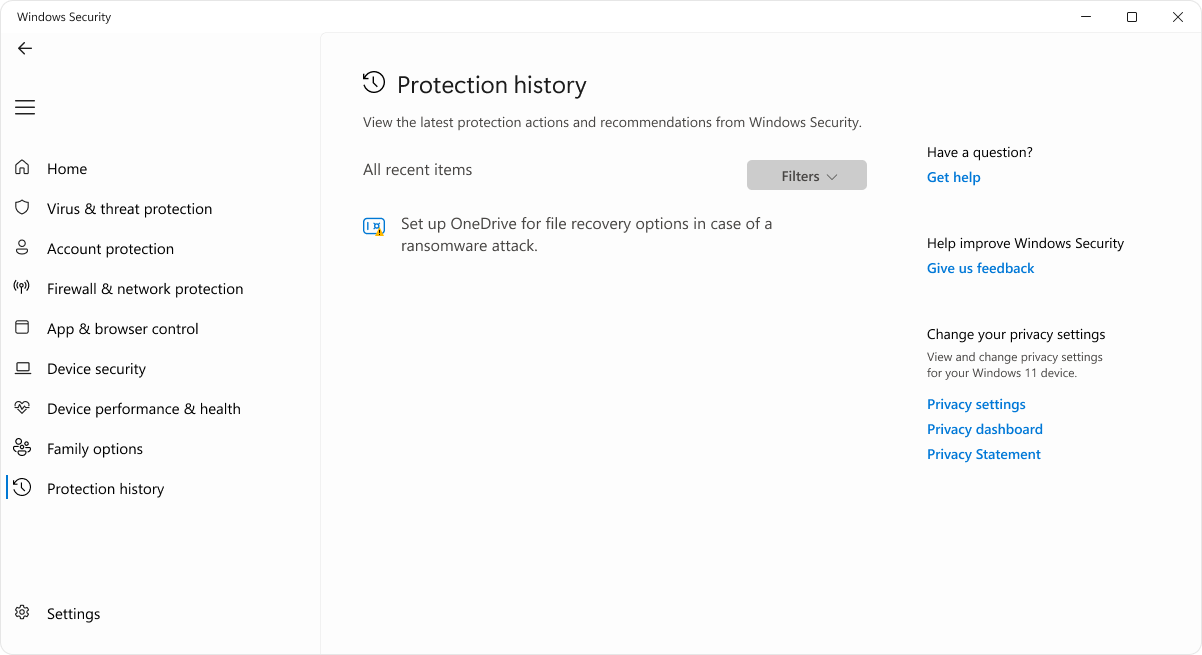
The CGBJ GTA 6 PC port is a community effort to run the Xbox build of Grand Theft Auto VI on a Windows PC. If Microsoft Defender flagged a file you downloaded under that name, leave it in quarantine. Open Windows Security → Protection history and check which file triggered the alert. If you already ran the launcher, we recommend a full PC scan with Gridinsoft Anti-Malware to check for related files and changes elsewhere on the system.
What is the CGBJ GTA 6 port?
Rockstar released GTA VI for PlayStation 5 and Xbox Series X|S on November 19, 2026. The CGBJ name comes from a different development effort. On November 24, DSOGaming described a private test build based on the community project VIctory, with work from XCL. Testers reportedly reached an in-game scene, moved a character and opened the menu. Those are milestones in making console software work on a PC. Rockstar’s announcement covers the two console platforms.
That distinction matters when someone sends you a ZIP. The compatibility software, the game data it needs and the package a third party assembles can all come from different sources. A clip of a character walking through Vice City can tell you something about the build shown in the clip. It gives you no way to identify the executable sitting in your Downloads folder. For examples of how unrelated installers have used real footage as bait, see our investigation into fake GTA 6 downloads.
Why do people report different Defender results for CGBJ?
In discussions on November 26, players reported both warnings and clean scans. One participant posted separate file identifiers for the archive, the executable, a runtime DLL and a launch script. The ZIP’s SHA-256 started with 9b3ec620. The executable’s started with df748c62. These prefixes illustrate the difference between the two objects. Use all 64 characters when comparing your own file.
Suppose your alert names an executable inside the ZIP, but the report a friend sends you is for the ZIP itself. Even if their archive has the same filename as yours, their result leaves your alert unresolved. Compare the exact affected item and the full hash for that item. A matching hash identifies identical bytes. You still need a trustworthy source and a reason to believe those bytes are safe. The reports available to us do not establish whether the original poster saw a false positive.
Find out what Windows actually blocked
- Open Windows Security from Start and choose Protection history. Expand the event closest to the time you downloaded, extracted or started the file. Windows may ask for administrator permission to show the details.
- Record the threat name, affected items, time and action. Look at the filename at the end of the affected path. A ZIP in Downloads, an extracted DLL and a script in a temporary folder are different objects. Windows keeps these history entries for about two weeks.
- Choose the action that matches the entry. If it says Threat found – action needed, choose Quarantine for an unverified file. Threat quarantined means Defender isolated it. Leave it there or choose Remove. Threat blocked means Defender already blocked and removed that item.
If all you saw was a browser download warning, check whether Protection history actually contains an antivirus event. A browser warning alone does not supply a Defender threat name. Avoid adding the game folder to exclusions or choosing Allow on device on the strength of a forum reply. An exclusion would also cover later files placed in that folder.
How to check a file without opening it
If the file is still present, open PowerShell and use Get-FileHash -Algorithm SHA256 -LiteralPath "C:\Users\Alex\Downloads\example.zip". Replace the example path with the path to your file. This reads its contents to calculate a fingerprint without launching it. Compare the full result with a trusted reference for the same release and the same object. A checksum posted alongside an anonymous re-upload only tells you whether your copy matches the uploader’s copy.
If Defender has already quarantined the file, keep it there. The history entry gives you enough information to document what happened without restoring the file to calculate a hash. A developer disputing a detection can submit the original build to Microsoft for review.
What if I already ran the launcher?
If you only downloaded the archive and Defender blocked it before you opened or ran anything, remove any remaining untrusted copies. That event alone gives you no reason to reset your game or email passwords.
If you ran an EXE or launch script before the warning, close it and disconnect the PC from the network if you suspect it is compromised. A quarantine entry tells you what Defender isolated. It cannot establish what a process did before that time. Record the detection details and the time you ran the file.
Run a Full Scan with Gridinsoft Anti-Malware. Use the official download below if you need the app. Check that the threat list is up to date, then open Scan → Full, start the scan and let it finish. The Gridinsoft scan guide shows the four available scan types. Review the detected items and their locations, apply the recommended cleanup actions and restart if prompted. A scan of the whole PC can find related files beyond the download folder, including a loader or startup entry that could recreate a file Defender removed.
If a warning returns after cleanup, compare its path with the earlier event. For another check, save your work and run Microsoft Defender Offline scan under Windows Security → Virus & threat protection → Scan options. It will restart your PC.
If you entered credentials into the launcher, receive an unfamiliar sign-in notice, or a scan identifies an information stealer, use a known-clean device to secure your email and affected gaming accounts. Change exposed passwords, revoke active sessions and review recovery details. Our game and mod account-recovery guide explains why an existing session can survive a password change.
References
- Rockstar Games. Grand Theft Auto VI: Out Now. November 19, 2026.
- John Papadopoulos. Grand Theft Auto 6 Unofficial PC Port CGBJ Now Reaches In-Game. DSOGaming, November 24, 2026.
- Microsoft Support. Protection History in the Windows Security App. Accessed November 26, 2026.