

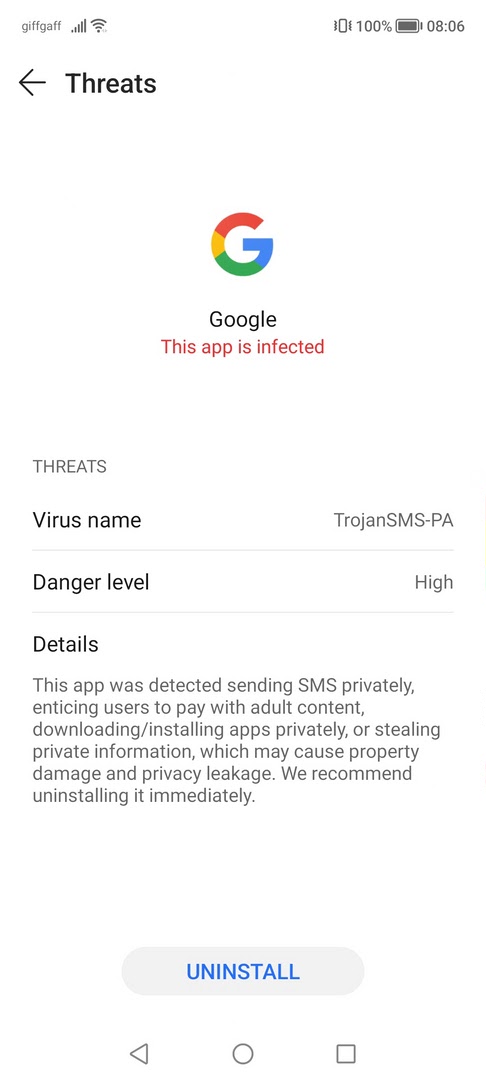
Android:TrojanSMS-PA is a mobile security detection name, not proof by itself that Google is infected. If Huawei, Honor, Vivo, or a similar Android security app flags the official Google app or Google Play Services as Android:TrojanSMS-PA, the most likely explanation is a false positive in the phone’s security database. Still, you should check which app was flagged: an official Google package is usually safe to wait out, while an unknown APK with SMS permissions should be treated as real malware.
For broader cleanup steps when the alert names an unknown APK, fake update, or app with SMS permissions, follow our Android malware removal guide before deciding whether a factory reset is necessary.
What is Android:TrojanSMS-PA?
Android:TrojanSMS-PA is a detection label used by some Android antivirus and phone-security engines for behavior associated with SMS trojans. A real SMS trojan may try to send premium SMS messages, subscribe the victim to paid services, steal verification codes, or abuse messaging permissions. The label itself is generic: it describes what the scanner thinks it sees, not the final verdict on one specific app.
The confusing part is that this detection has repeatedly appeared against legitimate Google components on some Huawei, Honor, and Vivo devices. In the 2023 wave, users reported warnings for the Google app; later reports also described Google Play Services or a Play Services update being blocked. That pattern matters because Google apps on Huawei-family devices can sit outside the normal factory-installed Google ecosystem, making them more likely to be judged by a third-party security engine rather than by the device vendor’s usual trust chain.
Why the Google app or Google Play Services can trigger it
Top-ranking coverage from 2023 was strong because it answered the urgent question quickly: Google was not suddenly distributing a trojan, and the alert was most likely a false positive. Reports also pointed to Huawei/Honor phone-security components, including Optimizer or Phone Manager, and to antivirus-definition updates as the likely place where the mistake had to be fixed.
There are several practical reasons this kind of false positive can happen:
- Heuristic matching: the scanner sees behavior that resembles SMS-trojan activity, even when it belongs to a legitimate service.
- Trust-chain mismatch: Google apps may not be preinstalled or vendor-certified in the same way on Huawei-family devices.
- Outdated virus definitions: the local security app may be using a detection database that was fixed upstream but not refreshed on the phone yet.
- APK source confusion: if Google components were installed from a mirror or unknown APK bundle, the phone may not be able to verify them cleanly.
False positive or real malware?
| What you see | How to read it |
|---|---|
| The alert names the official Google app, Google Play Services, or a Google update from a trusted source. | Most likely a false positive. Update the phone-security database, rescan, and avoid deleting core Google components unless the warning persists and support confirms it. |
| The alert names an APK from a download site, Telegram channel, mod, cracked app, or unknown installer. | Treat it as suspicious. Uninstall it, revoke SMS and notification permissions, and scan the phone with a second security tool. |
| The app asks for SMS, notification, accessibility, device-admin, or overlay permissions without a clear reason. | Higher risk. Those permissions can be abused by real mobile malware for theft, spam, or account takeover. |
| You see premium SMS charges, unknown subscriptions, OTP messages disappearing, or new apps you did not install. | Act as if the phone may be infected. Remove suspicious apps, check billing, reset passwords from a clean device, and contact the carrier if needed. |
What to do on Huawei, Honor, or Vivo phones
- Open the warning details. Confirm the exact app name, package, install source, and permissions. Do not rely only on the red warning label.
- If it is the official Google app or Google Play Services, update the phone-security app first. Open Optimizer, Phone Manager, or the built-in Security app and update virus definitions if that option is available.
- Clear the security app’s temporary data if the warning keeps returning. On many devices this is under Settings -> Apps -> Optimizer or Phone Manager -> Storage -> Clear cache. Use Clear data only if you are comfortable resetting that app’s local settings.
- Restart and rescan. A stale detection can remain visible until the phone security app reloads its definitions.
- Update Google components from a trusted route. Prefer Google Play, the official app source available on your device, or the vendor’s documented update path. Avoid APK mirrors for Google Play Services unless you fully trust and verify the source.
- If the detected app is not official, remove it. Uninstall unknown APKs, revoke SMS and accessibility permissions, and check recently installed apps.
- Run a second-opinion scan when the source is unclear. Gridinsoft’s Android Trojan Scanner can help check whether the warning is tied to a suspicious app rather than a scanner mistake.
If Google Play Services update is blocked
Do not permanently disable Google Play Services just because the warning is dramatic. Play Services handles account sign-in, app updates, notifications, and many safety features. If the alert appears during an update, first refresh the phone-security definitions, restart the phone, and try the update again from the trusted app source. If the warning still blocks the update, wait for a vendor-definition fix or report the false positive to the phone vendor instead of installing random replacement APKs.
When Android:TrojanSMS-PA may be real
The same detection name can still describe a real threat when it appears on an unknown app. Be especially careful with APKs that claim to be banking helpers, cracked games, VPNs, payment tools, delivery apps, fake Google updates, or “security fixes.” A real SMS trojan often wants permissions that let it read or send messages, intercept one-time passwords, hide notifications, or keep running in the background.
If you already installed a suspicious app, remove it first, check your mobile bill for premium SMS activity, review bank and messaging accounts, and change important passwords from a clean device. If the phone still behaves oddly after removal, back up essential files and consider a factory reset after confirming the backup is not carrying suspicious APKs.
FAQ
Is Android:TrojanSMS-PA on the Google app a virus?
Usually no. When the warning names the official Google app or Google Play Services, it is most likely a false positive in the phone’s security scanner. Unknown APKs are different and should be checked seriously.
Should I uninstall the Google app or Google Play Services?
Not as the first step. Update the phone-security definitions, restart, and rescan. Removing Google Play Services can break sign-in, notifications, app updates, and other Android functions.
Why does this happen mostly on Huawei or Honor phones?
Huawei-family devices may treat Google apps differently from devices that ship with Google’s full mobile services. That can make built-in security tools more likely to scan and classify those apps as third-party packages.
What if the alert is on an APK I downloaded?
Uninstall it, revoke dangerous permissions, and run a second scan. A TrojanSMS label on an unknown APK is much more concerning than the same label on an official Google component.
References
- BleepingComputer. “Huawei phones are detecting the Google app as a severe threat.” BleepingComputer, October 30, 2023, accessed June 1, 2026. https://www.bleepingcomputer.com/news/google/huawei-phones-are-detecting-the-google-app-as-a-severe-threat/
- 9to5Google. “Huawei phones think Google’s app is malware.” 9to5Google, October 30, 2023, accessed June 1, 2026. https://9to5google.com/2023/10/30/huawei-google-app-virus/
- Android Headlines. “Your HUAWEI Phone May Be Calling The Google App A Virus.” Android Headlines, updated October 31, 2023, accessed June 1, 2026. https://www.androidheadlines.com/2023/10/huawei-phone-google-app-virus.html
- Google. “Client protections with Google Play Protect.” Android Developers, accessed June 1, 2026. https://developers.google.com/android/play-protect/client-protections


I could not find Trojan Scanner on the app store. Thank you for the article.