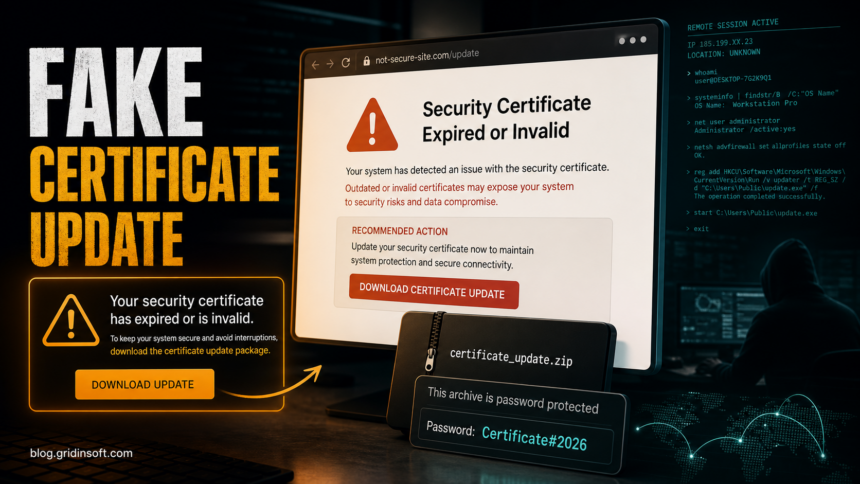
The “Windows Security Certificate Expired/Invalid” pop-up is a fake certificate update warning, not a real Windows repair screen. Do not press the download button, do not open the password-protected archive, and do not run any file it claims is a Microsoft Runtime Package. Current reports of this lure tie it to XWorm, a remote access trojan that can give an attacker control of the Windows device after the file is launched.
| Threat type | Fake Windows Security / certificate update pop-up leading to malware |
| Common text | “Security Certificate Expired or Invalid”, “Download & Install certificate” |
| Reported archive clue | Password-protected download using Certificate#2026 |
| Main risk | XWorm RAT, credential theft, remote control, follow-on malware |
| Safe action | Close the page, keep the archive unopened, isolate the PC if anything ran, then scan and secure accounts. |
What Is the Windows Security Certificate Expired/Invalid Scam?
This scam page pretends that Windows has found an expired or invalid security certificate and that your computer needs a certificate package to stay protected. The pressure point is the download button. A normal Windows certificate, Secure Boot, or browser trust update is not distributed by a random website as a zipped installer with a password.
The visible wording is designed to sound close to legitimate HTTPS and certificate errors. That overlap is what makes the lure dangerous: users who have seen real certificate warnings may assume the download is a normal fix. In reality, the page is asking you to run software from an untrusted source.
Fake Certificate Update vs a Real Certificate Error
A real browser certificate warning usually blocks one website and shows an error such as NET::ERR_CERT_DATE_INVALID or ERR_CERT_AUTHORITY_INVALID. You normally fix it by checking the address, syncing date and time, completing a Wi-Fi login, updating the browser, or waiting for the website owner to renew the certificate. Our Your Connection Is Not Private guide covers that ordinary troubleshooting path.
A fake certificate update page behaves differently. It pushes a download, tells you to install a “certificate” package, may provide a password for an archive, and may claim the file is from Windows or Microsoft even though the page is not an official Microsoft channel. Treat those signs as a malware-delivery attempt.
Why XWorm Makes This More Serious Than a Pop-Up
XWorm is a remote access trojan family seen in Windows campaigns. Microsoft tracks XWorm variants as malware, and security researchers describe the family as capable of remote control, credential theft, keylogging, screen capture, command execution, and data theft. That means the risk starts after the downloaded file runs, not when the warning appears in the browser.
If you only saw the page and closed it, the likely cleanup is browser-focused. If you downloaded and launched the archive or installer, treat the incident like a possible RAT infection: disconnect, preserve the file name and URL for reference, scan the system, and secure accounts from a clean device.
If You Only Saw the Pop-Up
- Close the tab or browser window. If the page blocks closing, use Task Manager to end the browser process.
- Do not restore the previous browsing session if the browser asks to reopen closed tabs.
- Clear site data for the suspicious page and remove notification permission for unknown domains.
- Check recent extensions. Remove anything installed around the time the pop-up started.
- Scan for adware if the warning returns. Repeated certificate-update pages usually point to a bad ad network, notification spam, or an unwanted extension.
If You Downloaded or Opened the Archive
- Disconnect the computer from the network. Pull Ethernet or turn off Wi-Fi if a file ran.
- Do not enter the archive password again. Password-protected malware archives are often used to bypass mail and browser inspection.
- Write down what happened. Keep the domain, downloaded file name, archive password, and approximate time.
- Scan the PC fully. Check downloads, temporary folders, startup entries, scheduled tasks, services, browser extensions, and recently modified files.
- Change passwords from a clean device. Prioritize email, banking, crypto, work, social, browser sync, and password-manager accounts.
- Revoke sessions and tokens. Sign out other sessions where each service allows it, then enable MFA if it was not already enabled.
- Restore files only after cleanup. If a RAT or loader is present, restoring data before removing persistence can reintroduce the problem.
Where Gridinsoft Fits in the Cleanup
If the archive or installer ran, the visible file may not be the only component. A RAT or loader can leave a scheduled task, startup entry, service, browser change, hidden file, or another payload that recreates activity after reboot. Run a full Gridinsoft Anti-Malware scan, remove confirmed detections, reboot, and scan again if browser warnings, unknown processes, or blocked outbound connections return.
If the page or email made you download an invoice, coupon, tracking app, browser extension, or support tool, scan the PC before opening it again or logging into sensitive accounts.
Scan downloads from this scamHow to Avoid This Lure Next Time
- Use Windows Update, browser built-in update menus, and official vendor pages only.
- Do not install “certificate updates” from pop-ups, ad pages, shortened links, or file-sharing pages.
- Be suspicious of password-protected archives that a website asks you to download and open.
- Keep browser notification permissions tight; remove unknown sites from the allowed list.
- For real HTTPS errors, fix date/time and browser/network issues first instead of downloading tools.
FAQ
Is the Windows Security Certificate Expired/Invalid pop-up from Microsoft?
No. A random web page that offers a certificate update archive is not a normal Microsoft or Windows update flow. Close it and do not run the downloaded file.
What if I entered the password Certificate#2026 but did not run the file?
If you only extracted or viewed the archive, delete the files and scan the computer. The highest risk begins when the executable, script, or installer inside the archive is launched.
Can a real expired certificate warning be harmless?
Yes. Real certificate errors can come from a wrong system clock, public Wi-Fi login, an expired website certificate, or HTTPS inspection. They do not require installing a certificate package from a pop-up.
Why do scammers use a password-protected archive?
Encrypted archives can prevent mail gateways, browsers, and some security tools from inspecting the payload before the user opens it. That is a common warning sign for malware delivery.
Should I change passwords after seeing the page?
If you only saw and closed the page, password changes are usually not necessary. If you downloaded and ran the file, change important passwords from a clean device and revoke active sessions.
References
- Microsoft Security Intelligence. “Trojan:Win32/Xworm.A!MTB threat description.” Microsoft, accessed July 1, 2026. https://www.microsoft.com/en-us/wdsi/threats/malware-encyclopedia-description?Name=Trojan%3AWin32%2FXworm.A%21MTB&threatId=-2147072087
- Huntress. “XWorm Malware: Analysis, Detection, Removal.” Huntress Threat Library, accessed July 1, 2026. https://www.huntress.com/threat-library/malware/xworm
- Microsoft Support. “When Secure Boot certificates expire on Windows devices.” Microsoft, accessed July 1, 2026. https://support.microsoft.com/en-us/topic/when-secure-boot-certificates-expire-on-windows-devices-c83b6afd-a2b6-43c6-938e-57046c80c1c2