A bootkit is malware that compromises the startup path of a computer so malicious code can run before Windows is fully loaded. That early position lets it hide drivers, weaken security tools, or bring back other malware after a normal cleanup. The practical question is not only “what is a bootkit?” but also “is my boot record, EFI partition, or firmware still trustworthy?”
What matters most if you suspect a bootkit?
- A bootkit targets the boot process: MBR, bootloader, EFI System Partition, or in rarer cases firmware.
- Normal in-Windows scans may miss an active boot-level component, so use trusted offline media when symptoms are serious.
- For old MBR bootkits, wiping or rebuilding the boot records can be enough; for UEFI/ESP cases, the EFI partition and firmware state also matter.
- If passwords, banking sessions, or work accounts were used on the infected PC, change them from a clean device after containment.
Bootkit definition
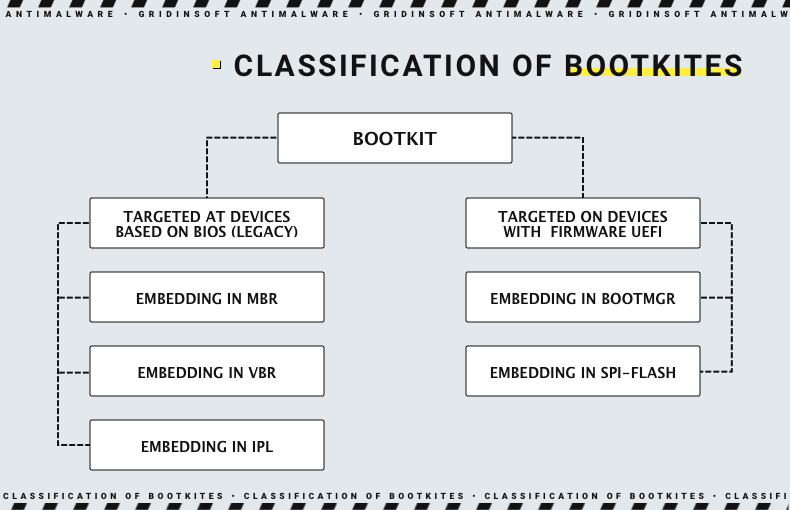
A bootkit is a rootkit-style threat focused on boot persistence. Older bootkits often modified the Master Boot Record (MBR) or Volume Boot Record (VBR). Newer threats may target UEFI firmware, EFI System Partition files, bootloaders, or early startup drivers. The goal is stealth and persistence: run early, hide activity, and keep control even when the visible Windows infection is removed.
| Threat | Where it hides | Main risk |
| Rootkit | User mode, kernel, boot, or firmware | Hides malicious activity after or during OS startup |
| Bootkit | MBR, VBR, bootloader, EFI files, or boot drivers | Starts before normal OS defenses |
| UEFI or firmware rootkit | Firmware on the motherboard or device | Can survive disk replacement in rare, advanced cases |
Bootkit symptoms people usually notice
Bootkits are hard to identify from symptoms alone. Many infections are found because a security product reports a boot-sector, EFI, rootkit, or bootkit detection. Still, these clues deserve attention when they happen after a suspicious download, cracked installer, malicious driver, fake update, or repeated malware cleanup failure:
- Security tools fail before or shortly after startup.
- Malware detections return after normal removal and reboot.
- Boot errors, recovery prompts, or unexpected bootloader changes appear.
- Secure Boot, BitLocker, or boot-order settings change unexpectedly.
- Antivirus reports MBR, VBR, EFI, bootkit, rootkit, or suspicious boot-driver activity.
- A PC behaves normally most of the time, but one threat keeps reappearing from a hidden startup location.
These signs do not prove a firmware infection. Adware, trojans, broken drivers, and damaged Windows updates can cause similar symptoms. Treat bootkit suspicion as a reason to verify the boot chain carefully, not as proof that the motherboard is permanently compromised.
Does DiskPart clean all remove a bootkit?
diskpart clean all writes zeros to every sector on the selected disk, while clean removes partition and volume formatting information. For an old MBR/VBR bootkit on the wiped drive, clean all is usually a stronger reset than deleting partitions in Windows Setup because it removes the places where old boot-sector code and hidden disk data would live.
There are important limits:
- It only affects the selected disk. If you wipe an old secondary drive but later boot from a different infected disk, the problem can continue.
- It does not clean motherboard firmware. UEFI firmware persistence is rare for home users, but disk wiping does not rewrite the motherboard firmware.
- It does not prove the files you restore are safe. Back up documents, not cracked installers, unknown scripts, pirated tools, or old executables from the infected system.
- It should be run from trusted boot media. If the current Windows installation is suspected, prepare installation or rescue media on a clean device.
For an Alureon-style MBR case on an old disk or VHDX image, the safer answer is: do not boot from the old media, mount it read-only or offline if you only need files, scan recovered files from a clean system, and wipe the disk before reuse. If you are rebuilding the same PC, reinstall from clean media, recreate partitions, and check Secure Boot/UEFI settings before restoring data.
What to do if you suspect a bootkit
- Disconnect the PC from the network. This limits follow-on malware, credential theft, and remote control while you investigate.
- Use a clean device to prepare recovery media. Do not trust installers or rescue tools downloaded on the suspected machine.
- Run an offline or bootable scan. A scan outside the running Windows session has a better chance of seeing boot-level changes.
- Check the boot chain. Confirm Secure Boot state, boot order, unexpected EFI entries, and whether the EFI System Partition has recently changed bootloader files.
- Repair or rebuild the boot records when needed. Older MBR/VBR infections may require boot repair commands or a clean reinstall.
- For serious UEFI/ESP suspicion, rebuild more than C:. Reformat the OS partition and EFI partition, update firmware from the vendor, then reinstall from known-clean media.
- Change passwords from a clean device. Do this after containment if the PC was used for email, banking, crypto, work, or administrator accounts.
If the issue looks like a broader hidden-malware problem rather than only a boot component, use the rootkit attack symptoms and prevention checklist. For a shorter operational checklist, Gridinsoft also keeps a bootkit cleanup helpdesk note.
How to protect against bootkits
- Keep UEFI/BIOS firmware updated from the device vendor.
- Keep Windows, browsers, drivers, and security tools updated.
- Use Secure Boot where supported and avoid switching to legacy boot unless you have a clear reason.
- Avoid cracked software, game cheats, unsigned drivers, fake activators, and unofficial boot tools.
- Block booting from untrusted USB/DVD media on shared or work devices.
- Use full-disk encryption and strong account security on portable devices.
- Run offline scans if boot-level malware is suspected.
After uninstalling the suspicious app or deleting the visible threat, use Gridinsoft Anti-Malware to check hidden files, startup entries, scheduled tasks, bundled apps, browser changes, and other persistence points that can restore malware.
Download Anti-MalwareFAQ
Is a bootkit the same as a rootkit?
A bootkit is a specialized rootkit-style threat that targets the boot process. All bootkits behave like rootkits in the sense that they hide and persist, but not all rootkits are bootkits.
Can Secure Boot stop bootkits?
Secure Boot reduces risk by checking trusted boot components, but it is not a guarantee against every UEFI, firmware, or configuration attack. It should be combined with firmware updates, least-privilege accounts, and trusted recovery media.
Can antivirus remove a bootkit?
Sometimes, especially when the product can scan offline or detect the boot component before it fully loads. Serious cases may require boot repair, rebuilding the EFI partition, firmware updates, or reinstalling the operating system from clean media.
Does reinstalling Windows remove a bootkit?
A clean reinstall can remove many disk-based bootkits if the OS and EFI partitions are rebuilt. It may not be enough for rare firmware-level persistence, and it will not help if infected executables are restored afterward.
Are bootkits common?
No. They are much less common than phishing, adware, infostealers, or ordinary trojans. They are worth taking seriously when a trusted security tool reports boot-sector, EFI, rootkit, or bootkit activity, or when malware keeps returning after normal cleanup.
References
- Microsoft Learn. “Clean.” Microsoft, last updated August 31, 2016, accessed June 8, 2026. https://learn.microsoft.com/en-us/previous-versions/windows/it-pro/windows-server-2012-R2-and-2012/cc731145(v=ws.11)
- Microsoft Security Intelligence. “Trojan:DOS/Alureon.F threat description.” Microsoft, updated September 15, 2017, accessed June 8, 2026. https://www.microsoft.com/en-us/wdsi/threats/malware-encyclopedia-description?Name=Trojan%3ADOS%2FAlureon.F
- Microsoft Incident Response. “Guidance for investigating attacks using CVE-2022-21894: The BlackLotus campaign.” Microsoft Security Blog, April 11, 2023, accessed June 8, 2026. https://www.microsoft.com/en-us/security/blog/2023/04/11/guidance-for-investigating-attacks-using-cve-2022-21894-the-blacklotus-campaign/