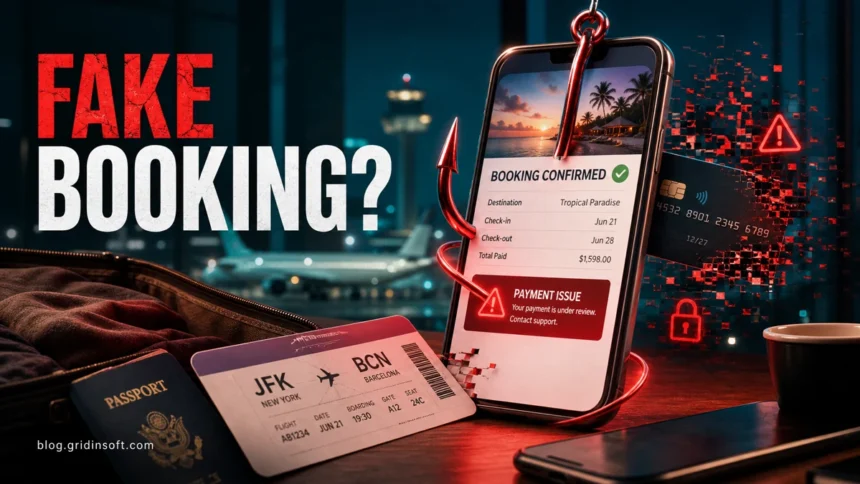
Vacation scams in 2026 are no longer just generic summer emails. Scammers now copy real rental listings, push travelers to pay outside trusted platforms, impersonate hotels or booking services, and send urgent payment or verification messages through email, SMS, WhatsApp, and sometimes even legitimate-looking booking threads. The safest response is simple: verify the reservation inside the official app or website, do not pay by wire, gift card, crypto, or off-platform transfer, and treat any last-minute payment problem as suspicious until the hotel, airline, or platform confirms it through a separate channel.
What vacation scams look like now
The old pattern was a suspicious email about a cancelled hotel or delayed flight. That still happens, but current travel scams are broader and more convincing because they often use real trip details, cloned listing photos, fake support pages, and urgent payment language. If you are planning a trip, the most common risk is not one single scam type – it is the moment when a message makes you rush.
| Scam type | What victims usually see |
|---|---|
| Fake vacation rental listing | A beautiful rental at a low price, copied photos, a new or thin review history, and pressure to reserve quickly. |
| Off-platform payment request | A host or manager asks you to leave Airbnb, Vrbo, Booking.com, or another platform and pay on a separate website, by bank transfer, payment app, gift card, or cryptocurrency. |
| Fake booking or payment verification | A message says your reservation will be cancelled unless you re-enter card details, pay an extra fee, or confirm your identity before a short deadline. |
| Flight, rental car, or refund phishing | A fake airline, rental car desk, or travel agent claims a delay, refund, replacement ticket, or cheap upgrade is waiting behind a link. |
| Malicious travel document | A PDF, spreadsheet, itinerary, invoice, or “secure viewer” asks you to download something or enable active content. |
Why travel scams are harder to spot in 2026
Travelers expect unusual messages before a trip: payment reminders, check-in forms, tax notices, room deposits, and late itinerary changes. Scammers exploit that expectation. They also know that people are often booking under time pressure, comparing prices, and trying to avoid losing a limited offer.
Fresh rental-scam data also shows why this category deserves more than a short seasonal warning. The FTC reported nearly 65,000 rental-scam reports and about $65 million in losses from January 2020 through June 2025. Fake listings often copy legitimate photos, change the contact information, and move victims toward upfront payments before they can inspect the property or verify the real owner.
Vacation platforms are also abused in more technical attacks. Microsoft Threat Intelligence has tracked Booking.com impersonation campaigns against hospitality organizations, including fake CAPTCHA pages and malware such as credential stealers and remote access tools. That matters for ordinary travelers because a compromised hotel or partner account can make a fraudulent payment request look much more believable than random spam.
Common vacation scam examples
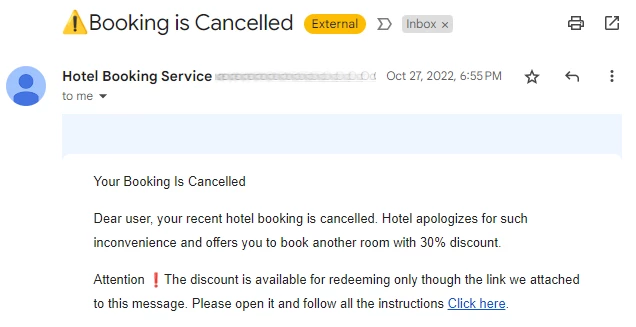
1. Your booking is cancelled
A message claims your hotel, apartment, or vacation rental was cancelled and tells you to pay a new deposit, rebook through a special link, or enter card details to keep the reservation. The sender may copy the property name, dates, and booking language. Do not use the link in the message. Open the official booking app or type the platform address yourself, then check the reservation there.
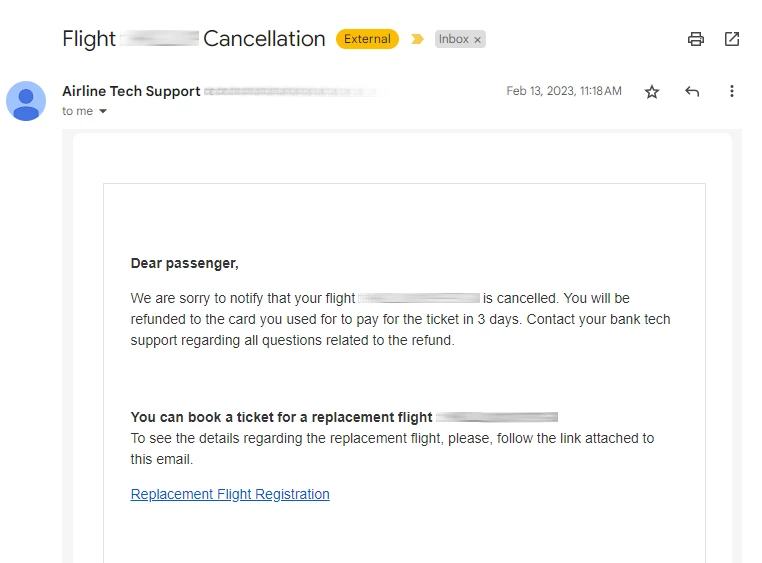
2. Your flight is delayed or a refund is ready
Flight scams often use disruption: a delay, cancelled leg, refund, replacement seat, or cheap upgrade. The goal is to make you click before you compare the message with the airline’s official app. A real airline may notify you by email or text, but it should not force you to pay through an unfamiliar domain or provide card details to a page that does not match the airline or booking platform.
3. A rental host asks you to pay somewhere else
This is one of the clearest warning signs. A host may say the platform is too expensive, the calendar is broken, the owner uses a private payment processor, or you can get a discount by booking directly. BBB warns that scammers often ask travelers to leave the official platform and use a separate website that looks professional but disappears when a cancellation or refund is needed. Keep communication and payment inside the platform whenever possible.
4. A real-looking reservation message asks for card verification
Some travel phishing is dangerous because it refers to a real stay or arrives near the correct travel dates. Treat any urgent card-verification request as suspicious, even if it mentions the right hotel. Contact the property using the phone number from the official platform or the hotel’s official website, not the number in the suspicious message.
5. HR or business-travel forms ask for vacation dates
Employees may receive fake HR messages asking them to confirm vacation dates, download a schedule, or sign in with a Microsoft account. These lures can steal work credentials or deliver malware through a document. If the message asks for credentials, macros, a command, or a new viewer to open an itinerary, pause and verify it with your HR or travel team.
Before you pay: a quick verification checklist
- Open the official app or website yourself. Do not use payment or verification links from an unexpected message.
- Keep payment inside the platform. Requests for wire transfer, gift cards, cryptocurrency, or off-platform payment are major red flags.
- Search the property address and photos. Reused images, different owner names, or the same address on unrelated listings can expose a fake rental.
- Check the cancellation and refund policy before paying. If the seller cannot provide clear terms, walk away.
- Use a credit card when possible. It usually gives better dispute options than debit, wire transfer, payment apps, or cash-like methods.
- Be careful with sponsored search results. Scammers can buy ads for fake travel, airline, or support pages.
- Call through an independently verified number. Use the official platform, airline, hotel website, or card issuer – not the contact details inside the suspicious message.
What to do if you already clicked or paid
If you entered payment details, call your bank or card issuer immediately and ask about blocking the card, disputing the charge, or reversing the transfer. If you paid by wire, gift card, crypto, or payment app, act quickly even if recovery is difficult. Save screenshots, message headers, phone numbers, payment receipts, and the listing URL before the scammer deletes them.
If you entered a booking-platform, email, or Microsoft password, change it from a clean browser session and enable two-factor authentication. Reuse of that password on other accounts is a bigger risk than many travelers expect. If you downloaded an attachment, ran a command, installed a “viewer,” or enabled macros, disconnect the device from sensitive accounts and run a malware scan. Gridinsoft Anti-Malware can help check for credential stealers, remote access tools, and malicious scripts after a suspicious travel message.
You can also check suspicious travel domains with the Gridinsoft URL scanner before entering payment details. A clean result is not a guarantee that a booking is legitimate, but a risky or recently created domain is a strong reason to stop and verify the reservation another way.
How to book travel more safely
- Prefer established booking platforms, airline sites, hotel sites, and agencies with verifiable reviews and support channels.
- Be skeptical of deals that are far below comparable listings in the same area.
- Do not let a host move the conversation to private email, messaging apps, or a different payment page.
- Use unique passwords for travel accounts, especially when a trip includes passport details, addresses, and stored cards.
- Keep your airline, hotel, and booking apps updated so you can verify messages inside the official account.
- For business trips, report suspicious HR, hotel, or invoice messages to your security or IT team before opening attachments.
FAQ
How do I know if a vacation rental is a scam?
Warning signs include a price that is much lower than similar rentals, copied photos, limited reviews, pressure to book quickly, a host who avoids the official platform, and payment requests by wire, gift card, cryptocurrency, or payment app.
Can a real booking message still be a scam?
Yes. A message can mention a real hotel, real dates, or a real reservation and still be fraudulent. Verify inside the official booking app or by contacting the hotel through an independently confirmed phone number.
What should I do if I paid outside Airbnb, Vrbo, or Booking.com?
Contact your bank or payment provider immediately, collect screenshots and receipts, report the listing to the platform, and report the fraud to the relevant consumer-protection agency. Recovery is much harder when payment happens outside the platform, so speed matters.
Are travel scams only email scams?
No. Travel scams can arrive through email, SMS, WhatsApp, social media ads, sponsored search results, fake websites, booking-platform messages, phone calls, and malicious attachments.
References
- Federal Trade Commission. “Rental scams hit home with $65 million in reported losses.” FTC Data Spotlight, December 2025. https://www.ftc.gov/system/files/ftc_gov/pdf/rental-scams-spotlight-2025.pdf
- Better Business Bureau. “BBB Scam Alert: Use caution when booking home rental vacations on external sites.” BBB, accessed June 7, 2026. https://www.bbb.org/all/consumer/scam/vacation-rental-booking-scams
- Microsoft Threat Intelligence. “Phishing campaign impersonates Booking.com, delivers a suite of credential-stealing malware.” Microsoft Security Blog, March 13, 2025. https://www.microsoft.com/en-us/security/blog/2025/03/13/phishing-campaign-impersonates-booking-com-delivers-a-suite-of-credential-stealing-malware/