

Salvador Stealer is an Android banking trojan that hides behind a fake banking app, steals personal and online-banking details, and intercepts SMS one-time passwords. If you installed an unexpected bank APK or entered information into it, disconnect the phone from mobile data and Wi-Fi, do not open your real banking app, and contact your bank from another trusted device. Removing the app is necessary, but it does not cancel credentials or OTPs that may already have been stolen.
Act first, investigate second: isolate the phone, remove the suspicious app, scan Android, then secure banking and identity accounts from a clean device.
What Is Salvador Stealer?
Salvador Stealer is malware for Android first documented by ANY.RUN researchers in April 2025. The analyzed campaign used a two-stage APK: a dropper installed a second payload that displayed a phishing page inside the app. The page asked for a registered mobile number, Aadhaar number, PAN details, date of birth, and online-banking credentials. The payload also requested access to SMS messages so it could capture banking verification codes.
| Question | Answer |
|---|---|
| Platform | Android phones and tablets |
| Main disguise | A sideloaded app that imitates a banking service |
| Data at risk | Bank login, personal identity details, phone number, and SMS OTPs |
| Primary target seen in research | Indian banking users, based on Aadhaar and PAN collection |
| Immediate priority | Isolate the phone and contact the bank from another trusted device |
The name comes from an internal storage reference found in the analyzed payload. It is not the visible name you should expect to see in the app drawer. A malicious build may use a bank-like label, icon, or filename instead.
How the Infection Works
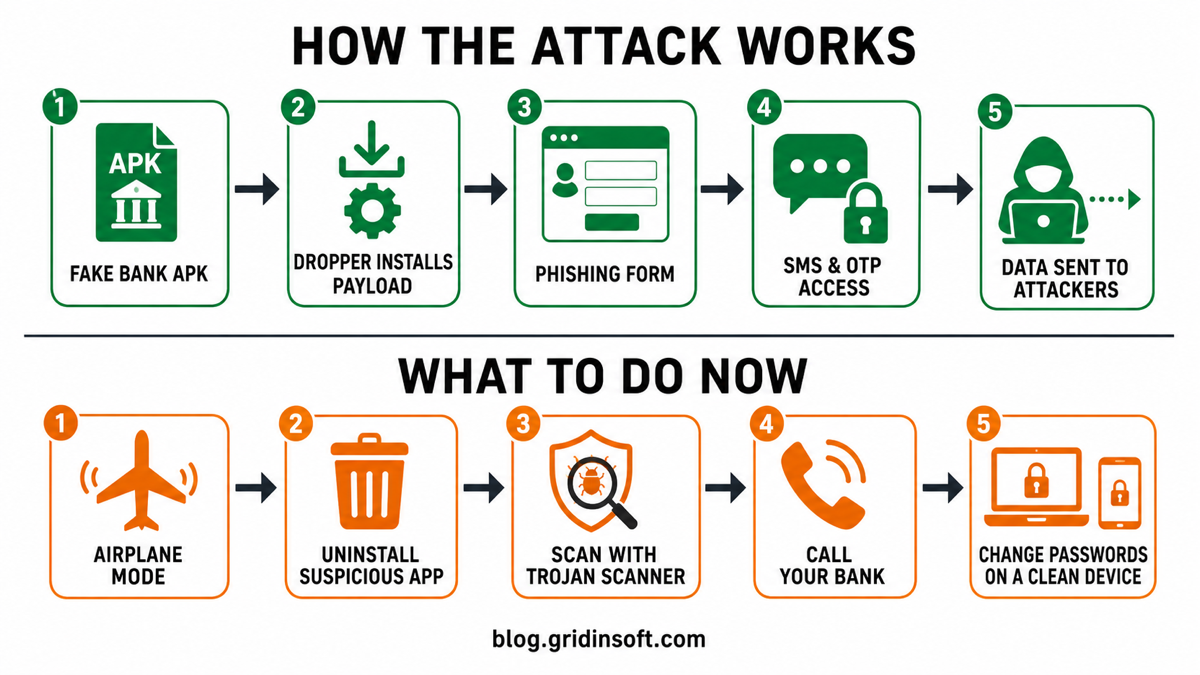
- A fake banking APK reaches the victim. The known sample was installed outside Google Play and presented itself as a banking application.
- The dropper launches a second APK. The first package carries and starts the actual credential-stealing payload.
- An embedded phishing page requests sensitive data. Because the form appears inside an app, it may feel more trustworthy than a browser page even though it belongs to the attacker.
- SMS permissions expose OTPs. The payload reads incoming messages and forwards verification codes through attacker-controlled channels.
- The service attempts to return. The analyzed version used Android WorkManager and a boot receiver to restart its background service after termination or reboot.
This combination matters: changing only a password may not stop the attacker if an active phone can still receive and leak the next OTP. Conversely, deleting the app does not reverse information that was already submitted.
How to Tell Whether Your Phone May Be Affected
One symptom alone does not prove Salvador Stealer is present. Treat the combination of an unexpected APK and sensitive permission requests as the strongest warning. Check for:
- a bank or KYC app installed from a message, website, file-sharing link, or third-party store;
- an unfamiliar app installed shortly before suspicious bank activity began;
- a banking-looking form that asks for Aadhaar, PAN, date of birth, login credentials, and SMS access in one flow;
- an app requesting permission to read, receive, or send SMS messages;
- a persistent “Customer support” notification or an app that reappears after being closed;
- unexpected OTP messages, login alerts, beneficiary changes, or bank transfers.
Open Settings → Apps and sort by recently installed when your phone supports it. Do not judge by the icon alone. Open the app information page and review the install source, permissions, mobile-data use, and battery activity. Android menus differ between manufacturers, so use the Settings search box if a menu name is different.
How to Remove Salvador Stealer from Android
1. Isolate the phone
Turn on Airplane mode, then make sure Wi-Fi and Bluetooth remain off. Do not use the affected phone to call the bank, change a password, or approve an authentication prompt. If the malware is still active, those actions may reveal more information.
2. Remove the suspicious app
Go to Settings → Apps → See all apps, select the unfamiliar banking or recently sideloaded app, choose Force stop, and then Uninstall. Before uninstalling, revoke its SMS, Phone, Notifications, and Files permissions if those controls are available.
If the Uninstall button is disabled, search Settings for Device admin apps and Accessibility, and remove privileges only from the suspicious app. If the phone remains unstable, restart it in Safe mode using the procedure for your device manufacturer and remove recently downloaded apps one at a time.
3. Scan with Gridinsoft Trojan Scanner
Once you have regained control of the phone, open Trojan Scanner for Android, update its threat database, and tap Start. Review the app name and reason shown in each finding, then remove unwanted apps and confirm Android’s uninstall prompt. Restart and scan again. The installed-app check gives you more to go on than a bank-like icon or a renamed package label.
A scanner can help find the malicious app and related suspicious files, but it cannot invalidate stolen bank credentials, recover exposed identity data, or guarantee that no information left the phone. Complete the account-response steps below even if the scan becomes clean.
4. Run Google Play Protect and update Android
Open Google Play, tap your profile picture, choose Play Protect, and run a scan. Install pending Android security updates and app updates after the suspicious app is removed. Do not restore the APK from a backup or download it again to “test” whether it is safe.
5. Factory-reset when trust cannot be restored
Back up photos, contacts, and documents—not apps or APK files—if the app cannot be removed, returns after reboot, security settings remain changed, or scans continue to report suspicious activity. Then use Android’s factory-reset option. Set up the phone as new where practical and reinstall apps only from Google Play or the publisher’s official site.
Protect Your Bank and Identity After Exposure
Use a different, trusted phone or computer for these steps. If you typed information into the fake app, assume it was transmitted even if you closed the form quickly.
- Call the bank using the number on your card or official website. Ask the fraud team to block online banking temporarily, review recent transactions and beneficiaries, and replace cards or credentials when advised.
- Change the bank password and the email password first. Use unique passwords and sign out other sessions. If the same password was reused elsewhere, change those accounts too.
- Replace SMS-only verification where possible. Prefer an authenticator app, passkey, or hardware security key after the phone has been cleaned.
- Review your mobile account. Ask the carrier to check for SIM replacement, call forwarding, or other unauthorized changes and add a port-out PIN if available.
- Monitor identity misuse. If Aadhaar or PAN details were entered, follow the official Indian identity and tax-authority guidance for locking, monitoring, or reporting misuse.
Keep screenshots of bank alerts and a timeline of what was installed and entered, but never copy the malicious APK to another everyday device. Security teams can use a dedicated sandbox; home users should not reopen it.
Technical Indicators for Defenders
The following indicators belong to the sample analyzed in 2025. They can support an investigation but do not prove that every similarly named app is Salvador Stealer, and newer variants may use different infrastructure.
| Indicator | Observed value |
|---|---|
| Dropper filename | INDUSLND_BANK_E_KYC.apk |
| Dropper SHA-256 | 21504d3f2f3c8d8d231575ca25b4e7e0871ad36ca6bbb825bf7f12bfc3b00f5a |
| Payload filename | Base.apk |
| Payload SHA-256 | 7950cc61688a5bddbce3cb8e7cd6bec47eee9e38da3210098f5a5c20b39fb6d8 |
| Observed package | com.indusvalley.appinstall |
| Phishing infrastructure pattern | t01[.]muletipushpa[.]cloud through t15[.]muletipushpa[.]cloud and related subdomains |
Do not visit a listed domain or submit data to it. Domain blocking should be combined with mobile-app inventory, file-hash review, SMS-permission auditing, and banking-fraud monitoring.
How to Avoid Similar Android Banking Trojans
- Install banking apps from Google Play or from a link on the bank’s verified website.
- Do not install an APK sent by SMS, WhatsApp, Telegram, email, or a search advertisement.
- Reject SMS access when it is not essential to the app’s stated purpose.
- Keep Google Play Protect enabled and Android security updates current.
- Use the Gridinsoft Online Virus Scanner to check a suspicious APK before opening it, and scan the phone with Trojan Scanner after an unsafe sideload.
- Learn the broader warning signs in our guides to Android malware and a hacked phone.
FAQ
Is Salvador Stealer an Android or Windows virus?
The documented Salvador Stealer sample is Android malware delivered through APK files. Use the Android removal steps above for an installed app; an APK merely downloaded and left uninstalled is a different exposure from entering banking details into the fake app.
Is uninstalling the fake app enough?
No. Uninstalling stops the known app from running, but credentials, OTPs, Aadhaar details, or PAN information submitted before removal may already be exposed. Contact the bank and change passwords from a clean device.
Can Salvador Stealer return after a reboot?
The analyzed version used a background service, WorkManager, and a boot receiver to restart activity. If the suspicious app returns, cannot be removed, or symptoms continue, use Safe mode, scan the phone, and consider a factory reset.
Will a factory reset secure my bank account?
A factory reset can remove user-installed malware when performed correctly, but it does not cancel stolen credentials or reverse fraudulent transactions. Bank and account recovery remain separate, required steps.
References
- ANY.RUN Research Team. Salvador Stealer: New Android Malware That Phishes Banking Details & OTPs. ANY.RUN Cybersecurity Blog, April 1, 2025. https://any.run/cybersecurity-blog/salvador-stealer-malware-analysis/
- Google. Use Google Play Protect to help keep your apps safe and your data private. Google Play Help, accessed July 20, 2026. https://support.google.com/googleplay/answer/2812853?hl=en
- Google. Find problem apps by rebooting to safe mode on Android. Android Help, accessed July 20, 2026. https://support.google.com/android/answer/7665064?hl=en



Thanks for the detailed breakdown of Salvador Stealer. It’s a strong reminder to stay cautious with app permissions and avoid suspicious links…