


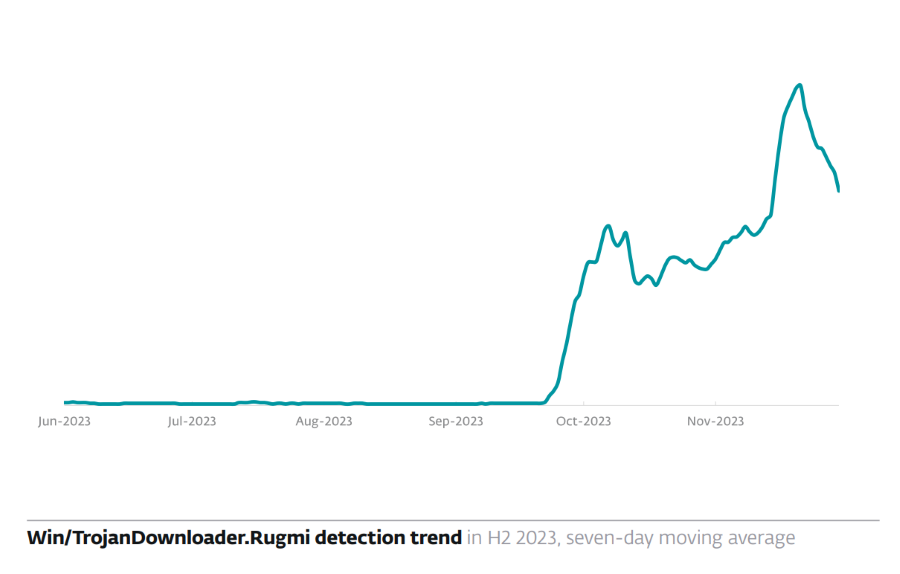
Win/TrojanDownloader.Rugmi is an ESET detection for a Windows malware loader, not proof of one specific final payload. ESET has observed Rugmi delivering infostealers including Lumma, Vidar, Rescoms, and RecordBreaker, but the alert alone does not show which payload, if any, ran. Leave the detected file in quarantine, note its path and status, run a full scan, restart, and scan again. If the file ran, the alert returns, or other detections appear, treat browser sessions and saved credentials as potentially exposed and respond from a clean device.
What does the Win/TrojanDownloader.Rugmi alert mean?
The exact label matters. Win/TrojanDownloader.Rugmi identifies Rugmi as a downloader or loader detected by ESET. Other security tools can use related names with architecture or suffix details, such as TrojanDownloader:Win32/Rugmi.* or Behavior:Win32/Rugmigen.B. Similar family wording does not prove that two alerts refer to the same file or behavior, so record the complete detection name, detected path, action taken, time, and any secondary detections.
ESET documented three Rugmi component types: a downloader that retrieves an encrypted payload, a loader that runs a payload stored in internal resources, and a loader that runs a payload from an external file on disk. This is why removing one visible file is important but does not automatically establish whether another component or payload already executed.
What should you do after a Rugmi detection?
| What happened | Risk and next action |
|---|---|
| ESET quarantined a download or archive before you opened anything | Keep it quarantined, delete the original download or archive, run a full scan, restart, and scan again. Do not restore the file merely to test it. |
| You opened the file, ran an installer, or allowed a security prompt | Disconnect the PC from the network, complete the cleanup sequence below, and use a clean device for sensitive account actions. |
| The alert returns after restart or comes with other detections | Assume another component, startup item, scheduled task, service, browser change, exclusion, or payload may remain. Do not keep restoring the same file. |
| The file is from a known vendor and you suspect a false positive | Leave it quarantined while you verify the publisher, digital signature, download source, full path, and vendor response. Submit the file or scan log to ESET rather than adding an exclusion first. |
- Save the detection details. Record the complete ESET label, path, action, time, and nearby detections. A folder such as
C:\ProgramData\MSFT_v1_promay be relevant in one investigation, but it is not a universal Rugmi path. - Keep the item quarantined. ESET quarantine disables and isolates the detected file. Restoring an unknown crack, fake update, loader, or unsigned installer recreates the original risk.
- Remove the source. Delete the untrusted archive, installer, browser download, email attachment, mod, cheat, or crack that supplied the file. Empty the browser’s download queue and do not reuse a copied version.
- Run a full scan, restart, and scan again. Review the complete result for secondary loader, stealer, remote-access, browser, startup, or persistence detections. A single clean result is useful evidence, not proof that no earlier exposure occurred.
- Check recurrence. If the alert returns, inspect Startup apps, Task Scheduler, installed apps, services, browser extensions, proxy settings, and security-tool exclusions. Unexpected items created at the same time as the detection deserve priority.
Is quarantine enough to remove Rugmi?
Quarantine is often enough to stop the specific file ESET detected from running again. It is not a retrospective answer to whether that file had already launched, created persistence, or downloaded another payload. If the file was blocked before execution, no other detections appear, and two scans around a restart remain clean, the evidence is reassuring. If execution is known or uncertain, the alert returns, or additional malware is found, continue with broader device and account response.
Avoid deleting evidence before you save the detection path and scan log. Those details can distinguish an isolated blocked download from a recurring component and can support a false-positive submission when the source is genuinely trusted.
Could TrojanDownloader.Rugmi be a false positive?
A false positive is possible with any security product, but the family name alone is not a reason to restore the file. Check whether it came from the developer’s official site, whether Windows shows a valid expected digital signature, whether the hash matches a vendor-published value, and whether the exact build has a documented detection dispute. You can also submit the file to a vendor or check the hash with the Gridinsoft Online Virus Scanner. Do not upload confidential documents or files that contain personal data.
Cracks, repacks, cheat loaders, fake browser updates, unsolicited attachments, and unsigned files in temporary or unusual shared-data folders do not gain trust merely because the user expected an installer. Keep them quarantined while you verify the source.
What can the Rugmi loader deliver?
ESET’s H2 2023 research linked Rugmi delivery to Lumma, Vidar, Rescoms, and RecordBreaker. These examples explain the credential and session risk, but they are not a checklist of what every Rugmi alert contains. Use the secondary detection names, execution evidence, new processes, persistence, browser changes, and account activity to determine the actual response.
If the alert followed a game mod, crack, cheat, or fake installer, use the separate infostealer-after-download triage guide to check browser data, wallets, game accounts, messaging apps, and saved sessions without assuming that every category was stolen.
When should you secure passwords and sessions?
If the file definitely never ran and was quarantined at download time, the Rugmi alert alone does not establish credential theft. If you ran it, approved an installer, temporarily disabled security, see secondary stealer detections, or cannot establish whether execution occurred, use a known-clean phone or computer to:
- change the primary email password first and verify its recovery email, phone, forwarding rules, and recent sign-ins;
- sign out other sessions and revoke app passwords, browser sessions, API tokens, and connected applications;
- enable multifactor authentication and regenerate backup codes;
- then secure banking, payment, shopping, work, game, messaging, social, and wallet accounts in risk order;
- watch for new devices, password-reset emails, payment attempts, trades, or messages you did not send.
Use the hacked-account recovery router when an account already shows unauthorized activity. Password changes do not remove malware from the PC, and a device scan cannot revoke stolen sessions or restore transferred funds.
Scan for loader leftovers and persistence
ESET may quarantine the visible Rugmi component while a downloaded payload, scheduled task, service, startup entry, browser change, or security exclusion remains. This is most relevant when the file ran, the alert repeats after reboot, or the scan lists additional detections. A full Gridinsoft Anti-Malware scan can check for detected leftovers and persistence; remove confirmed detections, reboot, and scan again if symptoms return.
If a token stealer ran here, logging back in can hand the attacker your new Discord session, email cookie, Steam token, or wallet access. Scan this Windows PC first, then reset passwords from a clean device.
Scan for Rugmi loader leftoversDo you need to reinstall Windows?
A clean Windows reinstall is not automatic after every quarantined Rugmi file. It becomes the safer choice when the loader executed with administrator rights, alerts or unknown persistence continue after cleanup, security settings were tampered with, multiple unrelated payloads are present, or you cannot rebuild confidence in the installation. Preserve personal documents without copying executables, scripts, cracks, installers, or browser profiles, then follow the clean-install USB guide after malware.
If the file was blocked before execution, the source was removed, no secondary detections or suspicious account events exist, and repeated scans stay clean, a reinstall may add little evidence. Continue monitoring the device and important accounts instead of treating a wipe as a guarantee.
References
- ESET Research / Jiří Kropáč. “ESET Threat Report H2 2023.” ESET, December 19, 2023, accessed July 26, 2026. ESET threat report (PDF).
- ESET. “[KB2505] My computer has a virus—what should I do?” ESET Support, updated April 13, 2026, accessed July 26, 2026. ESET malware troubleshooting guidance.


It’s great to have such high-quality analysis, information and documentation. We need it so much, and I really appreciate it. We’re also very much alone in considering these kinds of risks and threats when we work in cybersecurity, and very few people understand the background work, as well as the effort, time, training and energy needed to keep up to date. People don’t perceive the 100,000 threats we’re facing (and I’m being kind) and quickly categorize you as paranoid, whereas these are factual facts that require a great deal of analytical finesse, understanding, vigilance, and also experience, because many things are of a subtlety that’s hard to understand. It would be good to be able to forge partnerships or work seriously in this direction between professionals.