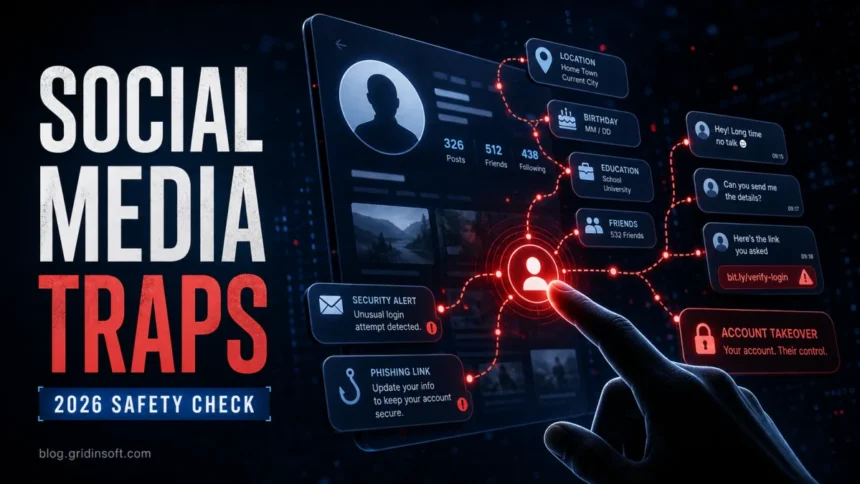
Social media security mistakes are no longer just about embarrassing oversharing. In 2026, the same public details, reused passwords, weak recovery settings, and casual direct-message clicks can help scammers take over accounts, impersonate you, and target your friends. The FTC reported that scams starting on social media caused $2.1 billion in reported losses in 2025, and account takeover schemes continue to rely on social engineering, phishing pages, and information people publish themselves.
This checklist focuses on the mistakes that still create the most damage: unknown friend requests, oversharing, unchecked tags, weak login protection, and password reuse. If you already suspect a compromise, start with the quick checks below before you keep scrolling.
If You Are Worried Right Now, Check These First
- Open the official app or website directly. Do not use a link from a DM, email, ad, or comment.
- Check active sessions. Sign out unknown phones, browsers, and locations.
- Change the password from a trusted device. Use a new password that is not used anywhere else.
- Turn on app-based two-factor authentication. An authenticator app or passkey is safer than SMS where available.
- Review recovery email and phone number. Attackers often change these first so they can return later.
- Warn contacts if strange messages were sent. Tell them not to click links or send money.
1. Accepting Unknown Friend or Follower Requests
Fake profiles are not always obvious. Some pretend to be old classmates, recruiters, giveaway pages, local sellers, support agents, or romantic interests. Once accepted, they can see more of your photos, contacts, posts, birthday details, workplace clues, and friend network. That is enough to build a believable phishing message or impersonation attempt. Business-themed lures can also arrive as fake LinkedIn quote requests, such as the LinkedIn Purchase Inquiry email scam.
The risk is bigger than one stranger seeing your profile. A scammer can use your public conversations and mutual contacts to make a message feel familiar: “I saw your post about the trip,” “your coworker told me to ask,” or “this is the link you requested.” If the account later sends a login page, fake payment request, or malware download, the social context makes it easier to trust.
Fix it: decline requests from people you cannot verify, hide your friend list where possible, and be suspicious of profiles that quickly move the conversation to money, investments, “support,” crypto, giveaways, or urgent account warnings. If a known contact sends a strange link, confirm through another channel.
2. Oversharing Details That Help Scammers Guess or Persuade
Oversharing is not only posting a vacation photo in real time. It also includes recovery clues and identity fragments: hometown, birthday, school, employer, pet names, family relationships, daily routes, badges, tickets, documents on a desk, or a screenshot that exposes an email address. Individually these details look harmless. Together, they help attackers guess security questions, personalize phishing pages, and impersonate support, banks, delivery services, or friends.
Scammers also use oversharing for timing. A public travel post says you may be away from home. A job update says which company systems or coworkers to reference. A story from a cafe or airport says when you are distracted and more likely to answer fast.
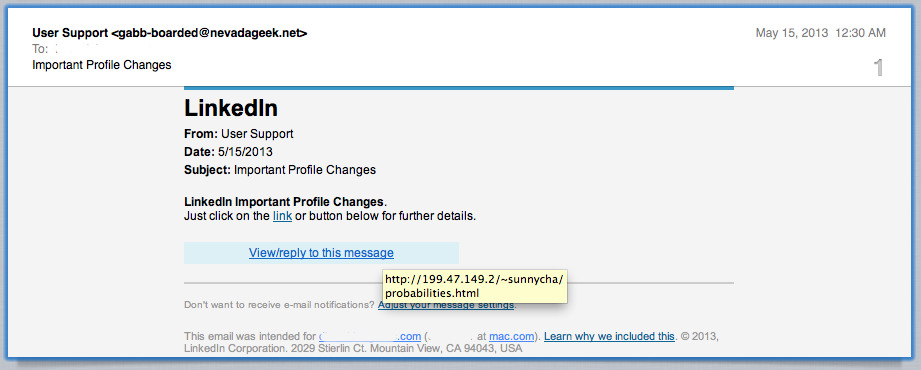
Fix it: remove nonessential public profile fields, delay travel posts until you are back, avoid posting documents or screens, and check old public posts for email addresses, phone numbers, home location clues, and workplace details. If you need to keep a public profile, separate personal content from business or creator activity.
3. Trusting DMs, Ads, and “Support” Links Too Quickly
Many social media attacks now start with something that looks normal: a copyright warning, job offer, brand collaboration, delivery issue, fake marketplace deal, account verification notice, investment club, or “your account will be disabled” message. The link may lead to a convincing login page, a fake support form, or a file download. Some scams do not steal the account immediately; they first collect enough information to reset it later.
Social media ads can also be dangerous because scammers can buy targeted ads and imitate legitimate stores, investment coaches, ticket sellers, or customer-service pages. The FTC has repeatedly warned that social media gives scammers cheap access to large audiences and targeting tools.
Fix it: open account settings and support pages from the official app or typed domain, not from a message link. Before buying from an ad, search the store name plus “scam” or “complaint.” For job, creator, or partnership messages, verify the sender through a company website, business email domain, or known public channel.
4. Ignoring Tags, Mentions, Privacy Settings, and Active Sessions
Tagged photos and public mentions can expose information you did not publish yourself. Friends may tag your location, workplace event, family gathering, or travel plans. Attackers can also tag accounts in scam posts to create fake credibility or push victims toward a malicious link.
Old privacy settings are another weak point. Platforms change interfaces often, and accounts that were safe in 2022 may expose more than intended in 2026. The most useful checks are who can see your posts, who can tag you, who can find you by phone or email, who can message you, and which devices are still logged in.
Fix it: enable tag review, limit who can see past posts, restrict who can find you by phone or email, and review active sessions monthly. Remove old connected apps, browser extensions, and third-party integrations you no longer use.
5. Reusing Passwords and Treating 2FA as Optional
Password reuse is still one of the fastest paths to social media account takeover. If a password appears in a breach from another site, attackers can try it automatically on Instagram, Facebook, TikTok, X, LinkedIn, Discord, and email accounts. If the same password works on your email, the attacker may control the recovery channel for everything else.
Two-factor authentication helps, but it is not magic. SMS codes can be intercepted through SIM-swap fraud or social engineering, and some phishing pages ask for the 2FA code in real time. App-based 2FA, passkeys, trusted-device reviews, and recovery-code storage are stronger than relying on a password alone.
Fix it: use one unique password per account, store it in a password manager, enable 2FA, save recovery codes offline, and secure your primary email account first. If your computer may be infected, scan and clean it before changing passwords so a stealer or keylogger does not capture the new credentials.
What Victims Usually Search For After a Social Media Attack
People rarely search for “cyber hygiene” when they are in trouble. They search for symptoms. Build your response around the exact situation:
- “My social media account was hacked.” Start with account recovery, password reset, sign out everywhere, and email security.
- “I clicked a link in Instagram/Facebook/TikTok DM.” Change the password, check sessions, scan the device, and warn contacts if messages were sent.
- “Someone changed my email or phone number.” Use the platform’s official hacked-account flow and secure the email inbox immediately.
- “My friends got weird messages from me.” Assume the account or session was used to spread phishing. Remove unknown sessions and tell contacts not to click.
- “I sent money to someone from social media.” Contact the payment provider, report the fraud, preserve screenshots, and avoid “recovery experts” who ask for fees.
2026 Social Media Safety Checklist
- Lock down email first. Your email is the reset key for most social accounts.
- Use unique passwords. Do not reuse a social media password on email, banking, gaming, or shopping accounts.
- Enable strong 2FA. Prefer passkeys or authenticator apps where available.
- Review active sessions. Remove unknown devices, browsers, and locations.
- Limit public profile details. Remove unnecessary birthday, school, workplace, location, and family data.
- Turn on tag review. Stop photos and mentions from appearing publicly without approval.
- Do not use DM login links. Navigate to the platform yourself.
- Audit connected apps. Remove old apps, integrations, and permissions.
- Check your device. If passwords keep changing back or sessions reappear, scan for malware and browser extensions.
- Warn people fast. If your account sent scam links, a quick warning can stop more victims.
When to Scan Your Device
A social media compromise does not always mean malware is present. But a scan is worth doing if you clicked a file download, installed a “verification” app, ran a cracked program, saw browser pop-ups, noticed unknown extensions, or found that passwords and sessions keep reappearing after you remove them. In those cases, clean the device first, then reset passwords from a trusted browser or phone.
Gridinsoft Anti-Malware can help check for stealers, unwanted browser extensions, suspicious startup items, and other threats that may keep accounts exposed. Use it as part of the cleanup flow, not as a replacement for changing passwords and securing account recovery settings.
FAQ
What is the biggest social media security mistake?
The biggest mistake is usually password reuse combined with weak account recovery. If attackers get one reused password or control your email inbox, they can reset multiple social media accounts.
Can someone hack my account just from a friend request?
A friend request alone does not hack an account, but accepting unknown accounts can expose private posts, contacts, photos, and personal details. That information can make phishing and impersonation much more convincing.
What should I do if I clicked a social media phishing link?
Open the official app or website directly, change the password, sign out of all sessions, enable 2FA, check recovery email and phone number, and scan the device if you downloaded anything or entered credentials on a suspicious page.
Is SMS two-factor authentication enough?
SMS 2FA is better than no 2FA, but an authenticator app or passkey is safer where available. Also save recovery codes in a secure place so you do not get locked out.
Should I delete old social media posts?
You do not have to delete everything, but old public posts can reveal recovery clues, travel patterns, workplace details, or personal contacts. Review old posts and limit visibility for anything that helps someone impersonate you.
References
- Federal Trade Commission, “New FTC Data Show People Have Lost Billions to Social Media Scams,” April 2026. https://www.ftc.gov/news-events/news/press-releases/2026/04/new-ftc-data-show-people-have-lost-billions-social-media-scams
- Federal Trade Commission Consumer Advice, “How To Recover Your Hacked Email or Social Media Account,” accessed June 7, 2026. https://consumer.ftc.gov/articles/how-recover-your-hacked-email-or-social-media-account
- Federal Bureau of Investigation Internet Crime Complaint Center, “Account Takeover Fraud via Impersonation of Financial Institution Support,” November 25, 2025. https://www.ic3.gov/PSA/2025/PSA251125