Five Eyes agencies warned that frontier AI is turning cyber risk into a shorter-timeline problem: organizations may have months, not years, to adjust their defenses [1]. The useful answer is not panic about one model or one vendor. The useful answer is a faster checklist: patch exposed systems first, verify AI-branded downloads, scan Windows machines when a suspicious file has already run, and lock down accounts before stolen credentials become a second incident.
The practical question is: what should I check first if AI makes attacks faster? For a home user, that may mean a fake AI assistant, a copied ChatGPT download page, or a “security scanner” from an ad. For a small business, it may mean an internet-facing service that has not been patched, an admin account without MFA, or an employee who already opened a suspicious installer.
Why This Warning Matters To Everyday Defenders
The warning matters because AI can shorten the time between a public vulnerability, a convincing lure, and real attempts to abuse both. For a reader, the useful question is simple: which exposed systems, downloads, and accounts should be checked first?
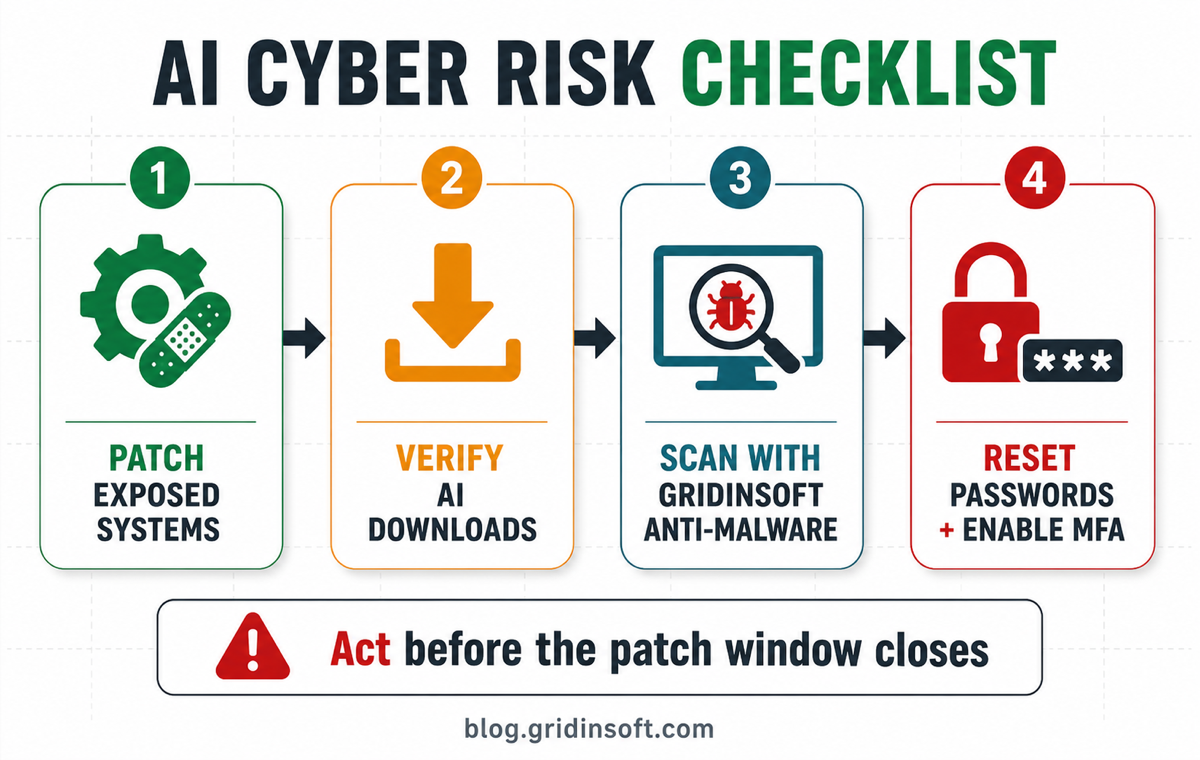
That is why the checklist below focuses on actions that reduce risk quickly: patch what is reachable from the internet, avoid unofficial AI tools, scan a machine if a suspicious file already ran, and protect accounts before stolen credentials become a second incident.
First 15 Minutes: AI Cyber Risk Checklist
| Situation | Risk and what to do first |
|---|---|
| An exposed system is unpatched | Patch or isolate it before lower-risk desktop updates. Start with VPN, RMM tools, WordPress plugins, identity providers, mail systems, and anything reachable from the internet. |
| An AI-branded app, extension, or archive looks suspicious | Do not run it because the page uses a familiar AI name. Check the official vendor domain, file signature, download source, browser extension permissions, and reputation of the URL. |
| The file already ran on Windows | Treat it as a possible infection, not only a bad download. Disconnect if activity looks active, keep the file for review if safe, run a full Gridinsoft Anti-Malware scan, remove detections, reboot, then scan again if symptoms return. |
| A login, token, wallet, or browser session may be exposed | Change passwords from a clean device, revoke unknown sessions, enable MFA, and check mailbox forwarding rules, OAuth grants, password-manager access, and recovery email settings. |
If A Suspicious AI Tool Already Ran
This is where the Five Eyes warning becomes a normal user problem. AI branding is already used in fake ChatGPT apps, fake Claude tools, copied software pages, malicious browser extensions, and “free pro” utilities. If the file was only downloaded, delete it and verify the source. If it was opened, installed, or allowed through a security warning, cleanup is easier when you check the machine before chasing every account symptom.
Use this order on Windows:
- Stop using the suspicious app and close related browser tabs.
- Check whether a new extension, startup item, scheduled task, service, or unknown remote-access tool appeared.
- Run a full Gridinsoft Anti-Malware scan and remove detections instead of only deleting the visible installer.
- Reboot and scan again if pop-ups, redirects, blocked connections, or security alerts return.
- Change passwords and revoke sessions for accounts used after the suspicious file ran.
Gridinsoft Anti-Malware cannot restore stolen passwords or prove that no account was viewed. What it can do is help find active malware, bundled components, persistence entries, suspicious browser changes, and leftovers that make account cleanup harder.
If the page or email made you download an invoice, coupon, tracking app, browser extension, or support tool, scan the PC before opening it again or logging into sensitive accounts.
Scan suspicious AI downloadsWhat Five Eyes Actually Warned
The joint Five Eyes statement says frontier AI is changing cyber risk fast enough that leaders should act now, not wait for a multi-year planning cycle [1]. Canada’s Cyber Centre describes frontier AI as dual-use: the same capabilities that help defenders review systems can also help with vulnerability research, reconnaissance, phishing, malware modification, and operational planning when abused [2].
That does not mean AI can break into any government or business by itself. Attackers still need reachable systems, stolen credentials, weak processes, or user mistakes. The change is speed and scale: more convincing lures, faster vulnerability triage, quicker malware packaging changes, and less time between public warning and exploitation attempts.
Patch Windows Are The Real Business Problem
For small businesses, the first executive question should be simple: which systems can hurt us fastest if an attacker gets help from automation? A practical order is:
- Internet-facing access: VPN, firewalls, RMM, mail gateways, hosting panels, WordPress admin, and cloud consoles.
- Identity: admin accounts, MFA gaps, shared mailboxes, service accounts, OAuth grants, and recovery channels.
- Endpoints: laptops that handle finance, passwords, browser sessions, remote access, or customer data.
- Recovery: backups, restore tests, emergency contacts, and who can revoke sessions or isolate a machine.
Do not wait for an “AI security product” before fixing this. Faster patching, MFA, least privilege, tested backups, and endpoint cleanup are still the controls that reduce damage when attackers move faster.
How Anthropic Mythos, Fable, And Glasswing Fit
Five Eyes did not name Anthropic in the joint warning. Separately, Anthropic has described Project Glasswing as a controlled program that gives vetted security organizations access to advanced vulnerability-discovery models [3]. Anthropic also describes Fable and Mythos as model families with cybersecurity uses [4]. The point is not that one named model is the threat. The point is that vulnerability discovery is becoming a serious AI capability, so access control and patch speed matter.
What Not To Assume
- Do not assume “AI” means safe. Fake AI tools can still be ordinary malware, adware, stealers, or remote-access lures.
- Do not assume deleting the installer is cleanup. If it ran, check persistence, browser changes, and account sessions.
- Do not assume MFA is complete because some accounts have it. Admin, email, cloud, and finance workflows matter most.
- Do not assume official sources will give consumer cleanup steps. They confirm the risk; you still need a response workflow.
FAQ
Can AI now hack any business automatically?
No. AI can accelerate parts of attack preparation, but attackers still need exposed systems, credentials, weak processes, or a user action such as running a malicious file.
What should I do first after reading the Five Eyes warning?
Patch exposed systems, close MFA gaps on important accounts, verify suspicious AI downloads, and scan any Windows machine where an unknown AI-branded file already ran.
When should I use Gridinsoft Anti-Malware?
Use it when a suspicious AI app, archive, extension, fake update, or “security scanner” has already been opened or installed. A full scan can find active malware, persistence, bundled components, and cleanup leftovers.
Is Anthropic Mythos malware?
No. Mythos is described as a cybersecurity-capable AI model family. The concern is dual use: advanced vulnerability-discovery tools can help defenders, but similar capability needs careful access control.
References
- Canadian Centre for Cyber Security. “Five Eyes cyber security agencies’ statement on the AI shift in cyber risk: Why leaders must act now.” Government of Canada, accessed June 23, 2026. Statement.
- Canadian Centre for Cyber Security. “Frontier Artificial Intelligence.” Government of Canada, accessed June 23, 2026. Guidance.
- Anthropic. “Expanding Project Glasswing: Advancing AI-powered cyber defense.” Anthropic, accessed June 23, 2026. Post.
- Anthropic. “Claude Fable 5 and Mythos 5.” Anthropic, accessed June 23, 2026. Post.