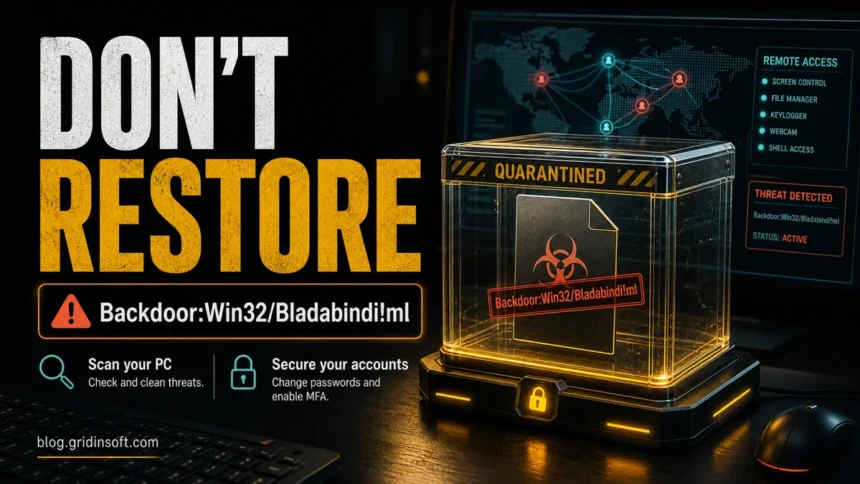
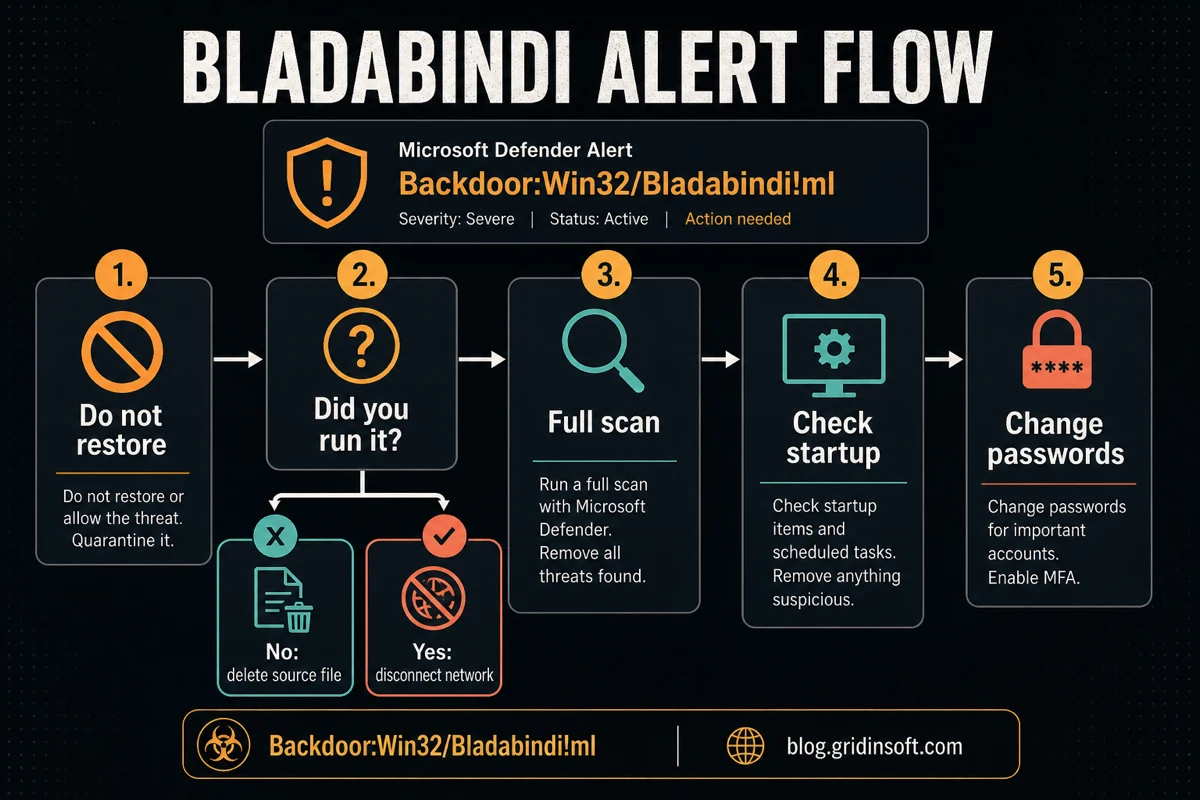
Backdoor:Win32/Bladabindi!ml is a Microsoft Defender detection for Bladabindi, also known as njRAT, a Windows remote-access trojan. Treat the alert as serious unless the file came from a trusted vendor, was never executed, and the vendor or Microsoft confirms a false positive. If Defender reports it in C:\$Recycle.Bin, treat it as a deleted copy that still needs cleanup, not as proof the threat is harmless. If the alert appeared after a crack, game repack, email attachment, USB drive, torrent, Discord link, or unknown installer, do not restore it. Keep the file quarantined, disconnect the PC if you ran it, scan for persistence, and change important passwords from a clean device after cleanup starts.
What is Backdoor:Win32/Bladabindi!ml?
Backdoor:Win32/Bladabindi!ml means Defender found code, behavior, or a machine-learning match associated with the Bladabindi/njRAT malware family. Microsoft classifies this detection as a backdoor and says the threat can perform actions chosen by a malicious actor on the device.
Bladabindi/njRAT is dangerous because it can give another person remote access to the infected Windows session. Depending on the variant and operator, it may run commands, upload or download files, capture screenshots, log keystrokes, steal browser credentials, inspect files, use the webcam or microphone, and add startup persistence.
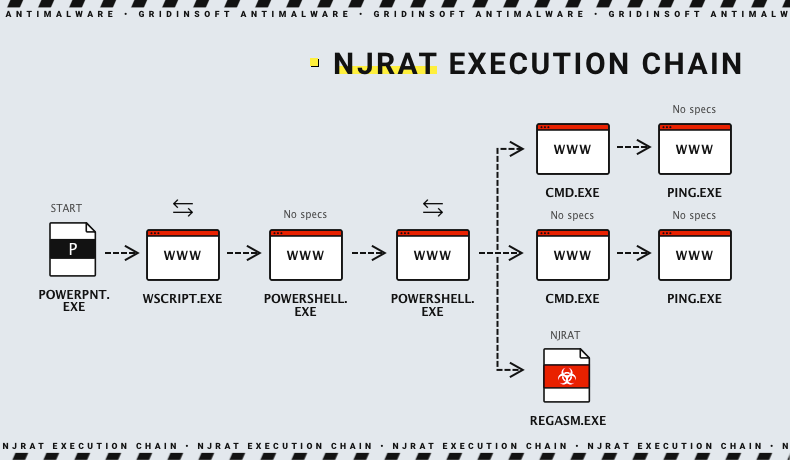
Common sources include pirated installers, cracked software bundles, fake game mods, malicious email attachments, drive-by downloads, and removable drives used on an infected computer. A single quarantine may be enough if the file never ran. If you opened the installer, allowed admin permission, or the alert keeps returning, assume another loader, startup entry, scheduled task, browser change, or bundled module may still be present.
Should You Restore or Allow Bladabindi?
In most real-world cases, no. Restoring a remote-access-trojan detection is only reasonable after you can verify all of these conditions: the file came directly from a known vendor, the download path and signature are clean, the file was never executed, and the vendor or Microsoft confirms the detection was wrong.
Do not restore the file just because VirusTotal has few detections, the installer looks familiar, a forum says the crack is usually safe, or you need the program to run. RAT detections are often tied to loaders and repacks where the visible installer is only part of the risk.
False Positive or Real Infection?
Use the source, path, and execution history to decide how cautious to be.
| Situation | Risk and what to do |
|---|---|
| File came from a vendor site, has a valid signature, and was never opened | Possible false positive. Keep it quarantined and submit it to Microsoft or the vendor before restoring. |
| Detection came from a crack, keygen, torrent, repack, mod menu, or unknown mirror | Treat it as malicious. Do not restore it. Delete the source archive and scan the PC. |
The alert path is under %TEMP%, %APPDATA%, Startup, or Task Scheduler |
Assume the file may have run or been dropped by another component. Check persistence and run a full scan. |
| Defender says the threat was not fully removed or the alert returns after reboot | Look for a loader, scheduled task, startup value, browser extension, or another bundled app recreating the file. |
Defender reports the file under C:\$Recycle.Bin or another Recycle Bin path |
Do not restore it to test. Save the detection path, empty the Recycle Bin only after you record the evidence, then scan for the original download and persistence. |
| The file was opened before Defender blocked it | Disconnect the PC, clean persistence, then change passwords from a clean device. |
Bladabindi Backdoor Threat Analysis
njRAT has existed for years and appears in many variants, but the practical risk is stable: an operator may gain remote control of the victim’s Windows session. The attacker usually needs the victim to run the payload first, then the malware tries to survive reboots and communicate with command-and-control infrastructure.
Launch and Detection Evasion
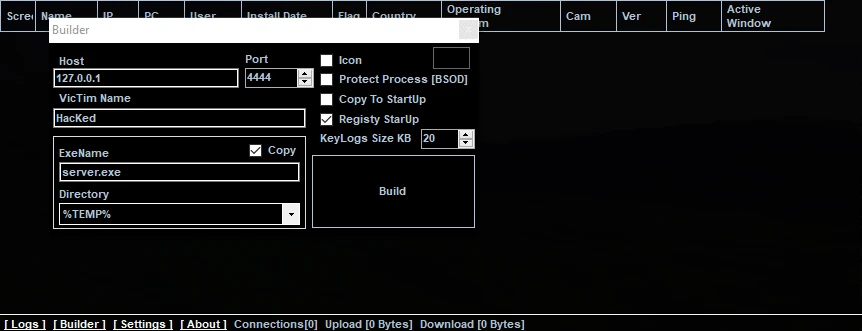
Bladabindi samples are often built with custom settings before delivery. The builder may define the executable name, installation folder, registry startup value, host address, and network port. This customization helps the same malware family appear under many file names and paths.
Many samples are also packed or obfuscated, so the !ml suffix may appear when Defender’s machine-learning layer identifies suspicious structure or behavior. That does not make the alert harmless. For a remote-access trojan, a cautious response is safer than restoring the file because the installer looked normal.
Persistence and Startup Entries
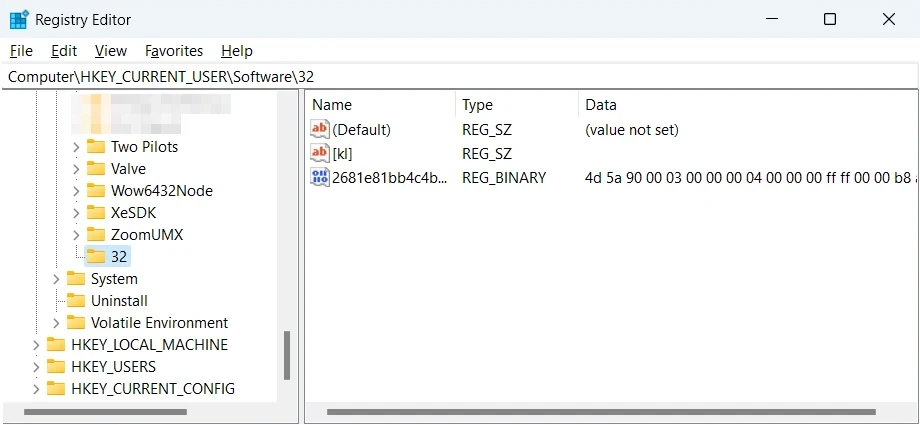
After launch, Bladabindi may create a startup entry so it runs again after reboot. Known persistence locations include startup folders and registry locations such as HKCU\Software\Microsoft\Windows\CurrentVersion\Run, HKCU\Software\Microsoft\Windows\CurrentVersion\RunOnce, and user startup folders under %APPDATA%\Microsoft\Windows\Start Menu\Programs\Startup. Some variants may use randomly named values, scheduled tasks, copied executables in user-writable folders, or scripts that relaunch the payload.
Remote Control and Data Theft
Once active, the malware can call out to a command server and wait for instructions. Depending on the build, it may give the operator a remote shell, a file manager, screenshot capture, keylogging, browser credential theft, clipboard monitoring, webcam access, or the ability to download more payloads.
- Remote shell commands and file transfer
- Browser credential theft and clipboard monitoring
- Keystroke logging and screenshot capture
- Webcam or microphone access
- Registry changes and startup persistence
- Additional payload download from a remote server
What to Do If Defender Quarantined Bladabindi
- Do not restore or allow the file. Leave the detection in quarantine unless a trusted vendor or Microsoft confirms a false positive.
- Disconnect from the network if you ran it. Turn off Wi-Fi or unplug Ethernet to reduce command-and-control communication while you clean the system.
- Delete the source file. Remove the original download, extracted folder, mounted ISO, USB copy, and duplicates from
%USERPROFILE%\Downloadsor Desktop. - Run a full scan. Use Microsoft Defender Full Scan or Offline Scan, then run a second cleanup scan with Gridinsoft Anti-Malware to look for loaders, scheduled tasks, hidden files, bundled apps, and startup entries that may recreate the alert.
- Check startup persistence. Review Startup Apps, Task Scheduler, browser extensions, and suspicious values under
HKCU\Software\Microsoft\Windows\CurrentVersion\RunandHKLM\Software\Microsoft\Windows\CurrentVersion\Run. - Reboot and rescan. If the same alert returns after reboot, treat removal as incomplete and focus on the path Defender reports.
- Change passwords from a clean device. Prioritize email, Microsoft, browser-synced accounts, banking, crypto, Steam, Discord, and any account used on the affected PC.
- Revoke active sessions. Sign out other devices, regenerate recovery codes, and enable MFA where possible.
If Bladabindi Is Detected in Recycle Bin
A Bladabindi alert under C:\$Recycle.Bin usually means Windows or a security tool is seeing a deleted executable, extracted installer, or leftover payload copy. The Recycle Bin location does not make the file safe. It only tells you the file was moved into the deleted-files area, where scanners can still inspect it and where a restored executable could still run if you bring it back.
Do not restore the file just to check whether the alert disappears. First copy the full detection path into your notes or screenshot the Defender alert, because the random Recycle Bin filename can help you trace which account or drive contained it. Then empty the Recycle Bin after you have recorded the path, delete the original archive or installer that created it, and run a full scan for matching files in Downloads, Desktop, extracted folders, Startup, Task Scheduler, and user-writable locations such as %TEMP% and %APPDATA%.
If the alert name appears as a related vendor alias such as Adware.Win32.Bladabindi.dd!n, handle it the same way: the important decision is whether the file ever ran and whether anything can recreate it after deletion. If the executable was opened before it reached Recycle Bin, continue with the startup, persistence, and account-check steps below instead of treating the deleted copy as the whole incident.
If Backdoor:Win32/Bladabindi!ml Keeps Coming Back
A recurring alert usually means one of three things: the original installer is still present, a startup entry is relaunching the payload, or another malware component is dropping it again. Start by deleting the original download and extracted folder. Then scan in Safe Mode or run an offline scan, because some persistence mechanisms are easier to remove when the malware is not active.
Use the detection path as the clue. If Defender points to a browser cache, archive, removable drive, or restore point, removing that container may solve the alert. If the path points to %APPDATA%, %TEMP%, ProgramData, Startup, Task Scheduler, or a Run key, treat it as post-execution cleanup.
How Gridinsoft Anti-Malware Helps With Cleanup
Defender may quarantine the visible file while another loader, scheduled task, startup value, service, browser change, or bundled module remains on the PC. Gridinsoft Anti-Malware is useful after a Bladabindi alert because it checks for detections, hidden files, startup entries, scheduled tasks, bundled apps, browser changes, and persistence that can bring the threat back after reboot.
Use it after you remove the original source file, especially if the alert appeared from a crack, repack, unknown installer, %TEMP%, %APPDATA%, Startup, or Task Scheduler path. Remove what the scan detects, reboot, and scan again if symptoms or alerts return.
Defender can quarantine the visible file, but repeated alerts may mean a loader, scheduled task, service, browser change, or bundled component is recreating it. Scan the PC before trusting the cleanup.
Scan for Bladabindi leftoversAfter Removal: Account and Device Checks
Because Bladabindi is a remote-access-trojan family, cleanup should not stop at deleting one file. If the file ran, assume passwords, browser sessions, and local files may have been exposed until you prove otherwise.
- Change important passwords from a clean phone or another trusted computer.
- Sign out other sessions for email, Microsoft, Google, Steam, Discord, banking, and crypto accounts.
- Enable MFA where possible and regenerate recovery codes.
- Check browser extensions and remove anything you did not install deliberately.
- Watch for new login alerts, password-reset emails, or unusual payment/account activity.
- Back up important files after cleanup, not before scanning unknown executables again.
FAQ
Why does Defender find Bladabindi in C:\$Recycle.Bin?
It usually means the detected executable was deleted but still exists inside the Recycle Bin storage folder. Keep it deleted, record the path, empty the Recycle Bin after saving the evidence, and scan for the original installer or persistence that may have created it.
Can I restore Backdoor:Win32/Bladabindi!ml from quarantine?
No, not unless the file came from a trusted source and Microsoft or the software vendor confirms a false positive. If it came from a crack, repack, torrent, game mod, unknown mirror, or email attachment, restoring it is the risky choice.
Does the !ml suffix mean it is only a machine-learning mistake?
No. The suffix can indicate machine-learning classification, but it does not make the alert harmless. Use the source, file path, signature, and whether the file was executed to judge risk.
Why does Defender keep detecting Bladabindi after removal?
The original archive may still be present, a startup entry may relaunch the payload, or another bundled component may be dropping it again. Check the reported path, Startup Apps, Task Scheduler, browser extensions, and Run keys.
What passwords should I change after Bladabindi?
Change email first, then Microsoft, browser-synced accounts, banking, crypto, Steam, Discord, and any account used on that PC. Change them from a clean device after malware cleanup starts.
Is Bladabindi the same as njRAT?
Bladabindi is one of the names associated with njRAT. Defender may use Bladabindi-style labels for detections tied to this remote-access-trojan family.
References
- Microsoft Security Intelligence. “Backdoor:Win32/Bladabindi!ml threat description.” Microsoft, published December 23, 2019, accessed June 20, 2026. https://www.microsoft.com/en-us/wdsi/threats/malware-encyclopedia-description?name=Backdoor:Win32/Bladabindi!ml
- MITRE ATT&CK. “njRAT, Software S0385.” MITRE, last modified May 12, 2026, accessed June 20, 2026. https://attack.mitre.org/software/S0385/