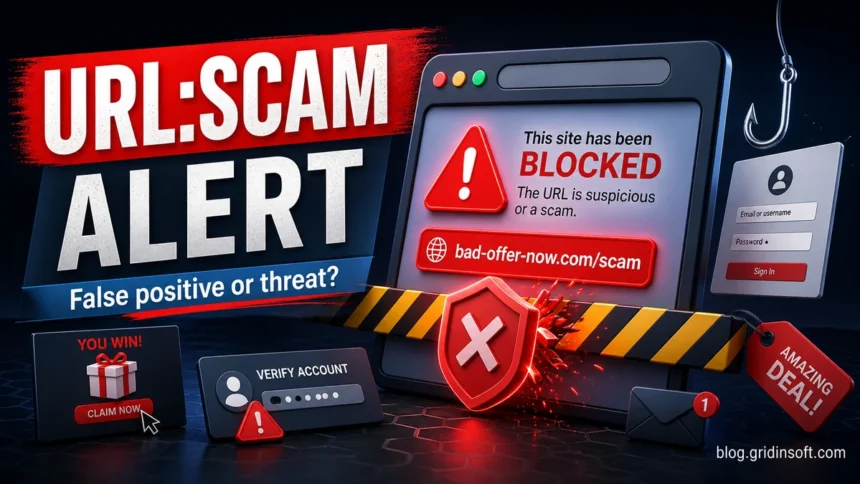
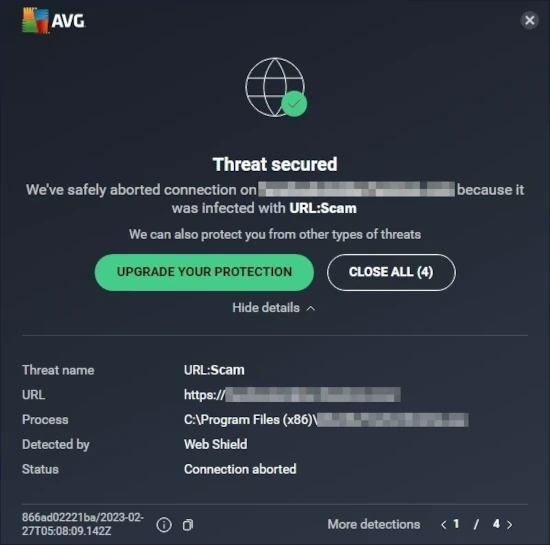
URL:Scam in Avast or AVG means the web shield blocked a URL that looks like a scam, phishing page, fake shop, fake giveaway, or other fraudulent website. The alert is about the address you tried to open, not proof by itself that Windows is infected. Treat it as real until you verify the URL, especially if the page came from an email, ad, social media message, search result, or browser redirect.
If you only saw the warning once, close the tab and check the address with a reputation scanner. If URL:Scam keeps appearing without you opening suspicious pages, look for adware, browser notification spam, a bad extension, or a browser hijacker that is sending traffic to scam domains.
One alert after clicking an email, ad, or message link
This usually means the linked page is unsafe or newly suspicious. Close it, do not sign in, and open the real service by typing its address manually.
Alert on a familiar site you typed yourself
This may be a false positive, a compromised page, a bad ad, or a third-party script. Check the exact URL with reputation tools before adding any exception.
Alerts appear when the browser is idle or on many unrelated pages
This points to possible adware, malicious extensions, notification abuse, or DNS/proxy changes. Scan the system, remove suspicious extensions, reset browser settings, and check DNS/proxy settings.
You entered a password, card number, or recovery code before the alert
Account or payment data may already be exposed. Change passwords from a clean tab or device, enable MFA, revoke sessions, and contact the bank or service provider.
What is URL:Scam in Avast and AVG?
URL:Scam is a web reputation detection used by Avast and AVG products when a requested address matches scam-like signals. Those signals can include a bad domain reputation, phishing-style content, fake payment or login forms, redirect chains, suspicious scripts, user reports, or behavior similar to known fraudulent sites.
The important detail is scope: Avast is blocking a URL. That differs from a file detection such as a Trojan or PUP alert. A single URL:Scam warning usually means “do not open this page.” Repeated URL:Scam warnings, especially when you are not deliberately visiting those addresses, can point to something on the device or in the browser that keeps forcing redirects.
What to do when Avast shows URL:Scam
1. Do not bypass the warning first
Close the blocked tab. Do not press through the warning just because the site looks familiar. Scam pages often copy Microsoft, delivery companies, banks, crypto exchanges, online stores, streaming services, and antivirus brands.
2. Check the exact URL, not only the brand name
Copy the blocked address from the Avast notification or browser address bar if you can do that without opening the page. Check it with the GridinSoft Website Reputation Checker, Google Safe Browsing, and a multi-engine URL scanner. If several services flag it, leave the site blocked.
3. Open important accounts from a clean route
If the alert appeared after a “security notice”, invoice, delivery notice, account verification, or password reset email, do not use that link. Open the service by typing the official domain yourself or using a saved bookmark. Then check account notifications, login sessions, recovery email, MFA settings, and recent transactions.
4. Act fast if you submitted data
If you entered a password, one-time code, seed phrase, card number, or identity document before the URL:Scam alert appeared, assume the data may be compromised. Change the password from a clean tab or device, enable multi-factor authentication, revoke active sessions, and contact the affected bank, marketplace, email provider, or workplace administrator.
Is URL:Scam a virus?
No, not by itself. URL:Scam is a website warning. It can still be connected to malware in two common situations: the blocked page tried to push a fake installer, or an unwanted program on your computer keeps redirecting the browser to scam domains.
Run a full system scan if the alert repeats, if the browser opens tabs by itself, if your search engine or homepage changed, if unknown extensions appeared, or if Avast blocks different scam URLs during normal browsing. GridinSoft Anti-Malware can remove browser hijackers, adware, malicious scheduled tasks, and other unwanted apps that cause scam redirects.
When URL:Scam keeps popping up
Repeated URL:Scam alerts are more important than a single block. Use the Avast Threat Secured recurrence guide when you need to identify the browser, app, or background process behind the next connection, then check these areas in order:
- Browser extensions: remove extensions you do not recognize, especially coupon, search, PDF, download, video, or “security” add-ons installed recently.
- Site notifications: disable notification permission for unknown sites in Chrome, Edge, Firefox, or Opera.
- Search engine and homepage: restore the default search provider and startup page if they changed.
- Proxy and DNS: remove unknown proxy settings and suspicious DNS servers.
- Startup apps and scheduled tasks: disable recently added launchers, updaters, and random-named tasks.
- Full malware scan: scan the whole system, then reset affected browsers if redirects continue.
For browser-specific cleanup, use the GridinSoft guides to browser redirect virus removal and resetting Chrome, Edge, Firefox, Opera, and Safari.
False positive or real scam?
A false positive is possible, but it should be the last assumption, not the first. Use this quick split:
Signals that lean toward a real scam
- You arrived through an email link, ad, pop-up, social message, or shortened URL.
- The domain has a misspelling, extra words, unusual TLD, or very recent registration.
- The page pushes urgent login, payment, wallet connection, fake support chat, or a download prompt.
- Multiple reputation scanners flag the same URL.
- Different scam URLs appear during normal browsing.
Signals that lean toward a false positive
- You typed the correct official domain manually or used a long-term bookmark.
- The page is on the correct domain with a normal HTTPS certificate.
- The page is a static informational page or a known business workflow.
- Only Avast or AVG flags the page and other reputation data is clean.
- The warning appears only for one specific page, not across unrelated websites.
If you are confident the alert is wrong, report it to Avast through the official false positive form listed in References. Add an exception only after verifying the URL. Avast also documents steps for troubleshooting blocked website access in its support materials.
Common pages that trigger URL:Scam
URL:Scam is most often associated with fraud rather than classic file malware. Typical examples include fake Microsoft or email login pages, fake delivery tracking pages, fake antivirus renewal warnings, crypto wallet connection pages, fake giveaways, fake shopping discounts, fake job forms, tech-support pop-ups, and survey pages that lead to payment or personal-data collection.
Some scam pages also redirect through several intermediate URLs. That is why the name in the Avast popup may not match the brand shown on the page. The blocked URL is usually the most useful clue.
URL:Scam vs URL:Blacklist vs URL:Phishing
URL:Scam
The website appears connected to online fraud, fake offers, phishing flows, or deception. Do not open it until reputation checks are clean.
URL:Blacklist
The URL or domain appears on a blocklist or has known malicious reputation. Leave it blocked unless you can prove the domain is safe. See also: URL:Blacklist in Avast or AVG.
URL:Phishing
The page specifically attempts to steal credentials or sensitive account data. Close it, change exposed passwords, and review active account sessions.
URL:Malware
The page may distribute or trigger malicious downloads. Do not download files; scan the device if anything was saved or opened.
FAQ
Why does Avast block a normal website as URL:Scam?
The page may have been compromised, may load a bad third-party script or ad, may redirect through a risky URL, or may be a false positive. Check the exact blocked address with several reputation tools before allowing it.
Can I add the site to Avast exceptions?
Only if you verified the exact URL and understand why it was blocked. Do not add broad domain exceptions for banking, email, crypto, software downloads, or payment pages just to bypass one warning.
Does URL:Scam mean my passwords were stolen?
Not if Avast blocked the page before you entered anything. If you typed a password, one-time code, card number, seed phrase, or personal document into the page, treat it as exposed and secure the affected account immediately.
Why do URL:Scam alerts appear on every site?
That pattern often points to adware, a browser hijacker, notification spam, a malicious extension, or changed DNS/proxy settings. Remove suspicious extensions, revoke site notifications, reset the browser, and run a full malware scan.
References
- Avast Support. “Troubleshooting website access issues caused by Avast Antivirus.” Gen Digital/Avast Support, accessed May 27, 2026. https://support.avast.com/en-ww/article/troubleshoot-website-access-antivirus/
- Avast. “Submit a suspected false positive website or file.” Gen Digital, accessed May 27, 2026. https://www.avast.com/false-positive-file-form.php
- Google. “Safe Browsing site status.” Google Transparency Report, accessed May 27, 2026. https://transparencyreport.google.com/safe-browsing/search
- VirusTotal. “URL scanner.” VirusTotal, accessed May 27, 2026. https://www.virustotal.com/gui/home/url