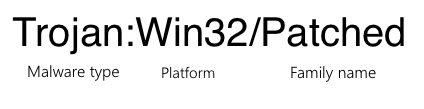
Trojan:Win32/Patched is a Microsoft Defender detection for a Windows program or library that appears to have been modified. Treat the alert as unsafe until you know the file path, where the file came from, and whether Defender removed it cleanly. The detection often appears with cracked installers, modified EXE files, patched DLLs, or malware that changes another program so malicious code runs inside something that looks legitimate.
If the file came from a torrent, crack, game cheat, unofficial mirror, Discord/Telegram download, or a password-protected archive, remove it and scan the PC. If it came from a trusted vendor update or your own signed software build, verify the signature and submit it as a possible false positive before restoring it.
| Detection name | Trojan:Win32/Patched |
| Usually means | An EXE, DLL, installer, or system component was modified in a suspicious way. |
| Common source | Cracks, activators, repacks, fake installers, malicious updates, or tampered program files. |
| False positive chance | Possible, but only believable when the file source, signature, and update path are trustworthy. |
| Best first action | Do not restore the file. Let Defender remove it, delete the original download, then run a full scan. |
What Trojan:Win32/Patched Means
Trojan:Win32/Patched is not always one single malware family. It is a detection pattern for malicious or suspicious Win32 files that have been altered, packed, or patched. Microsoft describes the related Trojan:Win32/Patched.I entry as a detection for malicious packed Win32 programs and says manual removal is not recommended for that threat.
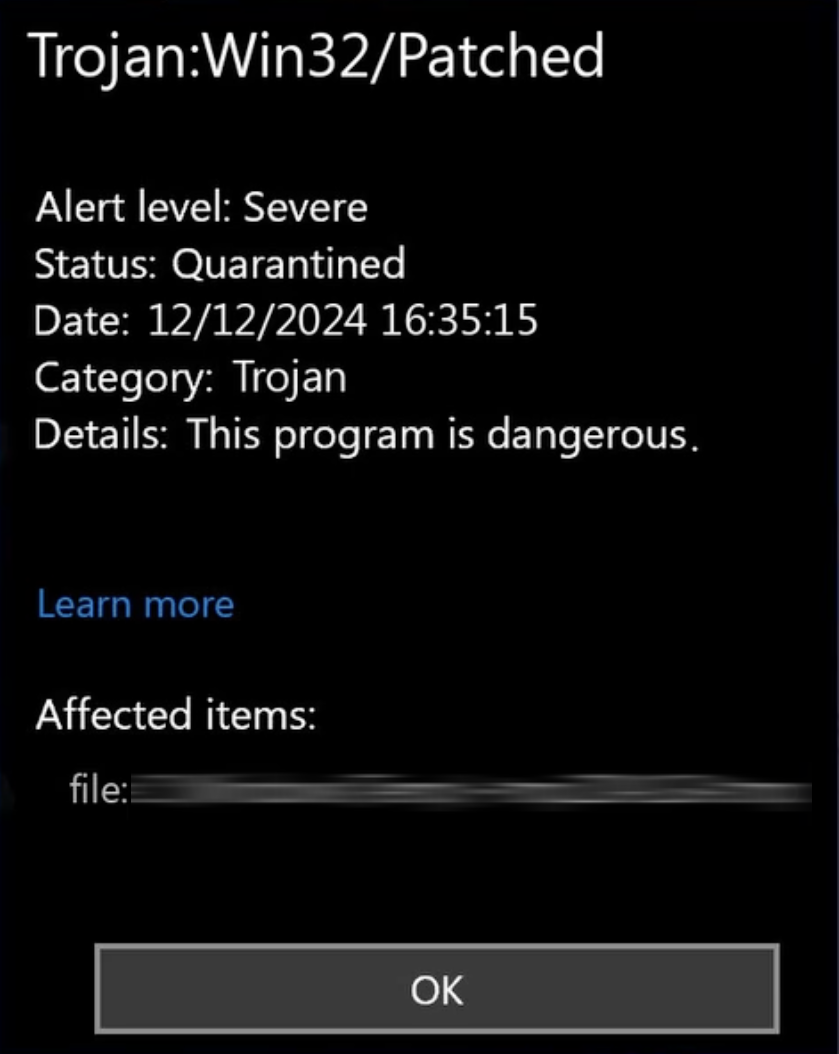
The important part is the word Patched. Attackers can add code to a real application, modify a DLL so it loads another payload, or change a security-related function so the original program keeps working while the malicious part runs in the background. That is why the same alert may appear for a game crack, a modified installer, a browser-related DLL, or a file inside AppData, Temp, Downloads, or a repack folder.
Is Trojan:Win32/Patched Dangerous?
On a normal home or work PC, assume it is dangerous. Patched files are commonly used to hide stealers, loaders, miners, proxy malware, browser hijackers, or remote-access tools inside something users expect to run. If you opened the file with administrator rights, allowed it in Defender, or disabled antivirus to install it, check the whole system rather than only the quarantined file.
The risk is higher when the detected file matches any of these patterns:
- It came from a crack, keygen, activator, trainer, mod menu, torrent, repack, or unofficial software mirror.
- The instructions asked you to turn off Defender, add an exclusion, run as administrator, or ignore a browser warning.
- The file sits in
Downloads,AppData\Local\Temp, a random folder name, or a recently extracted archive. - Defender shows Remediation incomplete, Action needed, Threat blocked, or the alert returns after reboot.
- You noticed new browser extensions, changed search settings, unknown startup items, or suspicious outbound traffic after running it.
Could It Be a False Positive?
A false positive is possible, especially with newly released software, self-built programs, packed installers, game mods, or legitimate update files that changed before security vendors had enough reputation data. Still, the file name alone is not enough to prove it is safe.
Use this quick decision rule:
| Trusted vendor update, valid signature, official download path | Pause before deleting business-critical software, update Defender definitions, rescan, and submit the file to the vendor or Microsoft if the alert persists. |
| Your own compiled tool or lab sample | Compare the build hash with your source artifact, sign the binary if appropriate, and submit a false-positive report only after independent scans agree. |
| Crack, activator, repack, patcher, trainer, or unknown DLL | Do not treat it as a false positive. Remove it, delete the original package, and scan for payloads. |
How to Remove Trojan:Win32/Patched
- Do not restore or allow the file. If Defender already quarantined it, leave it there while you identify the source path.
- Delete the original download or archive. Removing only the quarantined copy is not enough if the same installer, ZIP, ISO, or crack folder remains on disk.
- Update Microsoft Defender and run a full scan. A quick scan may miss the payload that the patched file dropped earlier.
- Run Microsoft Defender Offline if the alert returns. This helps when a loader, service, or startup task is active while Windows is running.
- Scan with a second security tool. Use Gridinsoft Anti-Malware when you need another look at patched EXE/DLL files, startup entries, browser changes, and leftover payloads.
- Check startup and persistence points. Review Startup Apps, Task Scheduler, unknown services, browser extensions, proxy settings, and recently created files in
AppDataandTemp. - Change passwords from a clean device if you ran the file. Prioritize email, browser sync, banking, crypto wallets, Steam, Discord, Microsoft, Google, and work accounts.
After uninstalling the suspicious app or deleting the visible threat, use Gridinsoft Anti-Malware to check hidden files, startup entries, scheduled tasks, bundled apps, browser changes, and other persistence points that can restore malware.
Download Anti-MalwareIf It Keeps Coming Back
Repeated Trojan:Win32/Patched alerts usually mean the source package is still present, another program is recreating the file, or a startup task is unpacking the same payload after reboot. Search Protection History for the exact path and time. If the path points to a browser cache, downloaded archive, installer folder, or game/mod directory, remove that whole source, not only the detected item.
If the path points to a Windows system folder such as System32 or SysWOW64, do not manually delete core DLLs. Run Defender Offline, then repair Windows components with trusted system tools or restore from a clean backup. A patched system component is a different risk than a random download because deleting the wrong file can break Windows while leaving the infection path untouched.
How to Stay Safe After Cleanup
Download installers from official vendor pages, avoid sponsored lookalike download results, and do not use cracks or activators. Patched software often asks users to disable protection before installation; that is the exact moment when stealers and loaders get the easiest path onto the machine.
For related context, read our guides on Microsoft Defender detection names, HackTool:Win32/Crack, infostealer malware, and fake “verify you are human” malware prompts.
FAQ
Should I remove Trojan:Win32/Patched?
Yes. On a normal PC, remove it unless you can prove the detected file is a trusted, signed, official update or your own controlled build.
Can Trojan:Win32/Patched be a false positive?
It can be, but source and context decide. A signed file from an official vendor update deserves verification; a crack, activator, repack, or unknown DLL should be treated as unsafe.
Why does Defender say the file is patched?
It means the program or library appears modified, packed, or altered in a way that matches malicious behavior. Attackers use this technique to hide code inside files users may trust.
What if Defender removed it but the alert still appears in Protection History?
If repeated scans are clean and the alert does not reappear with a new timestamp, it may be old history. If it returns after reboot or shows a new path, investigate persistence and scan offline.
References
- Microsoft Security Intelligence. “Trojan:Win32/Patched.I threat description.” Microsoft, updated September 15, 2017, accessed June 6, 2026. https://www.microsoft.com/en-us/wdsi/threats/malware-encyclopedia-description?Name=Trojan%3AWin32%2FPatched.I