

SRBMiner is cryptocurrency mining software that uses a computer’s processor or graphics card. The developer distributes SRBMiner-MULTI for Windows and Linux. On Windows, the program can appear in Task Manager as SRBMiner-MULTI.exe. You might recognize it as the miner you chose for your own rig. If you found it by accident on a PC nobody uses for mining, record the file location before closing it. That path can help you trace who put it there and what starts it.
What does SRBMiner do?
SRBMiner uses the CPU or a supported AMD, NVIDIA or Intel GPU to perform calculations for a cryptocurrency network. In a typical pool setup, the software submits work to a mining pool, which credits the account or wallet in the configuration. Your computer supplies the electricity and processing time. If someone else chose the payout account, that person can earn the rewards while you pay to run the machine.
The developer publishes SRBMiner-MULTI under the name doktor83. If you set up mining yourself, compare the version and folder in your mining application with the copy that is actually running. On a shared PC, ask the other users first. On a company machine, give IT the process name and path so they can check whether the installation was approved.
Is SRBMiner a virus?
SRBMiner has a legitimate use. It can also be deployed without the owner’s permission, a practice called cryptojacking. Even a genuine developer release can be used this way. To decide what to do, check two things: where this particular copy came from and whether anyone authorized it to run.
Microsoft documented the distinction in a campaign targeting people looking for PC utilities. Lookalike download sites offered installers that brought remote-access software onto victims’ machines. The attackers could then deploy one of several miners, including SRBMiner. Their software could pause mining during gaming or other heavy GPU activity. A PC that played games smoothly could still mine for someone else when its owner stepped away.
How to check an unfamiliar SRBMiner process on Windows
- Find the running copy. Press Ctrl + Shift + Esc, open Details in Task Manager, right-click the process and choose Open file location. Record the full path and filename. If the process disappears, use the affected file path in your antivirus alert. Leave a quarantined copy in quarantine.
- Distinguish a download from an execution. An alert pointing inside a ZIP in Downloads tells you the archive contained a flagged file. A live process shows that an executable actually started. Check your browser’s download history around the time of the first alert. A hardware utility you installed that day may be a better lead than the miner’s filename.
- Check the identity of any Windows-looking process. If the name is
SecurityHealthHost.exebut its details mention SRBMiner, record the folder and check the digital signature on that specific file. Windows uses the same filename for a security component. Our SecurityHealthHost.exe identification guide shows which properties to inspect before taking action.
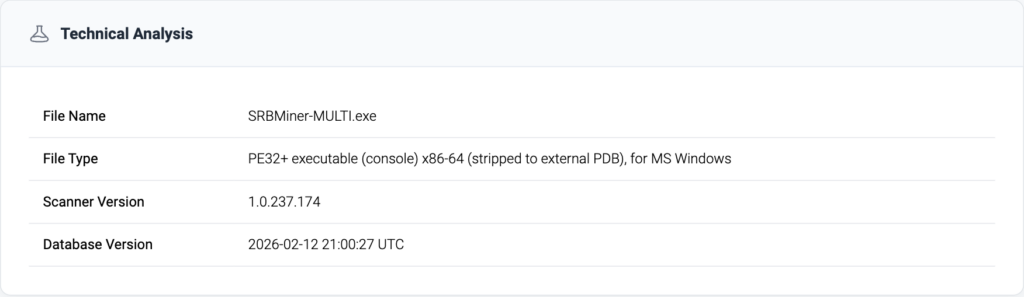
A file report can help you narrow this down. Gridinsoft analyzed a 64-bit Windows executable named SRBMiner-MULTI.exe on February 13, 2026 and classified that sample as Trojan.Win64.CoinMiner.mz!n. The sample report includes its SHA-256 fingerprint. Matching all 64 characters identifies the same file contents. A filename match alone leaves that question open.
How to remove SRBMiner if you didn’t install it
If you intentionally installed the miner and want it to stop, close it from your mining application, turn off the startup option you configured and restart the PC. If you personally created a scheduled task for mining, disable that task too.
If nobody authorized mining on a personal PC, scan the whole machine. In the campaign Microsoft investigated, one program obtained and launched another. Deleting the visible miner could leave its launcher in place. Install Gridinsoft Anti-Malware, update its detection database and run a Full Scan. Review the detected items and their paths, quarantine threats, then restart.
Why does SRBMiner keep coming back?
First check the timestamp. Windows Security keeps old quarantine entries in Protection history. An entry from yesterday can remain visible after a successful cleanup. A new alert after today’s restart, or a running executable at the path you recorded, gives you evidence of fresh activity.
If a fresh copy appears, save its path and the time it returned. Compare both with the earlier alert. A copy recreated at sign-in points you toward something that runs at sign-in. A fresh detection inside an archive you just reopened points you back to that download. The Windows coin miner cleanup guide covers startup items and scheduled tasks in more detail.
If the activity continues and Microsoft Defender is active, save your work and open Windows Security → Virus & threat protection → Scan options → Microsoft Defender Antivirus (offline scan). Windows restarts and scans from its recovery environment. Review Protection history afterward. On a managed PC, send IT the original installer name, both file paths and alert times. That sequence gives them a starting point for finding what relaunched the miner.
References
- doktor83. SRBMiner-MULTI cryptocurrency miner. Developer documentation. Accessed November 21, 2026.
- Microsoft Defender Experts and Microsoft Defender Security Research Team. From poisoned search results to GPU mining. May 26, 2026.
- Microsoft Support. Virus and Threat Protection in the Windows Security App. Accessed November 21, 2026.