
LG has pushed back against claims that its smart TVs record household conversations, publishing a September 10 clarification in Taiwan. The dispute gives owners a reason to review their TV’s permissions—but microphone controls, viewing-data consent and local-network discovery are separate decisions.
GamersNexus says its investigation found LG TVs identifying devices on its test network and raised concerns about microphone privacy and automatic content recognition, or ACR. Its public research summary describes the tested behavior; it is not proof that every LG television has been hacked. [2]
What LG says—and where the limits matter
LG says voice processing follows a held remote-control button or an enabled hands-free feature recognizing its wake word. Otherwise, it says wake-word processing stays local and the audio is deleted. The company acknowledges nearby-device discovery on the same network. Its statement also says current Taiwan models do not have ACR; that regional statement does not establish the position elsewhere. [1]
Those distinctions change what an owner should check. Finding a television on your home network is not evidence of a microphone recording. Turning off voice activation is not the same choice as declining viewing-data collection. And a setting described for one market may not exist on an imported set or another webOS version.
The competing claims should remain attributed. A company statement explains the intended behavior; it does not independently settle every research finding. Equally, a demonstration on a particular device cannot establish how all models behave under all settings.
Review the optional agreements first
LG’s current US support guide directs owners to Settings → Privacy & Terms → User Agreements. It distinguishes the Terms of Use and Privacy Policy needed for smart services from optional viewing-information, voice and personalized-ad agreements. Review those choices individually instead of treating every checkbox as a requirement. Menu placement can vary by model. [3]
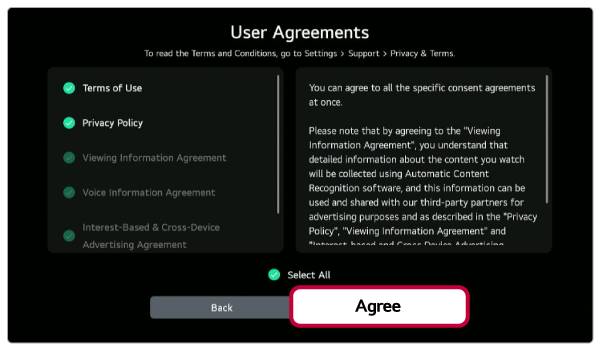
Read the description next to each optional choice before changing it. This lets you decide which convenience or personalization feature you actually want. It also avoids mistaking a rejected optional advertising agreement for a broken streaming app. The screenshot is a US example, so use the wording on your own television.
Check voice controls separately
LG’s voice-support instructions identify All Settings → General → AI Service → Voice Recognition Settings on supported sets. Review the available voice-activation control there if you do not want hands-free commands. Labels and availability differ; LG also notes that the menu may be absent without an internet connection. [4]
Keep a note of the model, software version and choices you changed. If a menu is missing or the TV behaves differently from its documentation, those details make a support request more useful than a general report that the device is “spying.” Do not install an unofficial privacy fix or follow a random blocklist on the assumption that every listed connection is malicious.
This privacy dispute is separate from the older LG TV command-execution vulnerabilities. Privacy preferences and security maintenance address different problems: neither a changed checkbox nor an installed update, by itself, proves that no personal data has ever been collected.
References
- LG Taiwan. “Clarification on smart-display privacy and voice-data processing.” September 10, 2026. Official statement.
- GamersNexus. “The Data Dragnet.” Public research summary, accessed September 12, 2026. Research overview.
- LG USA Support. “How to Accept the Updated User Agreements on Your LG TV.” September 2, 2026. Agreement settings.
- LG USA Support. “LG TV – Using Voice Commands.” July 17, 2026. Voice settings.