
Trojan:Win64/Grandoreiro!pz is a Microsoft Defender detection for components of the Grandoreiro banking trojan.[1] If Protection History says the item was blocked or quarantined before it ran, that is not proof that the PC was infected or that banking credentials were stolen. If an MSI, ZIP or RAR archive, DLL, or EXE ran—or the alert returns—disconnect the PC, scan it, check persistence, and protect financial accounts from a clean device.
Keep the detected item quarantined. Do not restore it or add an exclusion merely because a later scan is quiet: a second scan shows the current state, not whether the earlier file executed or what it did.
What the Trojan:Win64/Grandoreiro!pz alert means
Microsoft describes Grandoreiro as a Latin American banking-trojan family designed to steal banking credentials and personal information for unauthorized financial transactions. The family can arrive through phishing links or attachments and use MSI installers, compressed archives, DLLs, and executable files. Depending on the variant, it can collect system information, log keystrokes, watch for bank-related windows, provide remote access, and create a Run-key entry for persistence.[1]
The detection name tells you what Defender matched; it does not by itself tell you whether the file only reached Downloads, was stopped during launch, or completed its infection chain. For the naming parts used in alerts such as Trojan, Win64, and !pz, see the Microsoft Defender detection-name guide.
Check what Microsoft Defender actually did
- Open Windows Security → Virus & threat protection → Protection history.
- Open the event and confirm the exact label, affected item or path, detection time, action, and current status.
- Match the time and path to what you did. A file in Downloads that was blocked before opening is a different state from an installer you launched or an archive you extracted.
- Look for Quarantined, Removed, or Blocked. Treat Allowed, Restored, Remediation incomplete, or a repeating event as requiring more work.
- If you accidentally allowed or restored the item, use the steps in Undo Allow in Microsoft Defender before rescanning.
If Defender blocked the file before it ran
- Leave the item quarantined or remove it from Protection History.
- Delete the original download and any matching archive or installer from Downloads and temporary folders.
- Update Defender security intelligence and run a full scan.
- Restart Windows, check Protection History again, and confirm that the alert does not return.
If you did not open, extract, allow, or run the file and no new alerts or suspicious banking behavior appear, account exposure is less likely. That is still a risk assessment, not proof that a file was harmless.
If the MSI, archive, DLL, or EXE ran
- Disconnect the PC from the network. Do not use it for banking, email, password changes, or shopping while it is being checked.
- Remove or quarantine every Defender detection. Update Defender, run a full scan, and use Microsoft Defender Offline when normal Windows scans cannot clean a recurring item.
- Check persistence. Review newly added Startup apps, scheduled tasks, services, unfamiliar programs, and unexpected values under
HKCU\Software\Microsoft\Windows\CurrentVersion\Run. Do not delete an entry only because its name is unfamiliar; verify its file path and signer first. - Review the original download chain. Remove the phishing attachment, archive, MSI, fake invoice, receipt, or payment-notice download that started the event.
- Scan again after reboot. A returning alert can mean a loader, scheduled task, Run-key entry, or another component is recreating the visible file.
Defender may quarantine the file it can see while another component or persistence entry remains. Gridinsoft Anti-Malware can provide a follow-up check for detections, hidden files, startup entries, scheduled tasks, and related leftovers; it cannot prove that credentials were never exposed.
Defender can quarantine the visible file, but repeated alerts may mean a loader, scheduled task, service, browser change, or bundled component is recreating it. Scan the PC before trusting the cleanup.
Check what Defender may have left behindProtect banking and email accounts after possible execution
- From a different, clean device, change the password for the email account connected to banking first, then financial and other important accounts.
- Turn on multifactor authentication and review active sessions, recent sign-ins, forwarding rules, and recovery details.
- Contact the bank through the number on the card or its official app if the file ran, a banking window behaved strangely, or you see an unfamiliar transaction. Follow the bank’s advice about freezing transfers or replacing cards.
- Review recent transactions and alerts. Save suspicious messages and transaction details for the bank; do not contact phone numbers or recovery services supplied by the original sender.
Do these steps because execution or suspicious account activity creates a plausible exposure path—not because every Grandoreiro detection proves that passwords were stolen.
Could Grandoreiro!pz be a false positive?
A file-level false positive is possible, but a clean second scan is not enough to establish one. Check whether the file came directly from a known vendor, whether its digital signature is valid and matches that vendor, and whether the Defender event path and time match the file you expected. If the file is business-critical, keep it quarantined and submit it to Microsoft or the software vendor for review rather than restoring it immediately.
An unsigned file from an email, search ad, download mirror, fake invoice, or unexpected archive should not be restored. If the alert appears after such a download, follow the response path above even when another scanner reports no current detection.
How Grandoreiro spreads
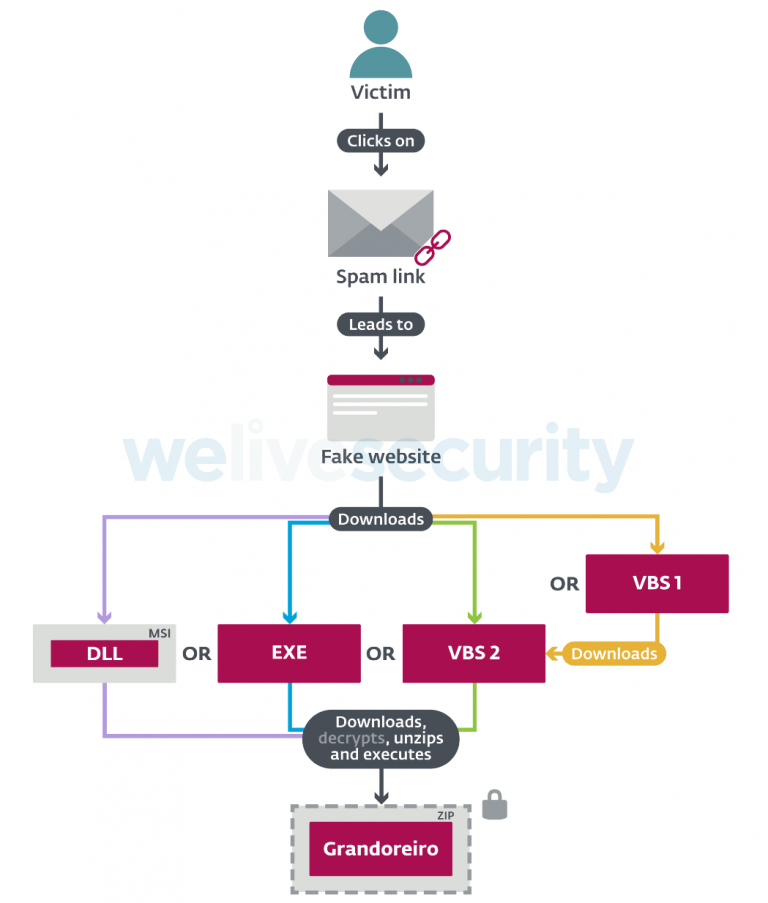
Current Grandoreiro campaigns commonly use phishing messages that impersonate banks, delivery services, government agencies, invoices, receipts, or payment notices. A link may download an MSI installer or compressed archive; running the installer can load a malicious DLL and retrieve the banking-trojan payload.[1] IBM X-Force has also documented newer campaigns spanning more countries and targeting a large set of banking applications, with loaders that profile the host and establish persistence.[2]
Before opening an unexpected attachment or sign-in link, inspect the sender and destination using the phishing-email red-flags checklist.
The 2020 fake-coronavirus-video campaign
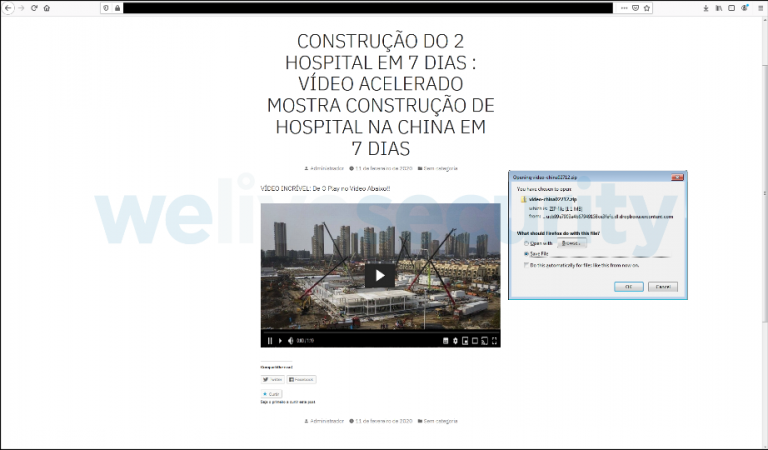
This URL originally documented an ESET investigation from April 2020. In that campaign, fake sites promised sensational coronavirus videos and attempted to download Grandoreiro when a visitor tried to play them. ESET also described large padded executables, anti-analysis checks, and campaigns aimed mainly at Latin America and Spain.[3] That delivery story remains useful history, but it is only one of several Grandoreiro lures.
FAQ
Does quarantine mean Grandoreiro infected the PC?
No. Quarantine means Defender isolated the detected item. Check the file path, time, action, and whether you opened or ran it. A file blocked before execution is not the same as a completed infection.
Do clean scans prove Trojan:Win64/Grandoreiro!pz was a false positive?
No. Clean scans can show that no currently detectable component remains, but they cannot prove that an earlier file never ran. Verify the file’s source and signature, keep it quarantined, and use vendor review before restoring it.
Should I change banking passwords after the alert?
Change them from a clean device if the file ran, was allowed or restored, the alert returned, or banking activity looked unusual. If Defender blocked an unopened download and follow-up checks stay clean, monitor accounts without assuming credentials were stolen.
References
- Microsoft Security Intelligence. “Trojan:Win64/Grandoreiro!pz threat description.” Updated September 15, 2024; accessed August 17, 2026. Microsoft threat entry.
- Golo Mühr and Melissa Frydrych-Dean. “Grandoreiro banking trojan unleashed: X-Force observing emerging global campaigns.” IBM X-Force; accessed August 17, 2026. IBM X-Force research.
- ESET Research. “Grandoreiro: How engorged can an EXE get?” WeLiveSecurity, April 28, 2020; accessed August 17, 2026. ESET research.